
Artificial intelligence is becoming part of everyday business operations. Organizations use AI tools to write content, analyze data, automate workflows, support customers, generate code, and help employees make decisions. As the number of AI applications grows, it becomes harder to know which tools are being used, who is responsible for them, and whether they have been properly reviewed.
One department may use an AI writing assistant, another may introduce an AI feature into its customer relationship management software, and a third may develop a custom AI application. Without a central record, management may not have a complete picture of these activities.
An AI governance registry helps solve this problem by providing a structured record of AI systems and use cases across an organization. It can document each system’s purpose, owner, risk classification, approval status, data requirements, safeguards, and review schedule.
A registry does more than list AI tools. When maintained properly, it helps organizations track governance decisions, identify unmanaged risks, prepare for reviews, and understand how AI is being used throughout the business.
In this guide, you will learn what an AI governance registry is, why it matters, which information it should contain, how to build one, and how to maintain it as your organization’s AI use grows.
What Is an AI Governance Registry?
An AI governance registry is a centralized record of AI systems, applications, and use cases that an organization wants to track and manage.
It provides a consistent place to store information about the AI systems the organization develops, purchases, deploys, or uses through existing software.
Depending on the organization’s needs, the registry may include:
- Generative AI assistants.
- AI features built into business software.
- Machine learning models.
- AI-powered customer service applications.
- AI systems used for analysis or recommendations.
- Internally developed AI applications.
- AI pilots and experimental projects.
- Third-party services that process information using AI.
The registry can be maintained in a spreadsheet, database, governance platform, or another controlled system. A small business may begin with a simple spreadsheet, while a larger organization may need a dedicated platform with workflow automation and access controls.
The format is less important than the quality of the information and the process used to maintain it.
A useful registry should help answer five basic questions:
- Which AI systems and use cases do we know about?
- Who is responsible for each system?
- What risks and approvals are associated with each use case?
- Which safeguards and monitoring activities are required?
- When must the system be reviewed again?
An AI registry does not automatically make an organization compliant or ensure that every system is safe. It provides visibility and supporting evidence that can help the organization manage its AI activities more consistently.
Why Does an Organization Need an AI Governance Registry?
As AI adoption increases, keeping information in individual emails, project documents, and departmental spreadsheets can become difficult to manage.
A central registry helps bring that information together.
1. Improve visibility into AI use
Management needs to understand where AI is being used and what each application does.
A registry provides a consolidated view of known AI tools and use cases. This can reveal duplicate software purchases, unapproved applications, and projects that have not completed the required review.
It also helps departments understand which systems are already available for approved business purposes.
2. Establish clear ownership
Every important AI use case should have a responsible owner.
Without an assigned owner, questions about system performance, data handling, approvals, or incidents may remain unanswered.
A registry can record the business owner, technical contact, and relevant review teams so responsibilities remain clear.
3. Track risk classifications
Different AI applications may require different safeguards.
The registry can record each use case’s risk tier, assessment date, rationale, and outstanding concerns. Reviewers can then identify systems that need additional attention.
For example, an AI application that processes sensitive customer information may require stronger controls and more frequent review than an approved tool used for low-impact internal brainstorming.
4. Monitor approval status
A registry helps distinguish between AI systems that are proposed, under review, approved, conditionally approved, rejected, or retired.
This prevents a common governance problem: assuming that a tool is authorized simply because someone has started using it.
For conditional approvals, the record should include the required conditions and whether they have been satisfied.
5. Support audits and internal reviews
Organizations may need to explain how AI systems are selected, assessed, approved, and monitored.
A well-maintained registry can provide useful evidence by linking each use case to its assessment, approval decision, responsible owner, and required safeguards.
The registry should not be treated as a substitute for detailed assessment reports or other supporting records. Instead, it can serve as the central index that connects those records.
6. Make ongoing monitoring easier
AI systems can change over time. Vendors may update their products, departments may introduce new uses, and data connections may expand.
A registry helps organizations track review dates and identify systems that need reassessment.
It also makes it easier to find affected systems when a vendor announces a security issue or a new requirement changes how a particular use case should be managed.
AI Governance Registry vs. AI Inventory: What Is the Difference?
The terms AI inventory and AI governance registry are sometimes used interchangeably, but organizations may use them to describe different levels of detail.
An AI inventory typically focuses on identifying which AI systems and tools exist.
An AI governance registry may include that inventory information alongside governance details such as risk assessments, approvals, safeguards, ownership, and review history.
| Feature | Basic AI inventory | AI governance registry |
|---|---|---|
| System name and provider | Usually included | Included |
| Business purpose | Usually included | Included |
| Responsible owner | May be included | Included |
| Risk classification | May be absent | Recorded where applicable |
| Approval status | May be absent | Tracked |
| Required safeguards | Limited detail | Recorded or linked |
| Review dates | May be absent | Tracked |
| Assessment and decision history | Limited detail | Recorded or linked |
| Ongoing governance workflow | Usually limited | Can be integrated |
These are practical distinctions, not universal definitions. Some organizations use the term AI inventory for a comprehensive governance record, while others maintain separate inventories and registries.
The important goal is to ensure that the organization can find the information needed to manage its AI systems.
What Information Should an AI Governance Registry Contain?
The registry should collect enough information to support governance without becoming unnecessarily complicated.
The exact fields will depend on the organization’s risk profile, regulatory environment, and the number of AI systems it manages.
1. Basic system information
Start with the identifying details.
Include:
- Unique system or use-case ID.
- AI system or application name.
- Vendor or developer.
- Business department.
- System type.
- Current lifecycle status.
- Date the record was created.
- Last updated date.
A unique identifier helps connect the registry entry to supporting documents, assessments, approval records, and incident reports.
2. Business purpose and use case
Describe what the AI system does and why the organization uses it.
Record the intended purpose, business problem, main users, expected benefits, and the process in which the system operates.
Avoid vague descriptions such as “AI productivity tool.” A more useful description might be “Summarizes customer support conversations for review by service representatives.”
A clear purpose helps reviewers determine whether the system is being used within its approved scope.
3. Ownership and accountability
Record the people or teams responsible for the system.
Useful fields include:
- Business owner.
- Technical owner.
- Department manager.
- Governance contact.
- Security or privacy reviewer, where relevant.
- Approval authority.
The business owner is responsible for the use case and its intended outcomes. Technical owners may manage integrations, access, maintenance, or system operation.
In smaller organizations, one person may hold several roles. Even so, the responsibilities should be documented clearly.
4. Data and information handling
Record what types of information the system processes and how that information moves through the system.
Depending on the use case, document:
- Public, internal, or confidential information.
- Personal or specially protected data.
- Data sources and destinations.
- External service providers receiving information.
- Relevant retention and deletion arrangements.
- Access permissions.
- Data-processing restrictions.
Do not store sensitive data unnecessarily in the registry itself. Usually, it is enough to document data categories and link to controlled technical or privacy records where more detail is needed.
5. Risk classification
Record the approved risk tier, the date it was assessed, and the reasoning behind the classification.
You may also want to record:
- The assessment owner.
- Key identified risks.
- Outstanding findings.
- Required safeguards.
- The next reassessment date.
- Any circumstances that would trigger an earlier review.
For a detailed classification method, see our guide to AI risk tiering.
The registry should distinguish between an initial classification and a later approved reassessment so that the history remains understandable.
6. Approval and compliance information
Record the status of the approval process and any requirements that must be satisfied.
Useful fields include:
- Intake request reference.
- Approval status.
- Approval date.
- Approver or approving team.
- Conditions of approval.
- Completion status of required conditions.
- Relevant legal or contractual review.
- Supporting documentation links.
A registry entry should not imply that a system is approved when approval is still pending or when required conditions have not been met.
Also avoid treating an internal approval as proof of legal compliance. These are related but separate questions.
7. Safeguards and human oversight
Document the main controls that help manage the system’s risks.
Examples include:
- Human review of important outputs.
- Access restrictions.
- Data minimization.
- Output testing and validation.
- Logging and monitoring.
- Security controls.
- Incident response procedures.
- Fallback or rollback arrangements.
Where a detailed control plan exists elsewhere, link to it rather than duplicating the entire document.
The registry should make it easy for an authorized reviewer to understand which safeguards apply and whether they are in place.
8. Lifecycle and review information
AI systems may move through several stages: proposed, under assessment, approved, deployed, suspended, and retired.
Track the current status and the dates of important changes.
Also record the next review date and any events that require reassessment. These might include a change in purpose, a new data source, a significant incident, or a material change to the vendor’s service.
Retain historical records according to the organization’s retention requirements rather than deleting information simply because a system has been retired.
Example of an AI Governance Registry
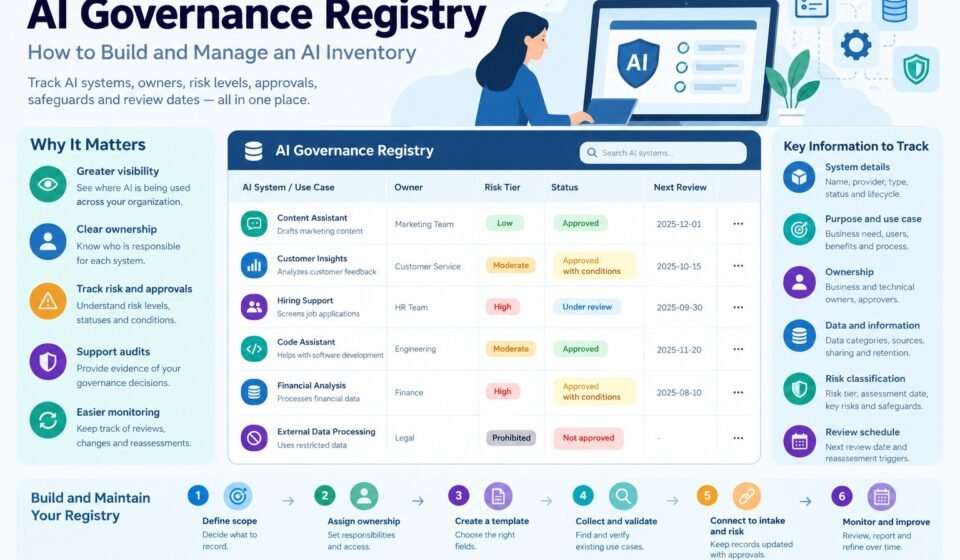
The following simplified example shows how a registry might look. The entries are illustrative, not actual company records.
| AI use case | Owner | Risk tier | Status | Main safeguard |
|---|---|---|---|---|
| Internal content brainstorming | Marketing lead | Low | Approved | Use approved tool; review outputs |
| Internal report summarization | Operations lead | Moderate | Approved with conditions | Approved data handling and human verification |
| AI-supported applicant screening | HR lead | High | Under review | Specialist assessment and documented oversight |
| AI tool using restricted data without authorization | Requesting department | Restricted | Not approved | Resolve the restriction before reconsideration |
A practical registry would include additional fields such as the system provider, approval date, data categories, assessment record, and next review date.
The table illustrates an important principle: the registry should capture not only which systems exist, but also their governance status and required actions.
How to Build an AI Governance Registry Step by Step
You do not need a dedicated governance platform to get started. Begin with a clear structure and a reliable process for keeping records up to date.
Step 1: Define the scope
Decide which AI systems and use cases must be recorded.
Consider purchased AI software, built-in AI features, custom applications, internal experiments, and third-party services used for business work.
Define how the organization handles personal AI accounts, shadow AI, and tools discovered outside the formal approval process.
The scope should be clear enough that departments understand what needs to be reported.
Deliverable: A documented registry scope.
Step 2: Assign a registry owner
Choose the person or team responsible for maintaining the registry.
The owner should be able to coordinate updates, follow up on missing information, and report on outstanding governance actions.
Also assign responsibility for updating individual records. Business and technical owners are often best placed to confirm whether their systems and use cases remain accurate.
Deliverable: A documented ownership and update process.
Step 3: Create a standard record template
Design a consistent set of fields based on the information described earlier.
At a minimum, start with the system name, business purpose, owner, provider, risk tier, approval status, key safeguards, and next review date.
Add more fields when they support a clear governance need.
Avoid collecting information simply because it might be useful someday. Excessive fields can make records harder to maintain and less reliable.
Deliverable: A standard registry template.
Step 4: Discover existing AI systems
Do not populate the registry only from newly submitted requests.
Existing AI use may be spread across departments, software subscriptions, procurement records, IT systems, and employee workflows.
Use a combination of department surveys, existing software records, interviews with managers, and appropriate technical discovery methods.
Make it easy for employees to report an AI tool that has not previously been reviewed. The organization should then assess the use case and decide what action is required.
Deliverable: An initial inventory of known AI systems and use cases.
Step 5: Validate the records
Check whether the information is complete and accurate.
Confirm the business purpose, system owner, provider, data categories, approval status, and current use.
Flag missing information and assign someone to resolve it. Where details are uncertain, record the uncertainty instead of treating assumptions as confirmed facts.
Deliverable: A validated initial registry.
Step 6: Connect the registry to intake and risk assessment
The registry should receive information from the organization’s AI request and review process.
When a request is approved, create or update the corresponding record with its owner, risk tier, approval decision, conditions, and review schedule.
The AI governance intake process provides a consistent way to collect this information before a new AI use case is deployed.
Avoid creating duplicate records for the same system and use case. If one product supports several materially different uses, the organization may need separate use-case records linked to the same product.
Deliverable: A repeatable process for creating and updating records.
Step 7: Apply access controls
The registry may contain confidential business information, security details, or information about sensitive AI applications.
Limit access according to job responsibilities.
For example, employees may need permission to submit or update their own requests, while governance reviewers may need broader access to assessments and approval records.
Use appropriate authentication, change tracking, backups, and retention controls based on the chosen system.
Deliverable: Documented access and record-management rules.
Step 8: Establish review schedules and triggers
Set review intervals that reflect the nature and risk of each AI use case.
Define additional triggers for reassessment, such as changes to the system’s purpose, data, users, permissions, or operating environment.
Create a way to identify overdue reviews and notify the responsible owner.
Deliverable: A review schedule and escalation process.
Step 9: Report on governance status
Use the registry to produce useful summaries for management and relevant reviewers.
Reports might show the number of known AI use cases, how many have assigned owners, which approvals remain outstanding, and which systems need reassessment.
Reports should help decision-makers take action, not simply display large amounts of data.
Deliverable: A regular governance report.
Step 10: Improve the registry over time
Review whether the fields remain useful and whether owners update their records reliably.
Remove redundant fields, improve unclear definitions, and automate repetitive tasks when appropriate.
As the organization’s AI use grows, a spreadsheet may no longer provide sufficient workflow, access control, reporting, or audit capabilities. At that point, consider moving to a more structured system.
Deliverable: A registry improvement plan.
Should You Use a Spreadsheet or Dedicated Registry Software?
The best option depends on the number of AI use cases, the complexity of the governance process, the sensitivity of the records, and the reporting requirements.
Using a spreadsheet
A spreadsheet can be a practical starting point for a small organization with a limited number of AI systems.
Advantages include low setup effort, familiar editing tools, and the ability to customize fields quickly.
However, spreadsheets can become difficult to manage when multiple teams update records, approval workflows become complex, or strict access controls and audit trails are required.
Use a controlled location with clear ownership and appropriate permissions rather than distributing multiple copies through email.
Using a database or governance platform
A database or dedicated platform may be more suitable when an organization needs structured relationships, automated workflows, role-based permissions, reminders, and reporting.
A larger organization may also need to connect the registry to procurement, security review, project management, or risk-management systems.
Before selecting a product, define the requirements first. Consider data security, access control, audit history, integrations, reporting, cost, and the effort needed to maintain the records.
A more expensive platform is not automatically better. The system must fit the organization’s actual governance needs and be maintained consistently.
Common AI Governance Registry Mistakes to Avoid
Treating the registry as a one-time project
A registry becomes outdated if it is created once and never maintained.
Assign owners, define update responsibilities, and schedule regular reviews.
Recording tools without recording use cases
A single AI product may be used for several purposes with different risks.
Record the relevant use cases separately when they have materially different data, users, purposes, or approval requirements.
Leaving out approval status
A list of AI systems does not explain whether those systems are approved for use.
Include clear statuses and record any conditions that must be completed before deployment.
Failing to assign owners
Without an owner, nobody may be responsible for correcting outdated records or addressing review findings.
Require a responsible person or team for every relevant use case.
Collecting too much sensitive information
A registry should not become an unnecessary repository of confidential data.
Record data categories and link to controlled documents where appropriate. Restrict access to sensitive records.
Ignoring retired systems
Removing a system from the active list without retaining appropriate history can make it harder to understand past decisions or investigate incidents.
Use a retired status and follow the organization’s record-retention requirements.
Measuring registry size instead of quality
Having hundreds of entries does not prove that governance is effective.
Focus on completeness, accuracy, assigned ownership, approval status, review timeliness, and whether the registry leads to meaningful action.
How to Measure AI Governance Registry Effectiveness
A few useful metrics can help determine whether the registry supports real governance activities.
| Metric | What it measures |
|---|---|
| Percentage of known use cases recorded | Registry coverage |
| Percentage of records with assigned owners | Accountability |
| Percentage of records with a current risk classification | Risk visibility |
| Percentage of deployed systems with documented approval status | Approval traceability |
| Percentage of reviews completed on time | Maintenance quality |
| Number of overdue governance actions | Outstanding work |
| Percentage of records validated during the latest review | Data quality |
| Time required to produce a governance report | Reporting efficiency |
Interpret these metrics in context. A sudden increase in registered use cases may indicate improved discovery rather than uncontrolled adoption. Similarly, a record with every field filled in is not necessarily accurate.
Periodically sample records and verify them with the responsible teams. The goal is to maintain information that supports decisions, not just to achieve a high completion percentage.
How the AI Governance Registry Fits Into the Wider Framework
A registry works best when it is connected to the organization’s broader governance process.
An AI governance policy establishes the rules for using AI. The intake process collects information about proposed use cases. Risk tiering helps determine the level of review and oversight required. The registry preserves the relevant details and tracks the system throughout its lifecycle.
Our guide to AI governance quick wins explains how these four elements work together.
Organizations can also use established guidance such as the NIST AI Risk Management Framework to inform their risk management activities. The registry can support documentation and oversight associated with those activities, although the framework does not prescribe one universal registry format.
The important point is to avoid treating the registry as a standalone spreadsheet. It should be part of a process that assigns responsibility, records decisions, implements safeguards, and responds to changes.
A Practical 30-Day Plan to Build an AI Governance Registry
Organizations can start with a small, useful registry and expand it as needed.
Week 1: Plan the structure
- Define which AI systems and use cases must be recorded.
- Appoint a registry owner.
- Select the initial fields.
- Define ownership and access rules.
Week 2: Discover and collect information
- Ask departments to identify their AI tools and use cases.
- Review existing software and procurement records.
- Identify tools that have not completed the approval process.
- Collect the required system and ownership information.
3 Week: Validate and connect records
- Check the information for completeness.
- Identify missing owners and risk classifications.
- Record approval statuses and required safeguards.
- Connect records to existing intake and assessment documentation.
Week 4: Launch and maintain
- Publish the registry in an appropriate controlled location.
- Assign responsibility for updating individual records.
- Set review dates and reassessment triggers.
- Create a basic management report.
- Schedule the first registry quality review.
This plan establishes a starting point, not a guarantee that all AI systems will be discovered or that every governance obligation will be fulfilled in 30 days. Complex organizations may require a longer implementation period.
Frequently Asked Questions
What is an AI governance registry?
An AI governance registry is a central record of AI systems and use cases that tracks details such as purpose, ownership, risk classification, approval status, safeguards, and review dates.
Is an AI governance registry the same as an AI inventory?
The terms are sometimes used interchangeably. In a basic setup, an inventory may simply identify AI tools. A governance registry often includes additional information about approvals, risk assessments, responsibilities, and ongoing reviews.
What should an AI governance registry include?
At a minimum, consider recording the system name, provider, business purpose, owner, data categories, risk tier, approval status, required safeguards, and review date. Add fields according to the organization’s actual governance requirements.
Is special software required to create an AI registry?
No. A small organization can begin with a controlled spreadsheet. Larger organizations may benefit from a database or dedicated governance platform when they need more advanced permissions, workflows, audit trails, and reporting.
Who should maintain the AI governance registry?
A designated governance lead or team should own the overall process. Business and technical owners should be responsible for keeping their individual records accurate and reporting relevant changes.
How often should an AI governance registry be updated?
Update it when a new use case is submitted or approved, when important system details change, and when a system is suspended or retired. Schedule periodic reviews and define triggers for reassessing systems after significant changes.
Does an AI governance registry guarantee compliance?
No. A registry helps maintain visibility and documentation, but compliance also depends on the applicable requirements, the organization’s activities, and whether the necessary controls are implemented and effective.
Should every AI use case have a separate registry entry?
Not necessarily. The structure should reflect how the organization manages its systems. A single product may have one record with several linked use cases, or separate use-case records when the purposes, data, risks, and approvals differ materially. The organization should be able to distinguish each use case that requires separate governance decisions.
Conclusion
An AI governance registry gives organizations a practical way to understand and manage their AI systems. It brings important information about purpose, ownership, risk, approvals, safeguards, and review schedules into a consistent record.
Start with a clear scope, a manageable set of fields, and an assigned owner. Discover existing AI use, validate the records, connect the registry to intake and risk assessment, and establish a reliable process for updates and reviews.
Do not focus only on collecting names of AI tools. A useful registry must help the organization answer important questions, identify missing controls, track outstanding decisions, and respond when systems change.
When the registry works together with a clear policy, a structured intake process, and risk-based review, it becomes a practical foundation for accountable and responsible AI adoption.