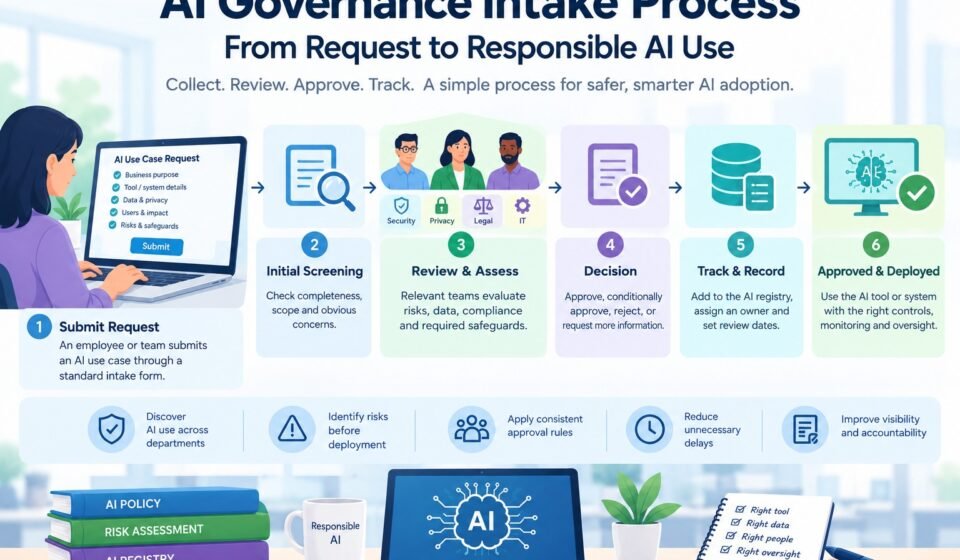

Artificial intelligence is becoming a regular part of business operations. Employees use AI tools to write content, analyze information, automate tasks, generate code, improve customer service, and support business decisions. Although these tools can increase productivity, introducing them without proper review can create security, privacy, compliance, and operational risks.
One employee might use an AI writing assistant to prepare a simple internal document, while another team might want to use AI to analyze customer records or automate decisions. These activities do not have the same risk level, so they should not follow exactly the same approval process.
An AI governance intake process helps organizations collect information about proposed AI tools and use cases before approving or deploying them. It gives employees a clear way to request AI applications while helping responsible teams understand the purpose, data, risks, and safeguards associated with each request.
Instead of discovering AI tools only after employees have started using them, organizations can use intake to identify new use cases early and review them consistently.
In this guide, you will learn what AI governance intake means, why it matters, what information an intake form should collect, how to design an approval workflow, and how to implement the process in a practical way.
What Is an AI Governance Intake Process?
An AI governance intake process is a structured method for receiving, documenting, reviewing, and routing requests involving artificial intelligence.
It creates a consistent starting point for evaluating AI-related activities across an organization.
A request might involve:
- Introducing a new AI software product.
- Enabling an AI feature in an existing business application.
- Using an approved tool for a new purpose.
- Connecting AI to internal company data.
- Building a custom AI application.
- Automating an existing business process with AI.
- Testing an AI system before a wider deployment.
The intake process collects enough information to determine what the requester wants to accomplish and which reviews are necessary.
For example, a marketing employee may request an AI tool to generate draft social media captions. A finance team may request an AI system that analyzes confidential financial records. The second request could require additional security, privacy, accuracy, and human oversight reviews.
The intake process helps direct both requests to an appropriate review path.
It is important to understand that intake is not the same as final approval. Submitting a request does not automatically authorize an employee to use the requested tool or deploy the proposed system.
Instead, intake provides the information needed for informed decisions.
Why Is AI Governance Intake Important?
Without a consistent intake process, AI adoption can become difficult to manage. Different departments may make decisions independently, and important information may never reach the people responsible for security, privacy, or compliance.
A structured process addresses these problems.
1. Discover AI use across departments
Employees may adopt AI features in different applications without realizing that the organization needs visibility into those uses.
An intake process creates a standard way to report proposed tools and use cases. This helps management understand where AI is being introduced and why.
2. Identify risks before deployment
Reviewing a use case before implementation gives the organization an opportunity to identify concerns early.
These might include sensitive data exposure, unreliable outputs, security weaknesses, discriminatory outcomes, or inappropriate automation.
Finding these issues early can reduce the cost and disruption of changing a project later.
3. Apply consistent approval rules
Without a defined workflow, similar requests may receive different treatment depending on which manager reviews them.
An intake process establishes common questions, review criteria, decision points, and approval responsibilities.
4. Reduce unnecessary delays
A well-designed process does not need to make every AI request complicated.
Low-risk requests can follow a simplified path, while higher-risk requests receive more detailed assessment. This helps teams avoid unnecessary reviews without ignoring important risks.
5. Establish clear ownership
Each request should have a person responsible for explaining its purpose and coordinating the proposed use.
The organization should also identify who reviews the request and who has authority to approve, reject, or impose conditions on it.
6. Improve documentation
Intake creates a record of what was requested, what information was reviewed, which decisions were made, and what conditions apply.
These records support later reviews, audits, monitoring, and updates to the organization’s AI inventory.
What Is the Difference Between AI Intake and AI Approval?
These terms are related, but they describe different stages.
| Activity | Main purpose |
|---|---|
| AI intake | Collect information about a proposed AI use case |
| Initial screening | Check completeness, scope, and obvious concerns |
| Risk assessment | Evaluate potential harm, exposure, and required safeguards |
| Specialist review | Obtain security, privacy, legal, or technical input where needed |
| Approval decision | Authorize, conditionally approve, reject, or request changes |
| Implementation review | Confirm that required controls are in place |
| Ongoing monitoring | Check whether the system remains appropriate and controlled |
For example, an employee might submit an AI tool request on Monday. The governance team may screen it on Tuesday and discover that the tool will process personal information. The request may then require a privacy review before an approval decision can be made.
The intake form begins the process; it does not replace the later steps.
Organizations should document these distinctions so employees understand what happens after they submit a request.
What Information Should an AI Intake Form Collect?
An intake form should collect enough information to route and assess a request without overwhelming employees with technical questions they cannot answer.
The exact fields will depend on the organization’s size, industry, and AI maturity. The following sections provide a useful starting point.
1. Requester information
Begin with basic information about the person or team making the request.
Include:
- Requester’s name.
- Department or business unit.
- Contact information.
- Manager or business sponsor.
- Date of submission.
- Requested implementation date.
This information helps reviewers contact the right person when clarification is needed.
2. AI tool or system details
Ask the requester to identify the proposed AI tool or system.
Useful fields include:
- Tool or system name.
- Vendor or service provider.
- Whether the system is purchased, internally developed, or built into existing software.
- Whether it is a pilot, experiment, or production deployment.
- Whether the organization already uses it.
- Whether it connects to other company systems.
These details help the organization identify existing vendor reviews, approved products, and potential duplication.
3. Business purpose and expected benefits
The requester should explain the problem the AI system is intended to solve.
Ask questions such as:
- What business problem are you trying to address?
- What task will the AI system perform?
- Why is AI being considered?
- Who will use the system?
- Who could be affected by its outputs?
- What benefits do you expect?
- How will success be measured?
For example, a customer service team might want AI to summarize support conversations so employees can identify recurring problems more quickly.
This description is more useful than a request that simply says, “We want to use an AI tool.”
A clear business purpose also makes it easier to evaluate whether the proposed system is suitable for the intended task.
4. Data and information requirements
Data questions are essential because an AI system may handle information that requires protection.
Ask what types of information the system will receive, generate, store, or share.
Potential categories include:
- Public information.
- Internal business information.
- Confidential documents.
- Customer or employee information.
- Financial records.
- Health or other specially protected information.
- Source code and technical data.
- Credentials or security-related information.
Also ask whether the tool sends information to an external provider, connects to internal systems, or retains submitted information.
If the requester does not know how the provider handles data, record that uncertainty and route the request for further review.
Do not assume that a vendor’s general statement about security answers every question about the proposed use case.
5. Automation and human involvement
An intake form should clarify what the AI system will actually do.
Will it generate suggestions for an employee to review, or will it take actions automatically?
Ask whether the system will:
- Draft or summarize information.
- Make predictions or recommendations.
- Change records or execute transactions.
- Communicate directly with customers.
- Influence decisions about individuals.
- Operate without routine human review.
The level of automation can affect the controls required.
A tool that drafts internal text may need relatively limited oversight. A system that changes customer records or influences significant decisions may need stronger safeguards, testing, and explicit approval.
6. Expected users and affected people
The requester should identify who will interact with the system and who might be affected by its outputs.
Possible groups include employees, customers, suppliers, job applicants, and members of the public.
This information helps reviewers understand the potential impact of mistakes or misuse.
It can also reveal whether the system needs accessibility measures, disclosure, additional testing, or specific human review procedures.
7. Existing safeguards
Ask the requester to identify any controls already planned or implemented.
Examples include:
- Access restrictions.
- Data minimization.
- Human review.
- Output validation.
- Security testing.
- Logging and monitoring.
- Fallback procedures.
- Incident reporting.
- Vendor security assessments.
The form should allow requesters to select “not sure” when they cannot answer a question. Guessing can create a misleading impression that a safeguard already exists.
8. Supporting documentation
Some requests may need additional information, such as vendor documentation, architecture diagrams, data flow descriptions, testing results, or a business case.
Avoid requiring every attachment for every request. Ask for documentation that is proportionate to the complexity and risk of the proposed use case.
How to Build an AI Governance Intake Process Step by Step
A useful intake process should be easy to access, consistent across departments, and connected to the organization’s approval procedures.
Step 1: Define which requests require intake
Start by deciding what kinds of AI-related activities must be submitted for review.
You might include new AI products, new uses of existing tools, AI integrations, internally developed systems, and AI applications that process sensitive information or influence important decisions.
Clearly explain how the rules apply to AI features already included in existing software.
You should also define exceptions carefully. For example, employees may be allowed to use certain approved tools for specified low-risk tasks without submitting an individual request every time.
Deliverable: A documented scope covering the AI activities that require intake.
Step 2: Assign ownership
Choose who will operate the intake process.
In a smaller organization, this might be one AI governance lead working with IT and security. In a larger organization, a central governance team may coordinate reviews across multiple departments.
Assign responsibility for:
- Receiving requests.
- Checking form completeness.
- Routing requests to reviewers.
- Tracking progress.
- Communicating decisions.
- Maintaining records.
- Escalating unresolved concerns.
Define who has the authority to make final decisions. A reviewer who provides advice should not automatically be treated as the person who grants approval.
Deliverable: A clear ownership and responsibility structure.
Step 3: Create a simple intake form
Use the information described above to develop a standard request form.
Make required fields easy to understand. Use plain language and provide examples where necessary.
Consider organizing the form into sections so employees can complete the basic information first. More detailed questions can be triggered when a request involves sensitive data, external integrations, or higher-impact decisions.
This approach helps keep the process manageable.
Deliverable: A standard AI use-case intake form.
Step 4: Establish an initial screening process
Before conducting a detailed review, check whether the request is complete and falls within the intake process.
The initial reviewer should confirm:
- The business purpose is clear.
- The proposed tool or system is identified.
- The data categories are described.
- The intended users and affected people are identified.
- Any obvious security or privacy concerns are recorded.
- The request has a business owner.
If important information is missing, return the request for clarification rather than forwarding an incomplete submission through every review stage.
Deliverable: A consistent screening checklist.
Step 5: Route the request to the appropriate reviewers
Different requests need different expertise.
For example, IT may assess technical integration, information security may evaluate security controls, privacy specialists may review personal data, and legal or compliance teams may examine relevant obligations.
Not every request needs every reviewer.
Define routing rules so the system sends requests to the teams whose expertise is relevant to the actual use case.
Deliverable: A routing matrix showing when each review is required.
Step 6: Apply risk-based review
After initial screening, determine the level of review needed.
Consider the purpose of the AI system, data sensitivity, degree of automation, potential impact on people, scale of deployment, and applicable legal requirements.
Use these factors to decide whether the request needs a basic review, additional specialist assessment, or formal escalation.
A structured AI risk tiering approach can help the organization classify use cases consistently and match safeguards to their potential impact.
The risk classification should be based on the actual use case, not just the name of the software product. The same AI tool may be suitable for one purpose but require additional safeguards for another.
Deliverable: A documented risk classification and corresponding review path.
Step 7: Record the decision
Once the relevant reviews are complete, record the decision and communicate it to the requester.
Common outcomes include:
- Approved: The use case may proceed within the approved scope.
- Conditionally approved: The use case may proceed only after specified controls or conditions are satisfied.
- More information required: The requester must provide additional details before a decision can be made.
- Rejected: The use case cannot proceed as proposed.
- Escalated: A designated authority must review the request.
For conditional approval, record the conditions, responsible person, and any deadline or verification requirement.
An approval should identify the intended purpose and relevant limitations. It should not be treated as blanket permission to use the system for unrelated activities.
Deliverable: A documented decision with clear next steps.
Step 8: Verify readiness before deployment
Some requests require a final check before the system goes live.
Confirm that required controls have been implemented, access has been configured appropriately, necessary testing has been completed, and the relevant users understand their responsibilities.
If a condition has not been met, follow the organization’s process for withholding deployment until the issue is resolved.
Deliverable: A deployment-readiness record where required.
Step 9: Add the approved use case to the AI inventory
An approved request should not disappear after the decision is made.
Transfer the relevant information into the organization’s central inventory or registry. Include the system name, purpose, owner, risk classification, approval status, and review requirements.
A central AI governance registry helps the organization track approved use cases and identify systems that need reassessment.
Deliverable: An updated AI inventory with an assigned owner.
Step 10: Monitor and reassess
An approval reflects the information available at the time of review. It may need to be revisited when circumstances change.
Trigger a reassessment when:
- The business purpose changes.
- New data categories are introduced.
- The system gains additional permissions.
- A new group of people is affected.
- The vendor materially changes the service.
- An incident reveals a previously unidentified risk.
- The system expands from a pilot to a wider deployment.
Deliverable: A review schedule and clear reassessment triggers.
Example of an AI Governance Intake Workflow
Consider a sales department that wants to use an AI application to summarize customer calls and recommend follow-up actions.
The request could follow this workflow:
- The sales manager submits the intake form and explains the intended business benefit.
- The intake coordinator checks the request for completeness.
- The reviewer identifies that customer conversations may contain personal or confidential information.
- The security and privacy teams assess the proposed tool and its data handling.
- The business owner explains how employees will verify the generated summaries and recommendations.
- The designated approver records a decision and any required conditions.
- The team confirms that those conditions are met before deployment.
- The approved use case is added to the AI inventory and reviewed according to its risk and operating requirements.
The request might be approved, rejected, or returned for more information. The outcome depends on the facts and the organization’s requirements.
The important point is that the process makes the decision traceable and ensures that relevant concerns are considered before the tool is deployed.
Common AI Intake Process Mistakes
Asking too many questions at the beginning
A lengthy form can discourage employees from submitting requests or lead to incomplete answers.
Start with essential information and use follow-up questions when the use case requires deeper assessment.
Using the same review for every request
Treating all requests as equally risky wastes time on simple use cases and may leave more serious ones without adequate attention.
Create proportionate review paths and clear escalation criteria.
Confusing submission with approval
Employees may assume that submitting a form gives them permission to begin using the tool.
State clearly that approval must be granted before use where the policy requires it.
Failing to assign an owner
Without a responsible person, reviewers may not know who can explain the business purpose, answer questions, or implement safeguards.
Require a business owner for each relevant use case.
Keeping decisions in email threads
Email conversations can be difficult to track, especially when multiple teams are involved.
Use a central tracking method that records the request, status, reviewers, decision, and outstanding conditions.
Ignoring changes after approval
A use case can become riskier when the organization changes its data, purpose, users, or level of automation.
Define reassessment triggers instead of assuming the original approval remains appropriate indefinitely.
Measuring speed but not quality
Fast approvals are useful, but speed alone does not demonstrate effective governance.
Measure whether requests receive appropriate review, decisions are documented, and required safeguards are completed.
How to Measure AI Intake Process Performance
Tracking a small number of meaningful metrics can help the organization improve the process.
| Metric | What it measures |
|---|---|
| Number of requests received | Demand for AI use cases |
| Percentage of complete submissions | Intake form clarity |
| Average time to initial screening | Efficiency of the first review |
| Average time to decision by review path | Approval process performance |
| Number of requests awaiting information | Common sources of delay |
| Percentage of approved use cases with assigned owners | Accountability |
| Percentage of required conditions completed before deployment | Control implementation |
| Number of overdue reassessments | Ongoing governance quality |
Compare results across different request types rather than relying on a single average. A straightforward request should not be expected to take the same time as a complex system involving sensitive information or significant decisions about people.
Review the metrics regularly and use them to identify bottlenecks, unnecessary questions, and missing controls.
How AI Governance Intake Connects With the Wider Governance Framework
Intake is most effective when it is part of a broader governance system.
An AI governance policy establishes the rules that define which AI activities are permitted, restricted, or prohibited. The intake process turns those rules into practical questions, review steps, and decisions.
Risk assessment helps determine the level of oversight required. Documentation preserves the results of the review, while monitoring checks whether the use case continues to operate within its approved scope.
The AI governance quick wins guide explains how policy, intake, risk tiering, and a registry work together as complementary parts of a practical governance approach.
Organizations can also use established guidance such as the NIST AI Risk Management Framework to inform their risk management activities. The framework supports structured AI risk management, but organizations still need to tailor their procedures to their own context.
A Practical 30-Day Plan to Implement AI Intake
A smaller organization can use the following plan to establish a basic process.
Week 1: Define the process
- Identify the AI activities that require review.
- Appoint a process owner.
- Define who can approve requests.
- Identify the main risks and review teams.
Second Week: Build the intake form
- Collect requester, tool, and business-purpose details.
- Add questions about data, automation, and affected people.
- Define which information is mandatory.
- Create a simple way to submit and track requests.
Week 3: Establish review and approval
- Define initial screening requirements.
- Create risk-based routing rules.
- Document approval outcomes.
- Set expectations for communicating decisions.
Week 4: Pilot and improve
- Test the workflow with a small number of real requests.
- Identify unclear questions and unnecessary steps.
- Confirm that decisions and conditions are recorded.
- Create a process for updating the AI inventory.
- Establish metrics and review dates.
Use the pilot to identify practical problems before rolling the process out across the entire organization. More complex organizations may need additional time to involve stakeholders, integrate systems, and meet sector-specific requirements.
Frequently Asked Questions
What is an AI governance intake form?
An AI governance intake form is a questionnaire used to collect information about a proposed AI tool or use case. It typically asks about the business purpose, system, data, users, expected benefits, risks, and proposed safeguards.
Who should review AI intake requests?
The required reviewers depend on the request. A central governance coordinator can manage the process, while IT, security, privacy, legal, compliance, and business teams provide input when their expertise is relevant.
Does every AI tool need formal approval?
Not necessarily. Organizations can define simplified procedures for approved, low-risk uses and require more detailed approval for other activities. The rules should be documented clearly, and applicable legal or contractual requirements must still be followed.
How is AI intake different from AI risk assessment?
Intake collects information and establishes what is being proposed. Risk assessment evaluates potential harms, likelihood, impact, and appropriate safeguards. Intake often provides the information needed to conduct that assessment.
What should happen if an AI request is rejected?
Record the reason for rejection and communicate it to the requester. Where appropriate, explain what changes could make the proposal acceptable, such as using an approved tool, reducing data exposure, adding human review, or changing the proposed use case.
How often should an AI use case be reviewed after approval?
The schedule should reflect the system’s risk, operating context, and applicable requirements. Organizations should also reassess a use case when its purpose, data, users, capabilities, or risk profile changes significantly.
Can a small business implement AI governance intake without special software?
Yes. A simple form, controlled spreadsheet, shared workflow tool, and designated reviewer may be sufficient to begin. The important requirements are consistent review, clear accountability, documented decisions, and appropriate access controls. More advanced tools can be introduced as the volume and complexity of requests increase.
Conclusion
An AI governance intake process helps organizations manage AI adoption before new tools and use cases become difficult to track. It gives employees a consistent way to request AI applications while helping reviewers understand the business purpose, data requirements, potential risks, and necessary safeguards.
Start with a clear intake form, defined ownership, an initial screening process, and risk-based review paths. Record decisions and conditions, verify required controls before deployment, and maintain an up-to-date inventory of approved use cases.
Most importantly, keep the process proportionate. Simple requests should not face unnecessary delays, while applications involving sensitive information or potentially significant consequences should receive the attention they need.
When intake is connected to policy, risk assessment, and ongoing documentation, it becomes a practical foundation for responsible AI adoption across the organization.


[…] This information is typically collected through the AI governance intake process. […]