
If you are learning computer networking, IP addresses and subnetting, one term you will encounter again and again is the subnet mask. But what is a subnet mask, and how does it determine which devices belong to the same network?
A subnet mask is an important part of IPv4 networking. It helps separate the network portion of an IP address from the host portion. Network devices use this information to determine how IP addresses are organized and whether a destination is located on the local network or another network.
In this guide, we will explain what is a subnet mask in simple terms, how subnet masks work, how they relate to CIDR notation, and how common masks such as 255.255.255.0 and 255.255.255.255 are used. If you want to understand the basics of subnetting first, read our complete guide to What Is a Subnet?
What Is a Subnet Mask?
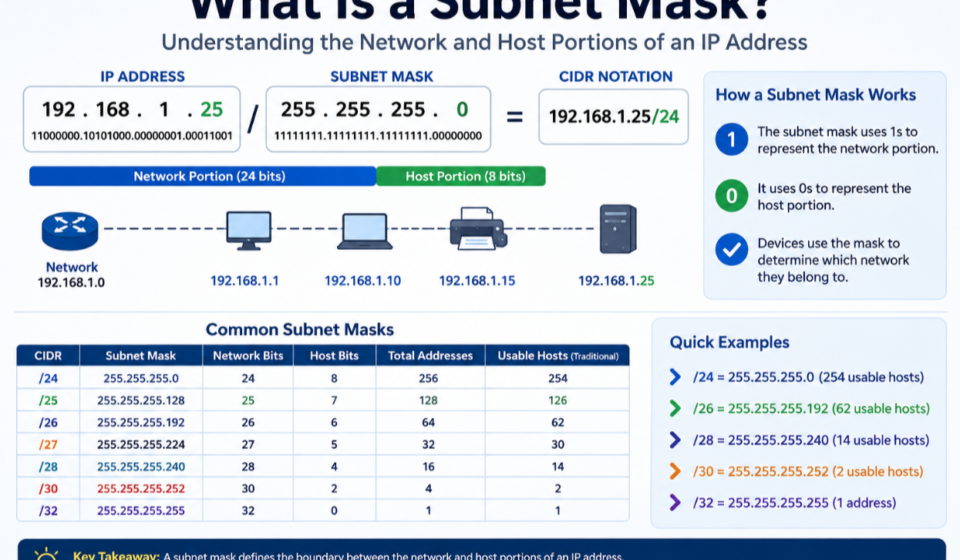
A subnet mask is a 32-bit number used with an IPv4 address to identify the network and host portions of that address.
For example:
IP address: 192.168.1.25
Subnet mask: 255.255.255.0
The subnet mask tells the network which part of the IP address identifies the network and which part identifies the individual device.
In this example, 255.255.255.0 is equivalent to /24 in CIDR notation.
A simple answer to what is a subnet mask is:
A subnet mask defines the boundary between the network portion and host portion of an IPv4 address. To understand how subnet masks relate to IP addresses and subnetting, see our guide on What Is a Subnet?
Without this information, devices would not know how an IP address is divided into network and host components.
Why Is a Subnet Mask Important?
Subnet masks are important because they allow computers and network devices to understand the structure of an IP network.
A subnet mask helps determine:
- Which network an IP address belongs to
- Which devices are on the same local network
- How many host addresses are available
- Where one subnet ends and another begins
- Whether traffic should be sent directly or through a router
- How IP addresses should be allocated
For example, consider these two devices:
192.168.1.10/24
192.168.1.20/24
Both belong to the same 192.168.1.0/24 subnet.
The subnet mask provides the information needed to make that determination.
How Does a Subnet Mask Work?
An IPv4 address contains 32 bits divided into four 8-bit sections called octets. You can learn more about the official IPv4 Address Space through IANA
For example:
192.168.1.25
The subnet mask also contains 32 bits.
A subnet mask uses binary 1s to represent the network portion and binary 0s to represent the host portion.
For example:
255.255.255.0
In binary, this is:
11111111.11111111.11111111.00000000
The first 24 bits are 1, meaning they represent the network portion.
The final 8 bits are 0, meaning they represent the host portion.
This is why:
255.255.255.0 = /24
Subnet Mask Example
Consider this IP address:
192.168.10.50
With the subnet mask:
255.255.255.0
The network is:
192.168.10.0
The host portion identifies the specific device within that network.
The device could therefore be represented as:
192.168.10.50/24
The /24 tells us that the first 24 bits belong to the network.
Subnet Mask vs IP Address
An IP address identifies a network interface, while a subnet mask tells us how that IP address is divided.
For example:
IP address: 192.168.1.25
Subnet mask: 255.255.255.0
The IP address identifies the device.
The subnet mask identifies the network boundary.
Together, they allow a device to determine the network associated with the IP address.
What Is the Relationship Between a Subnet Mask and CIDR?
CIDR stands for Classless Inter-Domain Routing.
CIDR notation provides a shorter way to write an IP address and its subnet mask.
For example:
192.168.1.25/24
The /24 means that the first 24 bits are the network portion.
Its traditional dotted-decimal subnet mask is:
255.255.255.0
Some common examples include:
| CIDR | Subnet Mask |
|---|---|
| /8 | 255.0.0.0 |
| /16 | 255.255.0.0 |
| /24 | 255.255.255.0 |
| /25 | 255.255.255.128 |
| /26 | 255.255.255.192 |
| /27 | 255.255.255.224 |
| /28 | 255.255.255.240 |
| /29 | 255.255.255.248 |
| /30 | 255.255.255.252 |
| /31 | 255.255.255.254 |
| /32 | 255.255.255.255 |
CIDR notation is widely used because it makes network prefixess easier to read and configure.
What Is a /24 Subnet Mask?
One of the most common subnet masks is:
255.255.255.0
This corresponds to:
/24
A /24 subnet has 24 network bits and 8 host bits.
The total number of IPv4 addresses is:
2^8 = 256
For a traditional IPv4 subnet, two addresses are normally reserved:
- Network address
- Broadcast address
Therefore, a typical /24 has 254 usable host addresses.
For example:
192.168.1.0/24
has the range:
192.168.1.0 – 192.168.1.255
The commonly usable host range is:
192.168.1.1 – 192.168.1.254
What Is a /25 Subnet Mask?
A /25 subnet uses the subnet mask:
255.255.255.128
It contains 25 network bits and 7 host bits.
The total number of addresses is:
2^7 = 128
A traditional /25 therefore has 126 usable host addresses.
For example:
192.168.1.0/25
covers:
192.168.1.0 – 192.168.1.127
The second /25 within the original /24 would be:
192.168.1.128/25
covering:
192.168.1.128 – 192.168.1.255
This is an example of subnetting a /24 network into two smaller networks.
What Is a /26 Subnet Mask?
A /26 uses:
255.255.255.192
It contains 26 network bits and 6 host bits.
The total number of addresses is:
2^6 = 64
A traditional /26 therefore provides 62 usable host addresses.
A /24 can be divided into four /26 subnets.
For example:
192.168.1.0/26192.168.1.64/26192.168.1.128/26192.168.1.192/26
This can be useful when different departments or network segments need separate address ranges.
What Is a /27 Subnet Mask?
A /27 subnet uses:
255.255.255.224
There are 5 host bits remaining.
Therefore:
2^5 = 32
A /27 contains 32 total addresses and traditionally provides 30 usable host addresses.
A /24 can be divided into eight /27 subnets.
This can be useful for smaller groups of devices.
What Is a /28 Subnet Mask?
A /28 uses:
255.255.255.240
It leaves 4 host bits.
Therefore:
2^4 = 16
A /28 contains 16 total addresses and traditionally provides 14 usable host addresses.
It can be useful when a small network segment requires only a limited number of devices.
What Is a /30 Subnet Mask?
A /30 uses:
255.255.255.252
It leaves only 2 host bits.
Therefore:
2^2 = 4
A traditional /30 contains four addresses and provides two usable host addresses.
Historically, /30 subnets have commonly been used for point-to-point IPv4 connections because two endpoints need two usable addresses.
Modern networking can also use other approaches, such as /31, depending on the technology and configuration.
What Is a /32 Subnet Mask?
A /32 uses:
255.255.255.255
All 32 bits are part of the network prefix, leaving zero host bits.
It therefore represents exactly one IPv4 address.
For example:
203.0.113.50/32
identifies a single address.
/32 is commonly used for:
- Host routes
- Loopback addresses
- Firewall rules
- Access control lists
- Routing policies
- VPN configurations
How to Calculate Usable Hosts From a Subnet Mask
To calculate the number of IPv4 addresses in a subnet, first determine how many host bits are available.
The basic formula is:
Total addresses = 2^host bits
For example, a /24 has:
32 - 24 = 8 host bits
Therefore:
2^8 = 256 addresses
Traditionally, two addresses are reserved, leaving:
256 - 2 = 254 usable addresses
Here are some common examples:
| CIDR | Host Bits | Total Addresses | Traditional Usable Hosts |
|---|---|---|---|
| /24 | 8 | 256 | 254 |
| /25 | 7 | 128 | 126 |
| /26 | 6 | 64 | 62 |
| /27 | 5 | 32 | 30 |
| /28 | 4 | 16 | 14 |
| /29 | 3 | 8 | 6 |
| /30 | 2 | 4 | 2 |
| /32 | 0 | 1 | 1 specific address |
The traditional usable-host calculation has exceptions, particularly for /31 point-to-point networks and /32 host routes.
How to Find the Network Address
A subnet mask can also be used to calculate the network address.
For example:
IP address:
192.168.10.75
Subnet mask:
255.255.255.0
Because the mask is /24, the first three octets represent the network.
Therefore:
Network address:
192.168.10.0
The host portion is represented by the final octet.
This means that the IP address 192.168.10.75 belongs to the:
192.168.10.0/24
network.
How Subnet Masks Determine Whether Two Devices Are on the Same Network
Suppose you have two devices:
Device A:
192.168.1.10/24
Device B:
192.168.1.50/24
Both have the same first 24 bits, so they belong to the same subnet:
192.168.1.0/24
Now consider:
Device A:
192.168.1.10/24
Device B:
192.168.2.10/24
These belong to different /24 networks:
192.168.1.0/24
and
192.168.2.0/24
A router may therefore be required for communication between them, depending on the network configuration.
Subnet Mask and Network Security
Subnet masks are also important for network security and segmentation.
Organizations can create separate subnets for different types of systems.
For example:
- Employees →
10.0.10.0/24 - Servers →
10.0.20.0/24 - Printers →
10.0.30.0/24 - Guest devices →
10.0.40.0/24
Firewalls and routers can then control traffic between these network segments.
For example, guest devices might be prevented from accessing internal servers while still being allowed to access the internet.
Subnetting itself is not a complete security mechanism, but it is an important building block for network segmentation.
Common Subnet Mask Mistakes
Beginners often make several mistakes when working with subnet masks.
Confusing the IP Address With the Subnet Mask
An IP address and subnet mask have different purposes.
The IP address identifies the interface, while the subnet mask defines the network boundary.
Assuming Every /24 Has 256 Usable Hosts
A /24 contains 256 total addresses, but traditionally only 254 are usable for ordinary hosts because the network and broadcast addresses are reserved.
Forgetting the CIDR Prefix
192.168.1.10 alone does not tell you the complete subnet information.
192.168.1.10/24 provides the network prefix.
Using the Wrong Mask
Changing the subnet mask changes the size and boundaries of the network.
For example:
255.255.255.0
and
255.255.255.192
do not represent the same subnet size.
Subnet Mask Cheat Sheet
For quick reference:
| CIDR | Subnet Mask | Total IPv4 Addresses |
|---|---|---|
| /16 | 255.255.0.0 | 65,536 |
| /20 | 255.255.240.0 | 4,096 |
| /21 | 255.255.248.0 | 2,048 |
| /22 | 255.255.252.0 | 1,024 |
| /23 | 255.255.254.0 | 512 |
| /24 | 255.255.255.0 | 256 |
| /25 | 255.255.255.128 | 128 |
| /26 | 255.255.255.192 | 64 |
| /27 | 255.255.255.224 | 32 |
| /28 | 255.255.255.240 | 16 |
| /29 | 255.255.255.248 | 8 |
| /30 | 255.255.255.252 | 4 |
| /32 | 255.255.255.255 | 1 |
Frequently Asked Questions
What is a subnet mask in simple terms?
A subnet mask tells a computer which part of an IPv4 address represents the network and which part identifies the host.
What is the most common subnet mask?
255.255.255.0, or /24, is one of the most commonly encountered IPv4 subnet masks, especially in traditional small and medium-sized networks.
What does /24 mean?
/24 means that 24 of the 32 IPv4 bits are used for the network prefix, leaving 8 bits for host addressing.
What does 255.255.255.0 mean?
255.255.255.0 is the dotted-decimal subnet mask equivalent of /24. It provides 256 total IPv4 addresses in the block.
What does 255.255.255.255 mean?
255.255.255.255 is equivalent to /32 and represents a single IPv4 address.
Can a subnet mask change the IP address?
No. The subnet mask does not change the IP address itself. It defines how the IP address is interpreted as a network and host address.
Is a subnet mask the same as a subnet?
No. A subnet is a logical network segment, while the subnet mask is the value used to define the network and host boundary of an IPv4 address.
Conclusion
A subnet mask is one of the fundamental concepts in IPv4 networking. It defines which portion of an IP address represents the network and which portion identifies a host.
Common masks such as 255.255.255.0 correspond to /24, while 255.255.255.255 corresponds to /32. By changing the subnet mask or CIDR prefix, network administrators can create larger or smaller network segments.
Understanding subnet masks makes it much easier to work with IP addressing, subnetting, routing, network segmentation, firewalls, and other networking technologies.
If you are learning subnetting, understanding the relationship between an IP address, subnet mask, network address, and CIDR prefix is the best place to start.