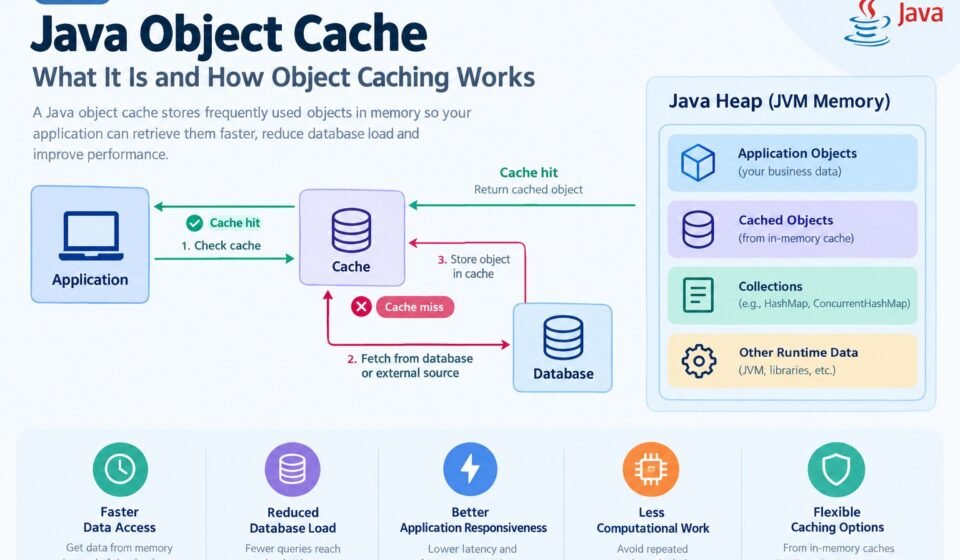

A Java object cache is a mechanism for temporarily storing objects in memory so an application can retrieve frequently needed data faster instead of repeatedly creating objects, querying a database, or performing expensive computations.
Object caching is commonly used in Java applications that need better performance, lower database load, and faster response times. Rather than performing the same operation every time a request arrives, an application can store the resulting object in a cache and reuse it while the cached entry remains valid.
In this guide, we’ll explain java object cache, how Java object caching works, whether cached objects consume memory, the difference between Java heap memory and a cache, and the common approaches developers can use for object caching.
Quick Answer
A Java object cache stores frequently used Java objects or computed data so they can be retrieved quickly. A cache may exist inside the Java application’s memory or in an external system such as Redis.
Cached objects generally consume memory while they are stored in an in-memory cache. The amount of memory used depends on the number and size of objects, references, cache metadata, and the caching implementation.
For small applications, an in-memory cache can be sufficient. Larger distributed applications may use an external cache such as Redis.
What Is a Java Object Cache?
A Java object cache is a storage layer that keeps objects or data that an application expects to access repeatedly.
Consider an application that retrieves a customer’s profile from a database. Without caching, every request might require a database query:
Application → Database → Customer Object → Application
If the same customer information is requested many times, repeatedly querying the database can introduce unnecessary latency and database load.
With caching, the application can store the object after the first retrieval:
First request:
Application → Cache miss → Database → Object → Cache

Later requests:
Application → Cache hit → Object
The second approach can be significantly faster because memory access is generally much faster than repeatedly performing database operations.
The cache does not necessarily replace the database. Instead, it usually acts as a faster temporary layer in front of the primary data source.
What Is Java Object Caching?
Java object caching is the process of storing objects or frequently required results so they can be reused instead of being recreated or retrieved from a slower source.
For example, suppose an application frequently needs configuration information:
Config config = loadConfigurationFromDatabase();
If loading the configuration requires an expensive database query, the application could cache the result and reuse it:
Config config = cache.get("application-config");
Or if the object is already present, the application can use it immediately.
If it isn’t present, the application can retrieve the data from the database, create the object, and place it into the cache.
This is commonly called a cache-aside pattern.
How Does Object Caching Work in Java?
A typical object-caching process contains four basic steps:
1. Check the cache
The application first checks whether the requested object is already cached.
Request
   ↓
Check Cache
2. Handle a cache hit
If the object exists and is still valid, the application returns it.
Cache Hit
   ↓
Return Cached Object
This avoids the more expensive operation that would otherwise be required.
3. Handle a cache miss
If the object isn’t available, the application retrieves it from its original source.
Cache Miss
   ↓
Database / API / Computation
   ↓
Create Object
4. Store the result
The application can then place the object into the cache for future requests.
Object
   ↓
Cache
The next request may therefore be served directly from the cache.
Java Cache Objects and Memory
One of the most important concepts when working with object caching is memory usage.
If a Java application stores objects in an in-memory cache, those objects generally occupy memory in the JVM’s heap.
For example:
Map<String, User> cache = new HashMap<>();

cache.put("user:101", user);
The map contains a reference to the User object. The object and the data associated with it require memory.
If the application keeps adding objects without removing them, memory consumption can continue to increase.
This is why production caching systems normally have mechanisms such as:
- Maximum cache size
- Time-to-live (TTL)
- Expiration
- Eviction policies
- Size-based limits
- Weak or soft references in specific use cases
- Manual invalidation
A cache should generally be treated as temporary storage, not unlimited memory.
Does Objects Take Up Java Cache?
The question “does objects take up Java cache?” can be confusing because Java does not have one single memory area officially called “the Java cache” where all cached objects automatically reside.
If by Java cache you mean an in-memory application cache, then yes: cached objects consume memory.
For example:
Map<String, Product> productCache = new HashMap<>();

productCache.put("product:1", product);
productCache.put("product:2", anotherProduct);
The cache holds references to the objects, and the objects remain reachable through the cache.
As long as those objects are reachable and haven’t expired or been removed, they may remain in the JVM heap.
The exact memory footprint depends on:
- Object size
- Number of objects
- Object references
- Collection overhead
- Cache metadata
- JVM implementation
- Garbage collector
- Cache library
Therefore, simply saying that an object “takes up Java cache” isn’t technically precise. It is better to say that an object stored in an in-memory cache consumes JVM memory.
Java Heap vs Object Cache
Another common source of confusion is the difference between the Java heap and an object cache.
Java Heap
The Java heap is the JVM memory area where Java objects are generally allocated.
For example:
User user = new User();
The User instance is allocated in JVM-managed memory.
Object Cache
An object cache is a software mechanism for retaining objects or data for faster reuse.
An in-memory cache can use the Java heap to hold its cached objects.
Therefore:
JVM Heap
│
├── Application Objects
├── Cached Objects
├── Collections
└── Other Runtime Data
A cache is not necessarily a separate type of JVM memory.
Instead, an application-level cache can be a data structure or caching library that uses available memory.
Why Use Java Object Caching?
Caching can provide several important performance benefits.
Faster Data Access
Retrieving an object from memory can be much faster than repeatedly qeurying a database or remote API.
Reduced Database Load
If frequently requested data is served from a cache, fewer requests need to reach the database.
Lower Network Traffic
External API calls and remote service requests can sometimes be avoided when the required information is already cached.
Better Application Responsiveness
Reducing expensive operations can improve application response times.
Reduced Computational Work
Applications can cache the result of expensive calculations rather than performing the same calculation repeatedly.
For example:
long result = performExpensiveCalculation(input);
If the same input is frequently requested, caching the result can avoid unnecessary computation.
Common Types of Java Object Caching
There are several ways to implement caching in Java applications.
1. Simple In-Memory Cache
A developer can create a basic cache using Java collections. For example, developers can use the Java HashMap documentation as a reference for the underlying collection.
For example:
Map<String, Object> cache = new HashMap<>();
This approach is easy to understand but has limitations.
A basic HashMap does not automatically provide features such as expiration, maximum size, or sophisticated eviction.
It may also require additional synchronization when accessed concurrently.
2. Concurrent In-Memory Cache
For applications with multiple threads accessing a cache, concurrent data structures can be useful.
For example:
Map<String, Object> cache = new ConcurrentHashMap<>();
This can provide safer concurrent access than a standard HashMap, although it is still a relatively basic caching mechanism.
3. Dedicated Java Caching Libraries
Production applications often use dedicated caching libraries that provide features such as:
- Expiration
- Maximum cache size
- Eviction
- Statistics
- Concurrency support
- Automatic loading
A dedicated caching library can be more appropriate than building every caching feature manually.
4. Distributed Object Caching
When an application runs across multiple servers, an in-memory cache inside one JVM may not be enough.
Consider this architecture:
Server A → Local Cache
Server B → Local Cache
Server C → Local Cache
Each server has its own cache.
An external distributed cache can instead provide a shared caching layer:
Server A ─┐
Server B ─┼──→ Distributed Cache
Server C ─┘
Redis is one example of an external caching system commonly used with Java applications.
The implementation details of storing Java objects in Redis are different from a local JVM cache and are better covered separately.
Cache Hit and Cache Miss
Two important caching terms are cache hit and cache miss.
Cache Hit
A cache hit occurs when the requested data already exists in the cache.
Application
    ↓
Cache
    ↓
Object Found
The application can return the cached value without accessing the original data source.
Cache Miss
A cache miss occurs when the requested data isn’t available.
Application
    ↓
Cache
    ↓
Object Not Found
    ↓
Database / API
The application must retrieve or calculate the data before optionally storing it in the cache.
A higher cache-hit rate generally means the cache is serving a larger proportion of requests.
What Happens When a Cached Object Is No Longer Needed?
A cache needs a strategy for determining when entries should be removed.
One common approach is TTL, or time-to-live.
For example:
Object added at 10:00
TTL = 10 minutes
Expiration = 10:10
After the expiration period, the cache can remove the entry or treat it as invalid.
Another approach is size-based eviction.
For example, an application might allow only 10,000 objects in a cache. When the cache reaches its limit, an eviction policy determines which entries should be removed.
Common policies include:
- LRU — Least Recently Used
- LFU — Least Frequently Used
- FIFO — First In, First Out
- Size-based eviction
- Time-based expiration
The right strategy depends on the application’s access pattern.
What Are the Risks of Java Object Caching?
Caching improves performance, but it also introduces several potential problems.
Memory Consumption
Caching too many large objects can consume significant JVM memory.
Stale Data
A cached object may become outdated when the original database record changes.
For example:
Database:
Price = $100

Cache:
Price = $90
If the cache isn’t invalidated correctly, users may receive outdated information.
Cache Invalidation
Keeping cached data synchronized with the source of truth can be challenging.
This is why cache invalidation is one of the most important design considerations when implementing object caching.
Serialization Problems
External caches may require objects to be serialized before they can be stored.
Changes to Java classes can sometimes create compatibility issues when previously serialized objects remain in a cache.
Cache Stampede
If a popular cache entry expires and many requests simultaneously try to rebuild it, the database or underlying service may suddenly receive a large number of requests.
Applications can use techniques such as request coalescing, locking, or refresh-ahead strategies to reduce this problem.
When Should You Use a Java Object Cache?
Object caching can be useful when:
- The same data is requested repeatedly.
- Database queries are expensive.
- API calls have noticeable latency.
- Calculations are computationally expensive.
- Data doesn’t change frequently.
- Fast response times are important.
- The application can tolerate a small amount of temporary data staleness.
Caching is less useful when data is rarely accessed, changes constantly, or is inexpensive to retrieve.
Java Object Cache Best Practices
A well-designed cache should have clear limits and predictable behavior.
Set an Appropriate Maximum Size
Don’t allow an application cache to grow indefinitely.
Use Expiration
TTL or another expiration strategy can prevent stale entries from remaining forever.
Monitor Cache Performance
Track metrics such as:
- Cache hits
- Cache misses
- Evictions
- Memory usage
- Entry count
- Average access time
Plan Cache Invalidation
Decide what should happen when the underlying data changes.
Avoid Caching Everything
Caching every object can waste memory and make the system more complicated.
Cache data that provides a meaningful performance benefit.
Consider Object Size
A few thousand small objects may be manageable, while thousands of large object graphs could consume substantial memory.
Consider Concurrency
If multiple application threads access the cache, use a caching mechanism designed for concurrent access.
In-Memory Cache vs Redis
A local Java cache and Redis can both improve application performance, but they solve somewhat different problems.
| Feature | Java In-Memory Cache | Redis |
|---|---|---|
| Location | Application/JVM memory | Separate server/service |
| Access speed | Very fast | Very fast |
| Shared across servers | Usually no | Yes |
| Survives application restart | Usually no | Depending on configuration |
| Network required | No | Yes |
| Memory location | JVM memory | Redis-managed memory |
| Best suited for | Local application caching | Distributed caching |
A local cache is often simpler and can have extremely low access latency because the application doesn’t need to make a network request.
Redis is more useful when several application instances need access to the same cache.
Java Object Cache Example
At a conceptual level, an object cache might work like this:
User user = cache.get("user:123");

if (user == null) {
    user = userRepository.findById(123);
    cache.put("user:123", user);
}

return user;
The flow is:
- Look for the user in the cache.
- If found, return the cached object.
- If not found, retrieve the user from the database.
- Store the object in the cache.
- Return the object.
This pattern is simple, but production implementations should also consider expiration, concurrency, cache size, invalidation, error handling, and serialization where applicable.
Frequently Asked Questions
What is a Java object cache?
A Java object cache is a mechanism for temporarily storing frequently used Java objects or data so applications can retrieve them more quickly.
What is Java object caching used for?
Java object caching is primarily used to reduce expensive database queries, remote requests, and repeated computations while improving application response times.
Does an object take up memory when stored in a Java cache?
Yes. If an object is stored in an in-memory cache, it generally consumes JVM memory while it remains reachable through the cache.
Is a Java cache the same as the Java heap?
No. The heap is a JVM memory area, while a cache is an application-level mechanism for storing reusable data. An in-memory cache can use part of the Java heap.
Can Java objects be stored in Redis?
Yes. Java applications can store object data in Redis, but the object generally needs to be represented in a format Redis and the Java client can store and retrieve, such as JSON or another serialization format.
Is object caching always beneficial?
No. Caching introduces memory usage, invalidation complexity, potential stale data, and additional application logic. It should be used where the performance benefit justifies the added complexity.
Final Thoughts
A Java object cache provides a way to keep frequently accessed objects or results available for faster reuse. Instead of repeatedly querying a database, calling an external service, or performing an expensive calculation, an application can retrieve data from a cache when appropriate.
For simple applications, an in-memory cache may be enough. More sophisticated applications can use dedicated caching libraries, while distributed systems may benefit from an external cache such as Redis.
The key is to treat caching as a performance optimization rather than a replacement for the application’s source of truth. Proper expiration, eviction, invalidation, memory management, and monitoring are essential for a reliable caching strategy.
If you want to implement caching yourself, the next step is learning how to create a cache object in Java, including practical approaches using Java collections and dedicated caching libraries.