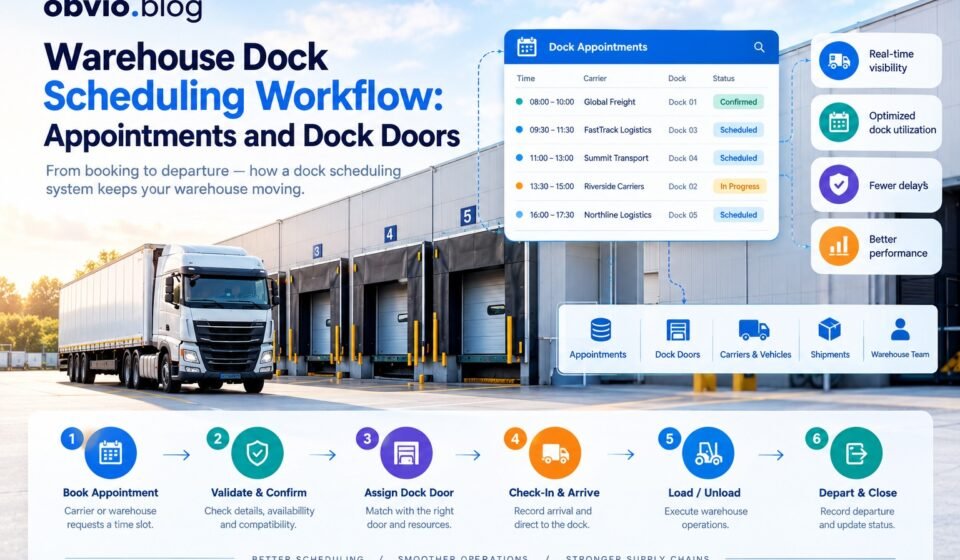
Warehouse Dock Scheduling Workflow: Appointments, Dock Doors, and Loads

Warehouses receive and dispatch trucks throughout the day. Without a clear scheduling process, multiple trucks may arrive at the same time, dock doors may become overcrowded, and warehouse employees may struggle to coordinate loading and unloading activities.
A warehouse dock scheduling workflow provides a structured process for planning truck arrivals, assigning dock doors, checking in drivers, completing warehouse activities, and recording departures.
The workflow connects transportation planning with warehouse operations. It also depends on accurate appointment records, dock availability, shipment details, and communication between carriers and warehouse staff.
In this guide, you will learn how a warehouse dock scheduling workflow operates, which steps are involved, how appointments and dock doors are managed, and how a dock scheduling system can integrate with a warehouse management system.
What Is a Warehouse Dock Scheduling Workflow?
A warehouse dock scheduling workflow is a sequence of activities used to coordinate trucks, shipments, appointments, and loading dock resources.
It begins when a carrier or warehouse employee requests an appointment. The system validates the request, checks resource availability, and confirms an appropriate time slot. When the truck arrives, warehouse staff record its arrival and direct it to the assigned dock.
The workflow continues through loading or unloading and ends when the truck departs and the appointment is completed.
A typical workflow includes:
- Appointment request and validation
- Time-slot selection and confirmation
- Dock door assignment
- Carrier communication
- Truck arrival and gate check-in
- Docking and loading or unloading
- Completion and departure recording
- Performance reporting and exception management
The exact process varies according to warehouse size, shipment type, safety procedures, and the capabilities of the scheduling software.
Why Is Dock Scheduling Important in Warehouse Management?
Dock scheduling helps warehouses coordinate the use of limited physical resources. A warehouse may have several dock doors, but each door has specific operating hours, equipment capabilities, and handling capacity.
If appointments are poorly planned, trucks can arrive before a door is ready, workers may wait for shipments, and outbound deliveries may miss their planned departure times.
A well-managed scheduling process provides several benefits.
1. Better Truck Arrival Coordination
Scheduling gives carriers a planned arrival window rather than allowing every truck to arrive whenever it chooses.
This helps warehouse staff prepare for incoming loads and distribute arrivals throughout the day.
2. More Efficient Dock Door Utilization
Dock doors are valuable warehouse resources. Assigning appointments according to door availability, vehicle compatibility, and expected handling time can reduce idle periods and prevent unnecessary congestion.
3. Improved Labor Planning
Knowing which trucks are expected and what they will carry helps supervisors plan receiving teams, forklift operators, and loading crews.
4. Reduced Waiting Time
A predictable schedule can reduce unnecessary queues at the warehouse entrance and outside loading bays.
Actual waiting times still depend on arrival punctuality, workload, staffing, and unexpected operational problems.
5. Better Shipment Visibility
Connecting appointments with shipment records helps employees identify what is expected, what has arrived, and what remains to be processed.
The Main Components of a Dock Scheduling Workflow
Before examining the steps, it is useful to understand the information and resources that support the process.
Warehouse
The warehouse represents the facility where the truck visit occurs. It determines the relevant location, operating hours, and time zone.
Dock Door
A dock door is a physical resource used for receiving or dispatching goods. Each door may have different capabilities and restrictions.
Carrier and Vehicle
The carrier represents the transportation company, while the vehicle identifies the truck or other equipment associated with the visit.
Shipment or Load
The shipment or load record contains information about the goods, their direction of movement, and their expected handling requirements.
Appointment
The appointment records the planned visit, including the scheduled time window, assigned resources, and current status.
Appointment Events
Event records track important activities such as arrival, docking, unloading, loading, and departure.
For a detailed explanation of these records, see the dock scheduling system data model.
Step-by-Step Warehouse Dock Scheduling Workflow
Step 1: Create an Appointment Request
The process starts when a carrier, supplier, transportation coordinator, or warehouse employee requests a dock appointment.
The request may include:
- Warehouse location
- Carrier name and contact details
- Requested arrival date and time
- Shipment or purchase order reference
- Inbound or outbound direction
- Expected pallet count or load size
- Vehicle and trailer information
- Special handling requirements
For example, a supplier may request a 9:00 AM arrival to deliver 20 pallets to a distribution center.
The scheduling system creates an appointment request and records its current status. The appointment may remain unconfirmed until the warehouse validates the information and identifies an appropriate time slot.
Step 2: Validate the Appointment Information
Before confirming a request, the system should verify that the required information is present and consistent.
Validation may include checking:
- Whether the warehouse exists and is operating
- Whether the carrier is authorized to book appointments
- Whether the requested time falls within permitted operating hours
- Whether the shipment reference is valid
- Whether the load requires special equipment
- Whether the requested vehicle is compatible with the facility
Invalid or incomplete requests should be returned for correction or flagged for manual review.
If the warehouse management system already owns the shipment record, the scheduling application may retrieve the shipment reference and relevant handling information from that system.
Step 3: Select an Available Time Slot
Once the request passes validation, the system evaluates available appointment windows.
The scheduling engine should consider more than whether a time slot appears empty. It may need to account for:
- Existing appointments
- Dock operating hours
- Expected loading or unloading duration
- Preparation and cleanup buffers
- Labor availability
- Vehicle compatibility
- Warehouse-specific capacity limits
For example, a warehouse may reserve 60 minutes for unloading and another 15 minutes for dock preparation. The resource reservation may therefore need to cover 75 minutes, even if the appointment displayed to the carrier has a shorter service window.
A scheduling engine should also prevent concurrent booking requests from reserving the same capacity.
Step 4: Assign a Dock Door
After identifying a suitable time slot, the system can assign a dock door.
The selected door should be compatible with the vehicle, load type, and planned warehouse activity.
For example, a refrigerated shipment may require a temperature-controlled handling area, while a standard pallet delivery may be assigned to a general receiving door.
The system should also consider the distance to the appropriate storage or staging area when that information is available and operationally relevant.
Some warehouses assign the dock door when the appointment is confirmed. Others assign a door closer to the truck’s arrival time to maintain flexibility when schedules change.
The appropriate approach depends on the warehouse’s operating model.
Step 5: Confirm the Appointment
After the time slot and required resources have been validated, the system confirms the appointment.
The confirmation should include:
- Appointment reference
- Warehouse address and arrival instructions
- Scheduled arrival window
- Assigned dock door, if already known
- Shipment or purchase order reference
- Vehicle requirements
- Check-in procedure
- Contact details for operational questions
The appointment status changes from a pending state to the appropriate confirmed or scheduled state.
If the warehouse needs to change the appointment, the system should notify the relevant parties and preserve the original schedule for reporting.
Step 6: Track Truck Arrival and Check-In
When the truck reaches the facility, the gate or receiving team records its arrival.
The system should capture the actual arrival time separately from the scheduled time. This makes it possible to identify early arrivals, late arrivals, and no-shows.
A typical check-in process includes:
- Verify the appointment reference.
- Confirm the carrier and vehicle details.
- Check the shipment or delivery documentation.
- Record the actual arrival time.
- Notify the receiving or shipping team.
- Direct the driver to the waiting area or assigned dock.
Some facilities use self-service kiosks, mobile check-in, gate systems, or automated identification. Smaller warehouses may record arrivals manually.
The workflow should also define what happens when a truck arrives without an appointment or when its reference cannot be verified.
Step 7: Move the Truck to the Assigned Dock
After check-in, the truck waits until the assigned dock is ready.
The warehouse may need to verify that the previous truck has departed, the door is safe to use, and the necessary personnel and equipment are available.
When the truck reaches the door, the system records the relevant event if the facility tracks dock arrival separately from gate arrival.
This distinction is useful because a truck may enter the warehouse yard well before it reaches the loading bay.
If the assigned dock becomes unavailable, authorized staff should be able to reassign the appointment according to the warehouse’s rules. The system should preserve the change history.
Step 8: Start Loading or Unloading
Once the truck is positioned and the necessary safety checks are complete, warehouse staff begin the planned activity.
For inbound shipments, this may include unloading pallets, checking quantities, inspecting goods, and transferring inventory into receiving or storage processes.
For outbound shipments, it may involve staging goods, verifying orders, loading the truck, and completing dispatch documentation.
The scheduling system can record the actual start time and update the appointment status to indicate that the activity is in progress.
The WMS may separately record detailed inventory transactions, receiving confirmations, picking, packing, or dispatch activity.
These systems should exchange the information required by the workflow without treating an appointment completion event as proof that every inventory transaction has finished.
Step 9: Complete the Dock Activity
After loading or unloading is finished, staff record the completion time and confirm that the dock is ready for its next use.
Depending on the warehouse’s process, this step may include:
- Confirming handling completion
- Recording exceptions or damaged goods
- Completing the required documents
- Confirming that the vehicle can safely depart
- Updating shipment or warehouse execution records
- Releasing the dock resource
The appointment should not be marked complete prematurely if required operational checks remain outstanding.
A well-designed system distinguishes between the end of physical dock activity and the completion of any separate administrative or inventory process.
Step 10: Record Departure and Close the Appointment
The final operational step records when the truck leaves the facility.
The system stores the departure time and updates the appointment to its final state according to the business rules.
The record can then support reports showing:
- Scheduled versus actual arrival
- Waiting time before docking
- Dock service duration
- Total time spent at the facility
- Appointment completion rate
- Frequency of late arrivals or cancellations
Keeping this history helps warehouse managers identify recurring problems and make better scheduling decisions.
Inbound and Outbound Dock Scheduling Workflows
The Inbound and outbound operations share the same basic appointment structure, but their operational requirements differ.
Inbound Dock Scheduling
Inbound scheduling coordinates goods arriving at the warehouse from suppliers, manufacturers, or distribution partners.
A typical inbound process is:
- The supplier or carrier requests an appointment.
- The warehouse validates the purchase order or shipment reference.
- The system assigns a time slot and compatible receiving door.
- The truck checks in at the facility.
- The receiving team unloads and inspects the goods.
- The WMS records the relevant receiving and inventory transactions.
- The truck departs and the appointment is closed.
Inbound scheduling is particularly useful when deliveries vary in size, handling complexity, or expected unloading duration.
Outbound Dock Scheduling
Outbound scheduling coordinates trucks that collect goods for delivery to customers, stores, or other facilities.
A typical outbound process is:
- The warehouse identifies a planned dispatch or collection.
- The carrier requests or receives an appointment.
- The system assigns a collection window and suitable shipping door.
- Warehouse staff stage the goods.
- The truck checks in and moves to the assigned dock.
- The team loads the shipment and verifies the required documentation.
- The truck departs and the dispatch process is updated.
Outbound operations often depend on order readiness, picking completion, shipment consolidation, and carrier departure schedules.
The scheduling system should account for these dependencies when assigning appointment times.
How a Dock Scheduling System Connects With a WMS
A dock scheduling system and a warehouse management system have related but distinct responsibilities.
The dock scheduling system coordinates appointment times, resource assignments, and truck visits. The WMS manages warehouse execution, such as receiving, inventory movements, order picking, and dispatch.
An integration may exchange information such as:
| Information | Typical use |
|---|---|
| Warehouse identifier | Identifies the facility |
| Shipment or order reference | Connects the appointment to warehouse work |
| Carrier and vehicle details | Supports visit planning |
| Appointment confirmation | Makes planned dock activity visible |
| Arrival and departure events | Supports operational tracking |
| Receiving or dispatch status | Helps coordinate warehouse execution |
| Exceptions | Communicates delays or operational problems |
The exact division of responsibility depends on the software architecture.
Before implementation, define which system owns each record and which system is permitted to update it. This prevents conflicting updates and inconsistent appointment or shipment statuses.
For technical background on how these records can be stored and connected, see the dock scheduling database schema guide.
Handling Common Dock Scheduling Exceptions
Not every truck visit follows the planned schedule. A useful workflow needs clear rules for handling exceptions.
Late Arrivals
When a truck arrives late, the system should determine whether the assigned dock and remaining time slot are still available.
The warehouse may allow a grace period, move the appointment to a later window, or require manual approval.
The original scheduled time should remain available for performance reporting.
Early Arrivals
An early truck may need to wait until its appointment window begins or until a suitable dock becomes available.
The warehouse should define whether early arrivals can be accommodated without disrupting confirmed appointments.
No-Shows
If a truck does not arrive within the permitted window, the appointment may be marked as a no-show after the required checks.
The system should release the reserved capacity when appropriate and notify the relevant team.
Dock Door Unavailability
A door may become unavailable because of equipment failure, maintenance, safety concerns, or an unexpected operational issue.
The scheduling team should identify compatible alternatives, check their availability, and record any reassignment.
Shipment Delays
A shipment may not be ready when the truck arrives, or an inbound delivery may be delayed by its supplier.
The workflow should communicate the delay and determine whether to hold, reschedule, or cancel the appointment.
Exception handling should be configurable enough to reflect the warehouse’s policies while keeping status transitions consistent.
Key Metrics for Evaluating Dock Scheduling Performance
Once the workflow is implemented, warehouse managers can measure its effectiveness.
Truck Waiting Time
Waiting time can be calculated as the difference between the truck’s arrival at the facility and the start of dock service, provided both timestamps use consistent definitions.
If gate arrival is recorded at 9:00 AM and dock service begins at 9:25 AM, the recorded waiting time is 25 minutes.
Dock Service Duration
Dock service duration measures the time between the start and end of the relevant loading or unloading activity.
This metric helps identify activities that regularly take longer than expected.
On-Time Arrival Rate
This metric measures the proportion of appointments whose trucks arrive within the warehouse’s defined on-time window.
The reporting rules should specify how early arrivals, late arrivals, cancellations, and no-shows are treated.
Dock Utilization
Dock utilization compares the time a dock is occupied by relevant operational activity with the time it is available for that activity.
The calculation must use a consistent definition of occupancy and availability. Planned appointment time and actual physical occupancy are not necessarily the same.
Appointment Completion Rate
This metric measures the proportion of eligible appointments that reach the required completed state within a reporting period.
Cancelled appointments and no-shows should be reported separately where doing so provides a more accurate operational picture.
These metrics are most useful when appointment records, actual timestamps, and status definitions are accurate and consistent.
Best Practices for Improving the Workflow
Define Clear Scheduling Rules
Establish appointment windows, permitted booking lead times, reservation buffers, cancellation rules, and procedures for late arrivals.
Match Resources to Load Requirements
Assign dock doors according to vehicle compatibility, handling equipment, shipment type, and operational capacity.
Keep Appointment Information Updated
Carrier changes, revised arrival times, shipment delays, and dock closures should be reflected in the scheduling system as soon as practical.
Preserve Scheduled and Actual Times
Do not overwrite planned timestamps with actual event times. Keeping both makes performance analysis more meaningful.
Coordinate With Warehouse Teams
Receiving, shipping, yard operations, and transportation coordinators should have access to the information they need to perform their roles.
Integrate Systems Carefully
Define data ownership, identifier mapping, error handling, and retry behavior before connecting the scheduling system to a WMS or TMS.
Review Performance Regularly
Use historical data to identify recurring bottlenecks, improve appointment durations, and adjust scheduling policies.
Frequently Asked Questions
What is a warehouse dock scheduling workflow?
It is the sequence of activities used to request, confirm, manage, and complete truck appointments at a warehouse, including dock assignment, check-in, loading or unloading, and departure.
How does a dock scheduling system work?
The system records appointment requests, checks scheduling rules and resource availability, assigns suitable time slots and dock doors, tracks truck visits, and preserves operational history.
What is the difference between dock scheduling and yard management?
Dock scheduling focuses on appointment windows and dock resources. Yard management focuses on vehicles and trailers moving, waiting, parking, or being repositioned within the warehouse yard. The two systems can share information and may be integrated.
How are dock doors assigned to appointments?
The scheduling process considers availability, operating hours, vehicle compatibility, load requirements, handling duration, and other warehouse rules. Some facilities assign doors when appointments are confirmed, while others assign them closer to arrival.
Can a dock scheduling system integrate with a WMS?
Yes. Depending on the products and their interfaces, the systems can exchange shipment references, appointment information, arrival events, and warehouse execution updates.
What happens when a truck misses its appointment?
The warehouse applies its late-arrival and no-show policies. It may extend the waiting window, reassign the appointment, offer a later slot, or cancel the reservation. The decision should preserve the original scheduling history.
Which metrics help improve dock scheduling?
Common metrics include truck waiting time, on-time arrival rate, dock service duration, dock utilization, and appointment completion rate.
Conclusion
A warehouse dock scheduling workflow coordinates the people, vehicles, appointments, and physical resources needed to move goods through a distribution center.
The process begins with an appointment request and continues through validation, time-slot selection, dock assignment, check-in, loading or unloading, and departure. Clear exception rules and accurate event records help the warehouse handle delays without losing visibility into operations.
When the workflow is supported by a well-designed data model and database schema, the warehouse can improve coordination, analyze performance, and integrate appointment planning with its existing warehouse management processes.
The most effective approach is to define clear scheduling rules, maintain accurate operational records, and continuously improve the workflow using real performance data.



[…] To understand how these entities support real warehouse operations, read our guide to the warehouse dock scheduling workflow. […]