
Receiving a toll invoice can be confusing, especially if you do not remember passing through a Massachusetts toll location or you are not familiar with the Pay By Plate MA system.
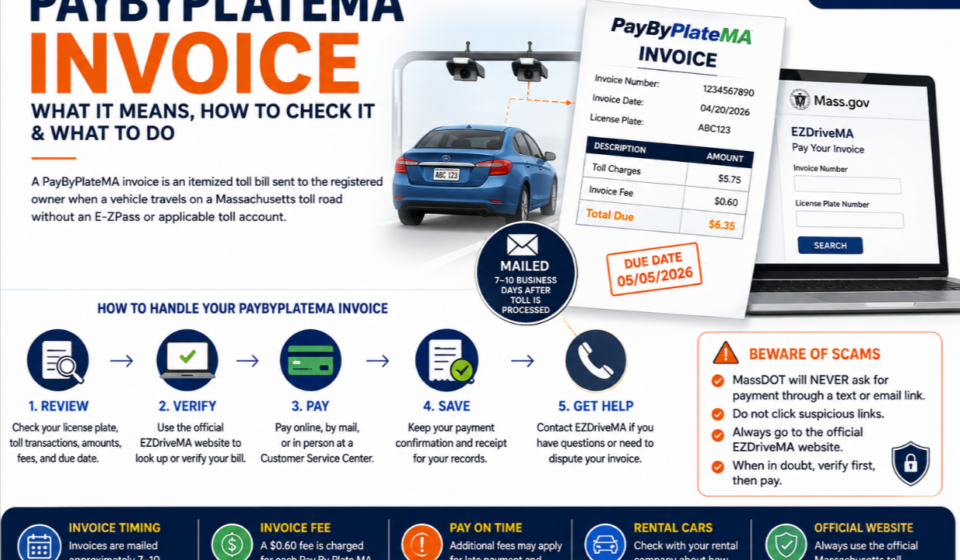
A PayByPlateMA invoice is an itemized toll bill associated with a vehicle that traveled on a Massachusetts toll road. Instead of paying through an E-ZPass MA transponder, the toll transaction can be associated with the vehicle’s license plate and an invoice can be sent to the registered owner.
If you have received an invoice, the most important thing is to understand what the bill contains, how to verify the information, how to recognize a legitimate invoice, and what to do if something on it looks incorrect.
This guide focuses specifically on understanding and managing your Pay By Plate MA invoice rather than explaining the entire tolling system. Visit our previous article to complete Pay By Plate MA guide for more information.
What Is a PayByPlateMA Invoice?
A Pay By Plate MA invoice is an itemized statement showing toll-related charges associated with a vehicle that traveled on a Massachusetts toll road.
According to Massachusetts’ official toll-payment information, drivers who travel on Massachusetts toll roads without an applicable account can receive a Pay By Plate MA Invoice by mail.
The invoice may include information such as:
- Invoice number
- Vehicle or license plate information
- Toll transaction details
- Amount due
- Applicable fees
- Payment due date
- Payment instructions
The exact information displayed can depend on the invoice and the toll transaction.
Why Did I Receive a PayByPlateMA Invoice?
There are several reasons why you might receive an invoice.
The most common situation is that your vehicle traveled through a Massachusetts toll facility without being associated with an E-ZPass MA account or another applicable toll account.
The tolling system can use images of the vehicle’s license plate to associate the transaction with the registered owner. Massachusetts describes Pay By Plate MA as an electronic toll collection option that uses video images of vehicle license plates.
You may receive an invoice if you:
- Drove on a Massachusetts toll road without an E-ZPass
- Were visiting Massachusetts from another state
- Used a rental vehicle
- Did not have an applicable toll account
- Had a vehicle associated with a toll transaction
If you recently drove in Massachusetts, compare the invoice details with your travel history before assuming that the bill is incorrect.
How Long Does a PayByPlateMA Invoice Take to Arrive?
One useful thing to know is that the invoice may not arrive immediately after your trip.
Massachusetts currently states that a Pay By Plate MA invoice is mailed to the registered vehicle owner approximately 7–10 business days after the toll is processed.
This means a delay between your trip and the arrival of the invoice is not necessarily a problem.
For example:
Toll trip → toll processing → invoice generated → invoice mailed
The timing can vary depending on processing and delivery.
If you have recently traveled on a Massachusetts toll road, keep this timeframe in mind before assuming that no invoice will be issued.
What Information Should You Check on Your Invoice?
Before paying, take a moment to review the information on the document.
1. Vehicle Information
Check whether the vehicle information corresponds with your vehicle.
2. License Plate
Compare the plate shown on the invoice with your vehicle’s actual license plate.
3. Toll Transactions
Review the listed toll transactions and dates.
If you recognize the trip, the transaction is easier to verify.
4. Amount Due
Check the total amount requested.
Make sure you understand whether the amount includes any applicable invoice fees or other charges.
5. Payment Due Date
The due date is particularly important.
Do not ignore the date shown on your invoice.
6. Invoice Number
Keep your invoice number available because you may need it when accessing payment services or contacting customer support.
How to Check If a PayByPlateMA Invoice Is Correct
If you are unsure about an invoice, do not immediately assume it is fraudulent.
Start by comparing the information with your own records.
Ask yourself:
- Was my vehicle in Massachusetts around the listed date?
- Does the license plate match?
- Did I travel on a Massachusetts toll road?
- Was the vehicle rented or borrowed?
- Does the listed transaction make sense?
- Does the amount and invoice information appear consistent?
If the information does not match your vehicle or travel history, use the official Massachusetts tolling channels to investigate the issue.
Avoid using an unknown website simply because it appears in a search result.
What Does the Invoice Fee Mean?
Massachusetts currently lists a $0.60 fee for each Pay By Plate MA invoice issued.
Therefore, the amount shown on your invoice may include more than just the underlying toll transaction.
If you are comparing your toll charge with the invoice total, make sure you account for any applicable invoice fees shown on the bill.
Additional fees can also apply when an invoice remains unpaid after its due date.
What Happens If a PayByPlateMA Invoice Is Past Due?
Do not ignore an unpaid invoice.
Massachusetts states that additional fees can be assessed for each month an invoice remains unpaid after its due date. Continued unpaid invoices may also be subject to registration or license non-renewal holds and referral to collections.
The safest approach is to deal with a valid invoice as soon as possible.
If you believe the invoice is incorrect, use the appropriate official dispute or customer-service process rather than simply ignoring it.
What If You Never Received the Invoice?
If you believe you should have received a toll invoice but nothing arrived, start with the official Massachusetts tolling service.
You may have:
- Moved recently
- Changed your vehicle registration
- Used a rental vehicle
- Had an address issue
- Experienced a mailing delay
- Received the invoice but misplaced it
The important point is not to create an account or make a payment through an unverified website simply because you are trying to locate the bill.
Use the official Massachusetts toll-payment resources to determine what options are available.
What If You Lost Your PayByPlateMA Invoice?
Losing the paper invoice does not mean you should ignore the toll.
The official EZDriveMA website provides options for paying an individual Pay By Plate MA toll bill online and directs users to toll-payment resources.
If you cannot locate your invoice information, use the official Massachusetts tolling service or customer-service channels to determine the available lookup or assistance options.
Have your vehicle and license plate information available when contacting the tolling authority.
What If the PayByPlateMA Invoice Shows the Wrong License Plate?
If the license plate shown on the invoice does not belong to your vehicle, do not simply pay it without investigating.
First, verify the information carefully.
Check:
- Plate number
- State
- Vehicle details
- Transaction date
- Your travel history
If the information still appears incorrect, contact the official EZDriveMA customer-service channel or follow the dispute instructions associated with the invoice.
Keep the invoice available while investigating the issue.
What If You Were Driving a Rental Car?
Rental vehicles can make toll invoices more complicated because the registered vehicle owner may be the rental company rather than the person who was driving.
Massachusetts specifically advises people using rental vehicles on Massachusetts toll roads to ask the rental car company how it processes tolls and fees.
If you rented a vehicle, check:
- Your rental agreement
- Rental company toll policy
- Travel dates
- Vehicle information
- Any toll-related charges from the rental company
Do not assume that a toll invoice and a rental-company charge are necessarily the same thing.
How Can I Pay a PayByPlateMA Invoice?
Massachusetts currently lists multiple payment options for Pay By Plate MA invoices.
These include:
- Online through Pay By Plate MA
- By mailing a check
- In person at a Customer Service Center using accepted payment methods
The official Massachusetts toll-payment page provides the current payment instructions and mailing information.
For online payment, start from the official EZDriveMA website rather than an unexpected link in an email or text message.
Can You Pay a PayByPlateMA Invoice by Mail?
Yes.
Massachusetts currently provides a mailing option for Pay By Plate MA invoices. The official toll-payment page instructs customers to mail a check to the Commonwealth of Massachusetts, EZDriveMA Payment Processing Center, and to include the invoice number with the check.
Because mailing instructions can change, always verify the address on the official Massachusetts website or your current invoice before sending payment.
Can You Pay a PayByPlateMA Invoice in Person?
Massachusetts states that cash, credit, and debit cards are accepted at its Customer Service Centers for Pay By Plate MA invoice payments.
If you prefer to pay in person, check the current Customer Service Center information before traveling.
What If Your Payment Is Still Showing as Unpaid?
Sometimes you may make a payment and later notice that the invoice still appears outstanding.
Before making another payment, check your records.
Keep:
- Payment confirmation
- Transaction number
- Receipt
- Date of payment
- Amount paid
- Payment method
If the payment has already been processed but the invoice status has not updated, contact the official tolling customer-service channel and provide your payment information.
Avoid making duplicate payments simply because the status has not changed immediately.
How to Keep Proof of Your PayByPlateMA Payment
After paying your invoice, save evidence of the transaction.
You can keep:
- Digital confirmation
- Payment receipt
- Transaction number
- Screenshot of the confirmation page
- Copy of the paid invoice
This information can be useful if you later need to prove that the balance was paid.
It is especially useful when dealing with a past-due notice or a payment-status question.
PayByPlateMA Invoice vs Pay By Plate MA Registered Account
These are not exactly the same thing.
A Pay By Plate MA Invoice is associated with an individual toll bill.
A Pay By Plate MA Registered Account is an account-based payment option that uses the vehicle’s license plate without requiring a transponder.
Massachusetts describes Pay By Plate MA Registered accounts as a separate toll-payment option, with prepaid and postpaid account choices.
This distinction matters because receiving an invoice does not automatically mean that you have a Pay By Plate registered account.
How to Avoid Fake PayByPlateMA Invoice Messages
This is especially important in 2026.
Massachusetts officials have warned about fraudulent text messages requesting toll payments through links. MassDOT says it will not ask for payment through a link embedded in a text message.
If you receive an unexpected message saying that you owe a toll:
- Do not click the payment link.
- Do not enter your card information.
- Do not provide passwords or security codes.
- Open the official Massachusetts tolling website separately.
- Check the bill through official channels.
- Contact EZDriveMA if you are unsure.
A message can look convincing while still being fraudulent.
Where Should You Go for PayByPlateMA Invoice Help?
For questions about an invoice, use the official EZDriveMA customer-service channels.
Massachusetts currently lists customer-service assistance by phone, email, online contact options, and Customer Service Centers.
The official EZDriveMA page lists the main customer-service number as (877) 627-7745.
Because contact information and service options can change, it is best to verify the latest details on the official Massachusetts website.
Frequently Asked Questions
How long does it take to receive a PayByPlateMA invoice?
Massachusetts currently says that an invoice is mailed approximately 7–10 business days after the toll is processed.
Is there a fee for a Pay By Plate MA invoice?
Yes. Massachusetts currently lists a $0.60 fee for each invoice issued.
What happens if I do not pay my invoice on time?
Additional fees may be assessed for unpaid invoices, and continued nonpayment can lead to further collection or registration-related consequences.
Can I pay my PayByPlateMA invoice online?
Yes. Massachusetts provides an official online option for paying individual Pay By Plate MA toll bills.
Can I pay a PayByPlateMA invoice by mail?
Yes. Massachusetts provides a check-by-mail payment option. Verify the current mailing instructions before sending payment.
Can I pay a PayByPlateMA invoice in person?
Yes. Massachusetts states that payments can be made at Customer Service Centers using accepted payment methods.
What should I do if my invoice is incorrect?
Review the vehicle, plate, transaction, and date information. If the information does not match your records, use the official Massachusetts tolling service to seek assistance or dispute the charge.
What should I do if I receive a toll-payment text?
Do not click the link. Massachusetts officials have warned about fraudulent toll-payment texts and advise people not to use payment links embedded in such messages.
Final Thoughts
A PayByPlateMA invoice is more than just a toll bill; it contains the information you need to identify the transaction, understand the amount due, and determine how to resolve the balance.
If you receive one, first check the vehicle and transaction details, review the amount and due date, and use an official Massachusetts toll-payment channel when you are ready to resolve the bill.
If the invoice looks incorrect, do not ignore it. Investigate the issue through the official EZDriveMA service instead.
And if a text message unexpectedly asks you to pay a toll through a link, be especially careful. Verify the bill independently before entering any financial information.