
If you are considering Murf AI for AI voiceovers, one of the first questions you will probably have is: How much does Murf AI cost?
Murf AI offers a free option for users who want to test its voice generation tools, along with paid plans designed for individuals, freelancers, businesses, and larger organizations. The amount you pay depends on how much voice generation you need and which features are important for your workflow.
In this guide, we will explain Murf AI pricing, the available plans, what you get with the free option, whether Murf AI is free, and which plan may make sense for different types of users. Read more about Murf in our previous article, Murf AI complete guide.
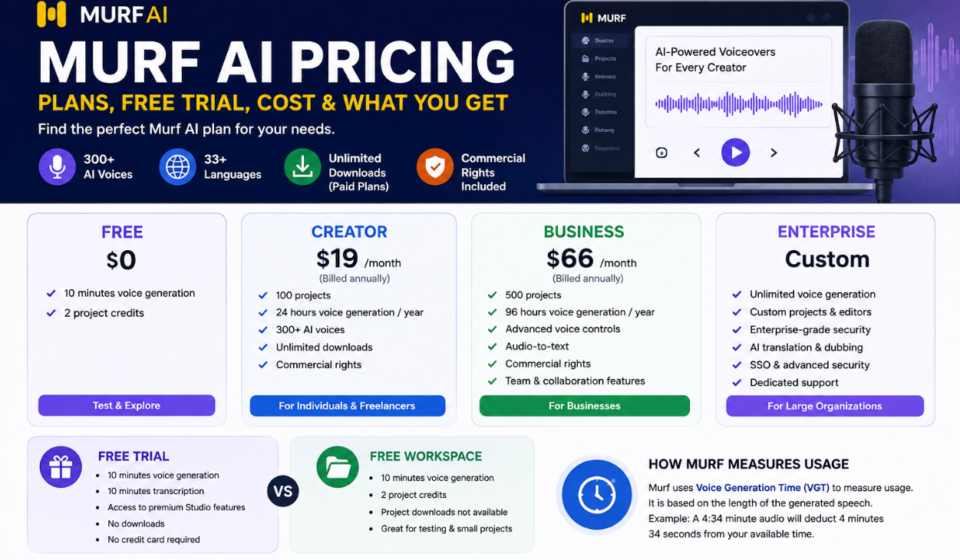
Murf AI Pricing at a Glance
Murf’s current public pricing page lists the following Studio plans:
| Plan | Starting Price | Best For |
|---|---|---|
| Free | $0 | Testing Murf and short projects |
| Creator | $19/month when billed annually | Individuals and freelancers |
| Business | $66/month when billed annually | Businesses and higher-volume users |
| Enterprise | Custom | Large organizations and specialized requirements |
The Creator and Business prices above are the starting prices displayed on Murf’s current pricing page with annual billing. Murf also offers monthly billing, so the actual cost can vary depending on the billing option you select.
Let’s look at each option in more detail.
Is Murf AI Free?
Yes. Murf AI has a free plan that allows new users to test its Studio before committing to a paid subscription.
The current Murf Free Trial allows first-time users to test the platform without a credit card. According to Murf’s Help Center, the free trial includes 10 minutes of voice generation, 10 minutes of transcription, access to the available voices and premium Studio features, and does not include downloads.
Murf also provides a Free Workspace. Its Help Center states that the Free Workspace includes 10 minutes of voice generation time and a limit of 2 project credits. Project downloads are not available in the Free Workspace.
The free option is therefore best understood as a way to test the platform rather than a full replacement for a paid voiceover subscription.
What You Get With the Murf AI Free Plan
The free option can be useful if you want to:
- Test different AI voices
- Experiment with text-to-speech
- Create short sample voiceovers
- Compare different voices and styles
- Learn how Murf Studio works
- Test pronunciation and voice controls
- Decide whether a paid plan is worthwhile
Murf’s Help Center says its free trial provides access to its voices and premium Studio features, with 10 minutes of voice generation and 10 minutes of transcription, while downloads are not included.
This makes the free option particularly useful for first-time users who want to evaluate the platform before paying.
How Long Does the Murf AI Free Trial Last?
One important detail is that the free trial is not simply a traditional trial that expires after a fixed number of days.
According to Murf’s Help Center, the free trial does not have a specific validity or end date. Instead, the trial ends after the available 10 minutes of voice generation and transcription time have been used.
That means you can take your time testing the platform rather than having to use all of your trial minutes within a short number of days.
However, the available voice generation time is limited, so users planning larger projects will eventually need a paid option.
Murf AI Creator Plan
The Creator plan is positioned toward individuals and freelancers who need more than the free option provides.
Murf’s current pricing page lists the Creator plan starting at $19 per month when billed annually, or $228 billed annually. The plan includes 100 projects, 24 hours of voice generation per year, access to 300+ voices, voice styles and tonalities, unlimited downloads, and commercial rights.
The Creator plan may be suitable for:
- YouTube creators
- Freelancers
- Podcast creators
- Video editors
- Online educators
- Small content teams
- Social media creators
Creator Plan Features
The current pricing information includes:
- 100 projects
- 24 hours of voice generation per year
- 300+ AI voices
- Voice styles and tonalities
- Multi-native voices
- Unlimited downloads
- Canva integration
- Commercial rights
- One editor seat
For someone producing regular voiceover content, the Creator plan offers considerably more usage than the free option.
Murf AI Business Plan
The Business plan is designed for users with higher-volume voice generation requirements and additional business-focused features.
Murf currently lists the Business plan starting at $66 per month when billed annually, or $792 billed annually. It includes 500 projects and 96 hours of voice generation per year.
In addition to the Creator features, the Business plan adds capabilities such as:
- Business license
- Emphasis controls
- Variability controls
- Say It My Way
- PowerPoint integration
- Audio-to-text
- Murf voices for Windows applications
- 500 projects
- 96 hours of annual voice generation
This plan makes more sense for companies and content teams that create voiceovers regularly and need more capacity and advanced controls.
Murf AI Enterprise Pricing
Murf also offers an Enterprise plan for organizations with more extensive requirements.
Unlike the standard Creator and Business plans, Enterprise pricing is customized rather than displayed as a fixed monthly amount.
The current pricing page lists enterprise features including:
- Custom projects
- Unlimited voice generation
- Custom editors
- Collaboration features
- Enterprise-grade security
- AI translation
- Single sign-on
- Security assessments
- Custom voice clones
- Customer success support
- Purchase orders and invoicing
Enterprise pricing is therefore more appropriate for organizations that need customized usage limits, security requirements, collaboration, or large-scale deployment.
Murf AI Cost: Which Plan Is Cheapest?
If your main concern is Murf AI cost, the Free plan is obviously the cheapest because it costs $0.
For users who need regular voiceover production, the Creator plan is the first paid option shown on Murf’s current pricing page, starting at $19/month with annual billing. The Business plan starts at $66/month with annual billing.
The important point is that price alone should not determine your choice.
You should also consider:
- How many minutes of audio you create
- How many projects you manage
- Whether you need commercial rights
- Whether you need downloads
- Whether you need advanced voice controls
- Whether you work alone or as a team
- Whether you need business features
A cheaper plan can become restrictive if you regularly exceed its usage limits.
How Does Murf Measure Voice Usage?
Murf uses Voice Generation Time, or VGT, to measure generated speech.
Murf’s documentation explains that VGT is based on the length of the generated speech. For example, if your generated audio is 4 minutes and 34 seconds long, that amount is deducted from your available voice generation time.
This is important when estimating your requirements.
Murf gives an approximate example that a 1,000-word English script can consume around 6 minutes of Voice Generation Time, although the actual amount can vary depending on factors such as the script, selected voice, and speaking speed.
So if you regularly create long-form videos, courses, or training material, you should estimate your expected monthly or yearly audio production before selecting a plan.
Is Murf AI Free Enough for YouTube?
The answer depends on how much content you create.
If you are simply testing AI voiceovers or producing very short samples, the free option can be useful.
However, if you regularly publish YouTube videos, you may need more voice generation time and the ability to download your finished audio. Murf’s current free workspace does not include downloads, while paid plans include unlimited downloads according to the pricing page.
For regular YouTube production, a paid plan is therefore likely to be more practical.
Is Murf AI Free for Commercial Use?
The distinction between free access and commercial usage is important.
Murf’s current pricing page lists commercial rights with the Creator and Business plans.
If you plan to use generated voiceovers for commercial videos, advertisements, client projects, monetized content, or business materials, you should check the rights associated with your specific plan before publishing.
Do not assume that a free trial automatically provides the same commercial rights as a paid subscription.
Murf AI Pricing for Freelancers
Freelancers often need a balance between price and usable production capacity.
The Creator plan can be a logical starting point for freelancers who regularly produce:
- Client videos
- YouTube content
- E-learning material
- Marketing videos
- Presentations
- Social media videos
- Product demonstrations
The plan includes commercial rights and unlimited downloads, which can be important when delivering finished work to clients.
However, freelancers producing large volumes of audio should compare their expected usage with the included voice generation allowance before choosing a subscription.
Murf AI Pricing for Businesses
Businesses usually have different requirements from individual creators.
A company may need:
- More voice generation time
- More projects
- Business licensing
- Advanced voice controls
- Team workflows
- Presentation integrations
- Transcription
- Enterprise security
- Collaboration
The Business plan is designed around higher usage and additional business-oriented capabilities.
Larger organizations can also contact Murf for Enterprise pricing if standard plans do not meet their requirements.
Murf AI Free vs Creator vs Business
Here is a simplified comparison based on Murf’s current public pricing information:
| Feature | Free | Creator | Business |
|---|---|---|---|
| Price | $0 | From $19/month annually | From $66/month annually |
| Voice generation | 10 minutes | 24 hours/year | 96 hours/year |
| Projects | Limited | 100 | 500 |
| AI voices | Available for testing | 300+ | 300+ |
| Downloads | Not included | Unlimited | Unlimited |
| Commercial rights | Limited | Included | Included |
| Advanced controls | Limited | Standard | More advanced |
| Best for | Testing | Individuals | Businesses |
Pricing and features can change, so always verify the current plan details on Murf’s official pricing page before purchasing.
Does Murf AI Have a Monthly Plan?
Murf’s pricing interface provides both monthly and yearly billing options. The public pricing page currently highlights annual starting prices for Creator and Business, with annual billing showing a saving compared with monthly billing.
If you are only planning to use Murf for a short-term project, monthly billing may be worth considering. If you expect to use the platform throughout the year, compare the total annual cost before making a decision.
Murf AI API Pricing
Murf also offers API-based voice generation for developers and applications.
The API has separate usage-based pricing rather than simply using the same Studio subscription structure. Murf’s current API pricing page lists different rates depending on the type of speech generation, including conversational text-to-speech and studio-quality speech synthesis.
The API free trial currently provides 100,000 characters for testing voice and API services, according to Murf’s documentation.
Therefore, developers should evaluate Murf API pricing separately from Murf Studio pricing.
Is Murf AI Worth Paying For?
Whether Murf AI is worth paying for depends on your workflow.
The free plan is useful for testing the platform and understanding how its voices sound.
The Creator plan makes more sense if you regularly create voiceovers as an individual or freelancer.
The Business plan is more suitable for higher-volume production and organizations that need additional features.
Enterprise is intended for organizations with specialized requirements, larger workloads, and additional security or collaboration needs.
The key is to compare the plan’s included voice generation time and features with your actual production requirements rather than choosing solely based on the monthly price.
How to Choose the Right Murf AI Plan
You can use this simple rule:
Choose Free if:
- You are testing Murf for the first time.
- You only need short samples.
- You want to compare AI voices.
- You are not ready to commit to a subscription.
Choose Creator if:
- You are an individual creator.
- You are a freelancer.
- You regularly create voiceovers.
- You need downloadable audio.
- You need commercial rights.
- Your usage fits within the included generation allowance.
If Business Choose:
- You produce a large amount of audio.
- You work for a business or larger content team.
- You need advanced controls.
- You need more projects and generation time.
- You need additional business-oriented features.
Choose Enterprise if:
- You need customized limits.
- You require enterprise security.
- You need advanced collaboration.
- You need large-scale voice generation.
- You need customized integrations or support.
Final Verdict: Which Murf AI Plan Should You Choose?
Murf AI offers a relatively straightforward pricing structure for people who want to experiment with AI voice generation and gradually move toward higher-volume production.
The Free plan is the best starting point if you simply want to test the platform. The Creator plan, currently starting at $19/month with annual billing, is aimed at individuals and freelancers, while the Business plan, starting at $66/month with annual billing, provides higher usage and additional business features. Enterprise pricing is customized for larger requirements.
If you are still deciding whether Murf is right for you, start with the free option and test your actual scripts. Pay attention to voice quality, pronunciation, generation time, editing controls, and your expected monthly usage.
That will give you a much better idea of whether upgrading is worthwhile than choosing a plan based only on its advertised price.