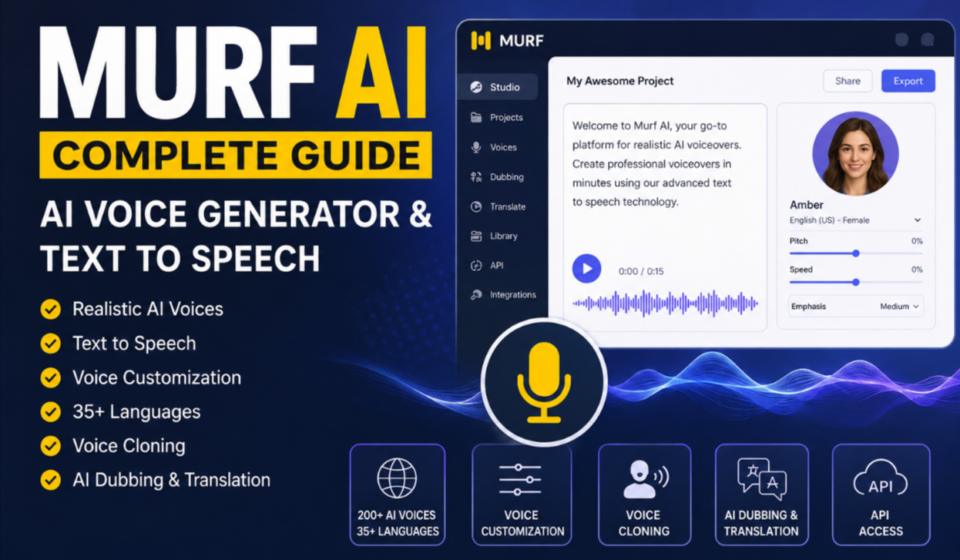

If you are looking for a simple way to turn written content into natural-sounding speech, Murf AI is one of the platforms worth exploring. It combines AI voice generation and text-to-speech technology with editing and customization tools, allowing creators, businesses, educators, and marketers to produce professional voiceovers without recording everything manually.
From converting a script into an AI voice to adjusting pitch, speed, pronunciation, pauses, and emphasis, Murf is designed to give users more control over the final audio. The platform also supports applications such as e-learning, YouTube videos, podcasts, advertisements, product demonstrations, presentations, and business content.
In this Murf AI complete guide, we will explain what Murf AI is, how its AI voice generator works, what you can do with its text-to-speech tools, its main features, use cases, and what to know before using the platform.
What Is Murf AI?
Murf AI is an AI-powered voice generation and text-to-speech platform that converts written scripts into spoken audio. Instead of hiring a voice actor or recording narration yourself, you can enter or upload your text, select an AI voice, customize the delivery, and generate a voiceover.
The platform is designed around realistic AI voices and provides controls that let users modify how the generated speech sounds. Murf’s official documentation describes its platform as a cloud-based solution for generating natural-sounding AI voiceovers using AI and machine learning.
Murf can be useful for:
- YouTube videos
- Online courses
- E-learning content
- Podcasts
- Marketing videos
- Product demonstrations
- Presentations
- Advertisements
- Explainer videos
- Audiobooks
- Corporate training
- IVR and customer-service applications
Rather than treating text-to-speech as a simple text-to-audio conversion, Murf gives users additional controls for making the narration fit a particular style and audience.
How Does Murf AI Work?
The basic process behind Murf is straightforward.
You start with written content, such as a video script, presentation, article, lesson, or advertisement. You then choose an AI voice that matches the type of narration you need.
After selecting a voice, you can customize different elements of the delivery. Depending on the voice and available features, these controls can include speed, pitch, pauses, pronunciation, emphasis, and speaking style.
Finally, you preview the generated narration and make adjustments before exporting or using the finished audio.
In simple terms, the workflow looks like this:
Text → AI Voice Selection → Voice Customization → Preview → Final Voiceover
This makes Murf particularly useful for people who need to create multiple voiceovers without repeatedly recording the same type of content.
Murf AI Voice Generator
The Murf AI voice generator is one of the platform’s main features. It allows users to transform written scripts into realistic AI-generated speech.
Murf currently promotes 200+ AI voices across 35+ languages and accents on its public AI voice generator page. The available voices can be explored according to factors such as language, voice characteristics, and intended use.
The platform’s voice library is intended for different content styles. For example, a creator making an educational video may want a clear and professional narration, while a marketing video may require a more energetic delivery.
The ability to select different voices means you do not have to use the same narration style for every project.
Murf AI Text to Speech
One of the most important capabilities of the platform is Murf AI text to speech.
Text-to-speech, commonly abbreviated as TTS, converts written words into spoken audio. Traditional TTS systems often produced voices that sounded robotic or lacked natural rhythm. Modern AI-based systems attempt to produce more realistic speech by modeling pronunciation, timing, intonation, and other characteristics of human speech.
Murf provides controls that allow users to adjust the generated narration instead of simply generating one fixed audio file.
For example, you can work with:
- Pitch
- Speaking speed
- Pauses
- Pronunciation
- Emphasis
- Voice styles
- Language and accent options
Murf’s documentation specifically describes controls for speed, pitch, pauses, and other speech customization options.
This makes its text-to-speech technology useful when the same script needs to sound different depending on its purpose.
Key Features of Murf AI
Murf includes several features beyond basic text-to-speech.
1. AI Voice Generation
The core feature is AI-powered voice generation. Users can select a voice and convert their written scripts into spoken narration.
2. Voice Customization
Murf provides controls for modifying how a voice delivers the script. Pitch, speed, pauses, pronunciation, and emphasis can be adjusted to create a more suitable result.
3. Multiple Languages and Accents
Murf supports multilingual voice generation, making it useful for creators and businesses producing content for audiences in different countries.
Its current public pages promote support for 35+ languages and multiple accents.
4. Voice Cloning
Murf also offers voice cloning capabilities. Voice cloning can be used to create a digital representation of a voice for approved content workflows and personalized experiences.
This can be useful for brands or creators that want consistency across a larger amount of audio content.
5. AI Dubbing and Translation
Murf has expanded beyond conventional text-to-speech with AI dubbing and translation capabilities. These features can help creators adapt existing content for audiences speaking different languages.
6. Voiceover Editing
Murf Studio provides an environment where users can work on voiceovers and adjust the narration before finalizing the project.
This is useful when a script contains multiple sections, different speakers, pauses, or specific pronunciation requirements.
7. API Access
Developers can also integrate Murf’s voice-generation capabilities into applications through its API.
Murf’s API documentation describes text-to-speech models and options for programmatic voice generation, making the platform relevant beyond individual content creators.
How to Use Murf AI
Getting started with Murf is relatively straightforward.
Step 1: Prepare Your Script
First, prepare the text you want to convert into speech.
This could be a YouTube script, training lesson, advertisement, presentation, podcast introduction, or any other suitable content.
Step 2: Choose an AI Voice
Select a voice that matches the tone of your content.
Consider factors such as:
- Language
- Accent
- Voice type
- Speaking style
- Audience
- Content format
Choosing the right voice is important because a voice suitable for an educational course may not be ideal for an energetic advertisement.
Step 3: Customize the Voice
After selecting the voice, adjust available settings such as speed, pitch, pauses, pronunciation, and emphasis.
These adjustments can make the generated narration sound more natural and better suited to the script.
Step 4: Preview the Audio
Listen to the generated narration before using it in your final project.
Pay attention to unusual pronunciations, pauses, emphasis, and the overall tone.
Step 5: Export or Use the Result
Once you are satisfied with the narration, you can use the generated audio in your intended project, depending on the features available under your Murf account.
Is Murf AI Free?
Murf does offer a free way to test its AI voice generation capabilities. Its current AI voice generator page states that users can get 10 minutes of voice generation and 2 projects without requiring a credit card.
However, free access and paid plans serve different purposes.
If you only want to experiment with AI voices or create short test projects, the free option may be enough to get started. Users who need more usage, additional capabilities, or advanced business features may need a paid plan.
For a detailed breakdown of Murf AI pricing, plans, free usage, and limitations, see our dedicated guide on Murf AI pricing and free plans.
What Can You Create With Murf AI?
The platform can be used for a wide range of content.
YouTube Videos
Creators can use AI-generated narration for educational videos, tutorials, explainers, documentaries, and other video formats.
E-Learning
Teachers, trainers, and businesses can create narrated lessons and training materials without recording every section manually.
Podcasts
Murf can be used to create introductions, narration, advertisements, and other spoken elements for podcast projects.
Marketing Content
Businesses can use AI voiceovers in product demonstrations, promotional videos, social media content, and advertisements.
Presentations
AI narration can be added to presentations and training materials to make them more accessible and engaging.
Product Demonstrations
Companies can create narrated product walkthroughs and explainer videos using AI-generated voices.
Who Should Use Murf AI?
Murf can be useful for several types of users.
Content creators can use it to produce voiceovers without recording their own voice.
Businesses can use AI narration for marketing, training, product demonstrations, and customer communication.
Educators can use text-to-speech technology to create narrated lessons and e-learning materials.
Developers can integrate AI voice generation into applications through APIs.
Marketing teams can produce voice-based content at scale while maintaining more consistent narration.
The best use case depends on the type of content you are producing and how much control you need over the generated speech.
Murf AI vs Traditional Voice Recording
Traditional voice recording usually requires a microphone, recording environment, voice talent, editing software, and time for multiple takes.
Murf changes that workflow by allowing users to start with a written script and generate AI narration.
This does not necessarily mean AI voice generation is the best choice for every project. Professional human voice actors can provide unique performances, personality, and emotional interpretation that may be important for certain productions.
However, AI voice generation can be particularly convenient when you need to produce, revise, or localize a large amount of narration.
Advantages of Murf AI
Some of the main advantages include:
- AI-powered voice generation
- Multiple voices and languages
- Text-to-speech capabilities
- Voice customization
- Pronunciation controls
- Pitch and speed adjustments
- Voice cloning capabilities
- AI dubbing and translation
- API access
- Support for different content types
Murf’s official product information lists text-to-speech, voice changer, voice cloning, integrations, AI translation, AI dubbing, and API services among its product capabilities.
Things to Consider Before Using Murf AI
Before choosing any AI voice generator, consider your specific requirements.
First, check whether the available voices and languages match your project.
Second, test pronunciation carefully, especially if your script contains names, technical terms, brands, or uncommon words.
Third, consider the amount of audio you need to generate. Your usage requirements may determine whether the free option is sufficient or whether you need a paid plan.
Finally, listen to the complete output before publishing it. Even high-quality AI voices may require adjustments to pauses, pronunciation, pacing, or emphasis.
Final Verdict
Murf AI is a versatile platform for creating AI-generated voiceovers and converting written scripts into spoken audio. Its combination of text-to-speech, voice selection, customization controls, multilingual support, voice cloning, dubbing, and API capabilities makes it suitable for creators, educators, marketers, businesses, and developers.
If your main goal is to turn written content into professional-sounding narration without recording every sentence yourself, Murf is worth exploring.
The best way to evaluate it is to test a sample script, compare different voices, adjust the delivery, and determine whether the available features fit your workflow.
For users who want to explore AI voice technology, Murf AI provides a practical starting point for creating voiceovers, educational content, marketing videos, podcasts, presentations, and other audio-based projects.