
As business scales up, there may either arise a competitive edge through IT or a situation where IT is a source of endless headaches. More workers will translate into more devices, files, applications, communication means, security needs, and data. The absence of an IT strategy may result in disconnected systems, additional costs, and unnecessary security threats for a company.
It is worth noting that growing companies do not have to embrace all innovations immediately. A good way forward is the construction of a scalable IT infrastructure, the cloudification of relevant workloads, enhancing collaboration, cybersecurity, and analysis of novel technologies.
This paper offers a practical roadmap for growing companies seeking cloud and IT solutions that can promote sustainable growth.
Why Growing Businesses Need a Cloud and IT Strategy
Technology needs vary greatly depending on whether the organization is small or big.
In the case of a startup, document management can be done using shared folders and communication can be done using some simple apps. However, with time, as the organization grows, it may need:
- Centralized file management
- Secure remote access
- Cloud applications
- Employee onboarding and offboarding
- Automated backups
- Cybersecurity controls
- Business continuity planning
- Collaboration tools
- Device management
- Data governance
- Scalable infrastructure
This is not meant to be about “moving everything to the cloud.” Rather, the idea should be that companies identify what technologies address real issues.
An effective IT strategy links technology decisions with business goals like efficiency, cost savings, customer service, security, and scalability.
1. Start With an IT and Infrastructure Audit
Before purchasing new technology, understand what you already have.
An IT audit should identify:
- Hardware and employee devices
- Software and SaaS subscriptions
- Cloud services
- On-premises servers
- Business-critical applications
- Data storage locations
- User accounts and permissions
- Backup procedures
- Security controls
- Internet and network infrastructure
- Existing IT support arrangements
This method may be able to identify potential areas of concern that would otherwise go unnoticed.
For instance, a rapidly growing organization may come to realize that all of its vital documents are being saved on personal computers, email attachments, various clouds, and USB drives. This results in redundancy and poses a challenge of figuring out which document is up-to-date.
The audit will give a good starting point for developing the technology strategy.
2. Move From Local Storage to Centralized Cloud Collaboration
However, cloud storage may improve accessibility and collaboration especially in the case of distributed and hybrid workforces.
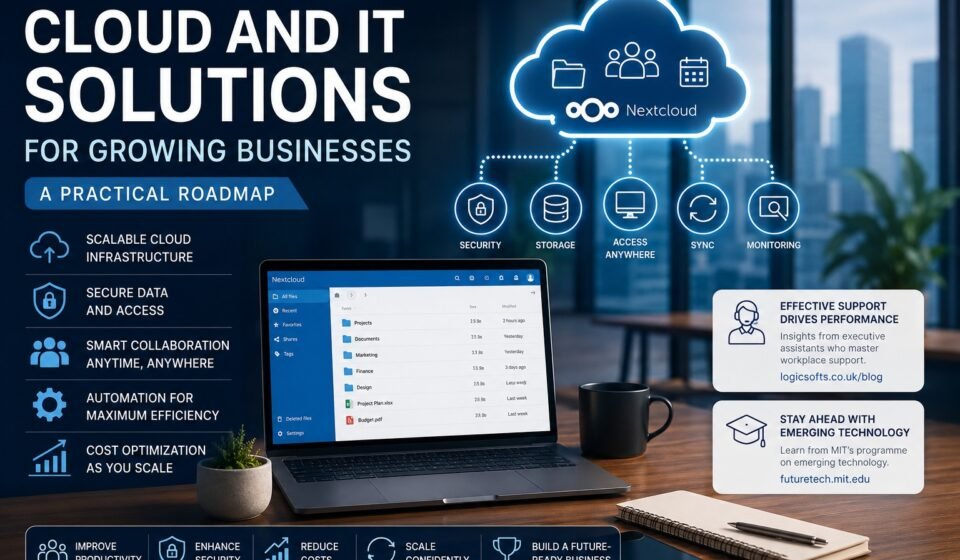
Nextcloud is one example of a cloud platforms which offers centralized file storage, sharing, collaboration and synchronization while providing greater control in managing data. In the case of Nextcloud platform, some of the capabilities include file sharing, real-time collaboration, version history, desktop synchronization, access management, monitoring, and auditing.
Here comes the use of Nextcloud workspace solutions that become highly helpful to organizations in need of collaboration solutions which require a higher level of control.
Rather than the practice of having workers send several versions of a spreadsheet through email, workers may have a workspace where authorized workers may access the files.
A well-designed cloud workspace should provide:
- Centralized document storage
- Permission-based access
- File synchronization
- Version history
- Secure sharing
- Collaborative editing
- Mobile access
- Backup and recovery
- Activity monitoring
Nevertheless, cloud computing should be accompanied by governance as well. There should be defined policies for data access, retention time, and the process of leaving the company for an employee.
3. Build a Secure Remote and Hybrid Work Environment
With remote work becoming common practice, how employees can connect to business networks has also evolved.
Employees could be working from offices, homes, co-working environments, hotel rooms, or even when traveling. Thus, there is a need to move away from perimeter-centric security measures.
A modern environment should consider:
- Multi-factor authentication
- Role-based access
- Device security
- Secure Wi-Fi practices
- Endpoint protection
- VPN or zero-trust access where appropriate
- Regular software updates
- Password management
- Employee security training
Access should be based on business requirements rather than automatically giving every employee access to everything.
For instance, a person working in the finance department can require access to accounting systems but not necessarily access to development products which are sensitive information.
Such a policy will lower the risk associated with hacked accounts.
4. Treat IT Support as a Productivity Function
IT support is sometimes viewed simply as a way to fix computers when something goes wrong. For growing businesses, that approach is too narrow.
Effective IT support should help employees work efficiently.
This means addressing issues such as:
- Slow or unreliable systems
- Application problems
- Account access
- New employee setup
- Software configuration
- Device management
- Security incidents
- File-access problems
- Collaboration challenges
The importance of proactive workplace support is also reflected in research and professional observations around executive support. For instance, the lessons from executive assistants focus on aspects like organization, communication, anticipation, and proper use of technology as elements of efficiency.
The same holds for IT services where the best solutions will be those that prevent any issue from occurring to employees.
5. Automate Repetitive IT Tasks
As a business grows, manual administration becomes increasingly expensive.
Consider automating tasks such as:
- Employee account creation
- Access provisioning
- Software deployment
- Backup monitoring
- Security alerts
- Password policies
- Device configuration
- Employee offboarding
- Routine reporting
Automation minimizes redundant activities and increases consistency in processes.
For instance, instead of having accounts being created every time someone comes onboard, an organization could have an onboarding process where the accounts are automatically created, assigned access permissions, and given applications.
Automation is not meant to substitute for human intervention. Rather, automation is supposed to give people more time to think strategically.
6. Make Cybersecurity Part of the Infrastructure
Cloud adoption does not automatically make a business secure.
Security needs to be designed into the IT environment.
A practical cybersecurity foundation includes:
Identity Security
Apply robust authentication, multi-factor authentication, and the right access controls.
Endpoint Security
Apply robust authentication, multi-factor authentication, and the right access controls.
Data Protection
Encrypt confidential information when necessary and develop policies regarding data sharing and retention.
Backups
Keep backup systems working properly and ensure that data restoration is possible.
Monitoring
Observe vital systems for any signs of anomalies and authentication failures.
Employee Awareness
Employees should know about phishing, attachments, passwords, social engineering, and proper data handling.
Nextcloud platform also has security capabilities like access controls, data retention policies, audits, monitoring, and suspicious login detection.
7. Create a Business Continuity and Disaster Recovery Plan
Organizations usually focus on backups once the need arises.
It would be prudent for organizations to have a recovery plan in place before the occurrence of any incidents.
Ask:
- What systems are essential to the business?
- How much data can the company afford to lose?
- How quickly must each system be restored?
- Where are backups stored?
- Who is responsible for recovery?
- Have restoration procedures been tested?
This leads to two important concepts:
Recovery Point Objective (RPO): How much data loss is acceptable?
Recovery Time Objective (RTO): How fast must the system be recovered?
The company using its Internet-based ordering system will need a very different RTO compared to another firm whose internal system is not critical and which can be down for many hours.
8. Integrate Your Business Applications
Technology becomes more valuable when different systems can communicate.
A growing organization might use:
- CRM software
- Accounting software
- Project management platforms
- Communication tools
- Cloud storage
- HR systems
- Marketing platforms
- Customer-support software
If these applications operate in isolation, employees may have to manually copy information between systems.
Integration can help eliminate duplicate processes and increase data accuracy.
For instance, the sales process can be integrated to pass details of the customers from the website into the CRM system, alert the system internally, create a project, and update reports.
The specific design would depend on the organization’s applications and needs, but the concept remains simple; integrate wherever there is value in integrating.
9. Prepare for AI and Emerging Technologies
Cloud technology infrastructure also provides the basis for adopting new technologies.
AI has already affected software development, customer support, marketing, analysis, cybersecurity, and even office automation.
But companies need to be careful not to use AI just because it’s trending.
A better process is:
Business problem → data → technology → measurable outcome
MIT FutureTech studies emerging computing trends and their relationship with productivity and economic growth, highlighting why organizations should think about technology not just as a collection of tools, but in terms of how it changes productivity and work.
Businesses considering AI should evaluate:
- What problem are we solving?
- What data is required?
- Is the data accurate?
- How will confidential information be protected?
- Where should humans remain involved?
- How will performance be measured?
This prevents technology spending from becoming disconnected from business strategy.
10. Control Cloud Costs as You Scale
Cloud services are scalable, but scalability can also lead to uncontrolled spending.
A company should regularly review:
- Unused licenses
- Duplicate SaaS subscriptions
- Storage consumption
- Cloud infrastructure usage
- Backup costs
- Data transfer
- Premium features
- Inactive accounts
Cloud cost management should be made a periodic business function instead of an occasional activity.
Periodic checks will help recognize unnecessary services as well as align resources with the true level of demand.
A Practical Cloud and IT Roadmap
Businesses can approach modernization in stages rather than attempting a complete transformation overnight.
Phase 1: Assess
Describe your current technology environment, assess threats, and set priorities.
Phase 2: Secure
Introduce more rigorous identity management, MFA, endpoint security, backups, and access controls.
Phase 3: Centralize
Consolidate your scattered files and processes onto proper platforms.
Phase 4: Modernize
Deploy cloud applications, promote collaboration, automate tasks that repeat, and integrate critical systems.
Phase 5: Optimize
Keep an eye on performance, security, user acceptance, and the cost of technology.
Phase 6: Innovate
Once you have laid a solid base, look into AI, automation, analytics, and more.
This phased approach minimizes disruption while continuously improving your organization.
Common Mistakes to Avoid
Growing companies should be careful about several common IT mistakes.
Buying Technology Without a Business Case
A new tool is not automatically an improvement. Every significant technology investment should have a clear purpose.
Using Too Many Platforms
Adding another application can create more complexity rather than solving it.
Ignoring Security Until Later
Security should be part of the initial architecture, not an afterthought.
Failing to Document Processes
The organization is vulnerable to operational risks if one person is the only person familiar with a critical system.
Neglecting Employee Training
The most advanced technology will be ineffective if the employees do not know how to use it properly.
Scaling Without Governance
A fast growth rate will make sure that what was once a manageable environment becomes uncontrollable because of the proliferation of users, applications, permissions, and information.
How to Choose the Right IT Partner
Not all organizations can take care of IT themselves; some organizations need either managed IT services or cloud solutions.
When evaluating an IT provider, look beyond price.
Consider:
- Relevant industry experience
- Security capabilities
- Cloud expertise
- Response times
- Monitoring and support
- Backup and disaster recovery
- Scalability
- Documentation
- Compliance knowledge
- Transparent pricing
- Strategic consulting
A good technology partner should understand the business objectives behind the IT requirements rather than simply selling products.
Final Thoughts
Cloud and IT modernization does not mean upgrading all current systems to the latest technology. Instead, it means designing an infrastructure that will make the business more secure, productive, scalable, and resilient.
An optimal roadmap would begin with an assessment, followed by improvements in security, collaboration, cloud deployment, automation, integration, management of costs, and emerging technologies like AI, in that order.
Solutions like nextcloud workspace environments can be useful to achieve this by providing a platform for file management, collaboration, synchronization, sharing, and governance.
So, for expanding organizations, the central issue does not become “What technology shall we invest in?” but “What technology will allow our people to do their job better while helping us expand further.”
This change in perspective is what makes IT more than just an operating cost – it becomes a business tool.