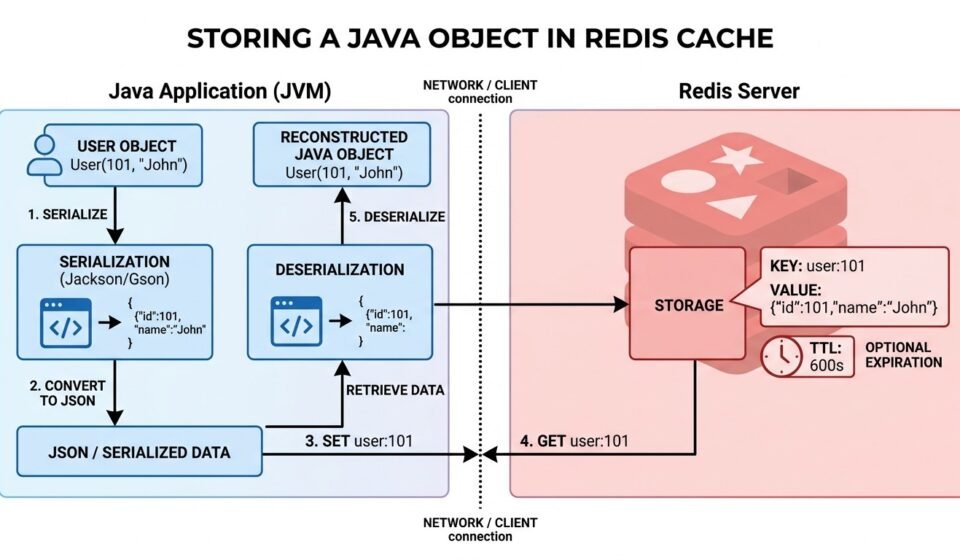

Redis is widely used as a fast, external caching layer for Java applications. Instead of keeping frequently accessed objects only inside the JVM, an application can store their data in Redis and retrieve it whenever needed.
If you are searching for how to store object in Redis cache Java, the key concept is serialization. A Java object cannot simply be placed into Redis as a Java object reference. The object needs to be converted into a representation that can be stored and reconstructed later.
One common approach is to convert the Java object into JSON, store the JSON representation in Redis, and deserialize it back into a Java object when it is retrieved.
This guide explains how to store Java objects in Redis, how serialization works, how to retrieve objects, how to add expiration, and how to design a reliable Redis caching strategy. Before using a distributed cache such as Redis, it is useful to understand how a Java object cache works inside an application.
Quick Answer
To store a Java object in Redis, you generally need to:
- Create the Java object.
- Serialize the object into JSON or another supported representation.
- Connect to Redis using a Java client.
- Store the serialized value using a unique Redis key.
- Optionally configure a TTL.
- Retrieve the value when needed.
- Deserialize it back into a Java object.
A simplified flow looks like this:
Java Object
     ↓
Serialization
     ↓
JSON / Serialized Data
     ↓
Redis
     ↓
Retrieve Data
     ↓
Deserialization
     ↓
Java Object
Redis supports several data types, including strings, hashes, lists, sets, sorted sets, and JSON. The best choice depends on how the application needs to access the cached data.
What Does It Mean to Store a Java Object in Redis?
Redis is an external data store, so it does not automatically understand a Java application’s object structure.
Suppose you have this Java class:
public class User {

    private int id;
    private String name;
    private String email;

    public User(int id, String name, String email) {
        this.id = id;
        this.name = name;
        this.email = email;
    }

    public int getId() {
        return id;
    }

    public String getName() {
        return name;
    }

    public String getEmail() {
        return email;
    }
}
You can create an object:
User user = new User(
    101,
    "John",
    "john@example.com"
);
The Java application has an in-memory object, but Redis needs data that can be transmitted and stored.
One possible representation is JSON:
{
  "id": 101,
  "name": "John",
  "email": "john@example.com"
}
The application can store this JSON as a Redis value.
When the object is needed again, the application retrieves the JSON and converts it back into a User object.
Why Store Java Objects in Redis?
Using Redis for object caching can be useful when the same data needs to be accessed repeatedly by one or more application instances.
Some common benefits include:
Faster Access
Frequently requested data can be served from Redis instead of repeatedly querying a database.
Reduced Database Load
If many requests ask for the same data, caching the result can reduce the number of database queries.
Shared Cache
Unlike a cache stored inside one JVM, Redis can provide a shared caching layer for multiple application instances.
For example:
Java Server A ─┐
Java Server B ─┼──→ Redis
Java Server C ─┘
Each application instance can access the same cached data.
TTL Support
Redis can automatically expire keys after a specified period.
This is useful for temporary application data and cached database results.
Flexible Data Structures
Redis supports several data structures that can be useful for different caching requirements. Redis supports several Redis data types that can be useful for different caching requirements.
Java Object Serialization for Redis
Serialization is the process of converting an object into a representation that can be stored or transmitted.
Deserialization performs the reverse operation.
Object
  ↓
Serialization
  ↓
Stored Data
  ↓
Deserialization
  ↓
Object
For example:
User Object
    ↓
JSON
    ↓
Redis
    ↓
JSON
    ↓
User Object
There are several possible serialization formats.
Common approaches include:
- JSON
- Java native serialization
- Binary serialization
- Hash-based storage
- Redis JSON
For many cache implementations, JSON is attractive because it is readable, portable, and relatively easy to debug.
Using JSON to Store Java Objects in Redis
One common approach is to use Jackson to convert a Java object to JSON.
The basic idea is:
ObjectMapper objectMapper = new ObjectMapper();

String json = objectMapper.writeValueAsString(user);
If the User object contains:
id = 101
name = John
email = john@example.com
The resulting JSON might look like:
{
  "id": 101,
  "name": "John",
  "email": "john@example.com"
}
The application can then send that JSON to Redis.
Connecting Java to Redis
A Java application needs a Redis client library to communicate with Redis.
One commonly used option is Jedis, a Java client for Redis.
A simplified connection example is:
RedisClient redisClient =
    RedisClient.create("redis://localhost:6379");
The exact connection configuration will depend on your Redis deployment.
For a local Redis server, the default port is commonly 6379.
In production, you should also consider authentication, TLS, connection management, timeouts, pooling, and failure handling.
Storing an Object as JSON
Once the Java object has been serialized, the JSON can be stored under a Redis key.
For example:
String key = "user:101";

String json =
    objectMapper.writeValueAsString(user);

redisClient.set(key, json);
The Redis structure is conceptually:
Key:
user:101

Value:
{
  "id": 101,
  "name": "John",
  "email": "john@example.com"
}
The key should be designed carefully because it becomes the identifier used to retrieve the cached object.
Choosing a Good Redis Key
A consistent key naming strategy makes a Redis cache easier to manage.
For example:
user:101
user:102
user:103
For products:
product:5001
product:5002
Orders For:
order:9001
order:9002
You can also use namespaces:
app:user:101
app:product:5001
app:order:9001
A good Redis key should be:
- Unique
- Predictable
- Easy to understand
- Consistent
- Suitable for the application’s access pattern
Avoid unnecessarily complicated key structures.
Retrieving a Java Object from Redis
Storing the object is only half of the process.
When the application needs the object again, it first retrieves the serialized value:
String json = redisClient.get("user:101");
If a value exists, it can be converted back into a Java object.
With Jackson:
User user =
    objectMapper.readValue(json, User.class);
The complete flow is therefore:
Application
     ↓
Redis GET
     ↓
JSON
     ↓
Jackson
     ↓
User Object
This lets the application work with the normal Java object after retrieving the cached representation.
Complete Object Caching Example
A simplified implementation could look like this:
import com.fasterxml.jackson.databind.ObjectMapper;
import redis.clients.jedis.RedisClient;

public class UserCache {

    private final RedisClient redisClient;
    private final ObjectMapper objectMapper;

    public UserCache() {
        redisClient =
            RedisClient.create("redis://localhost:6379");

        objectMapper = new ObjectMapper();
    }

    public void saveUser(User user) throws Exception {

        String key = "user:" + user.getId();

        String json =
            objectMapper.writeValueAsString(user);

        redisClient.set(key, json);
    }

    public User getUser(int id) throws Exception {

        String key = "user:" + id;

        String json = redisClient.get(key);

        if (json == null) {
            return null;
        }

        return objectMapper.readValue(
            json,
            User.class
        );
    }
}
This example demonstrates the fundamental process:
- Build a Redis key.
- Convert the Java object to JSON.
- Store the JSON in Redis.
- Retrieve the JSON later.
- Convert the JSON back into a Java object.
A production implementation should additionally handle connection lifecycle, exceptions, serialization configuration, TTL, monitoring, and Redis availability.
Adding TTL to a Cached Java Object
A cache should rarely keep every object forever.
Redis supports expiration for keys, allowing cached data to disappear automatically after a specified period.
For example:
redisClient.setex(
    "user:101",
    600,
    json
);
Here, the cached value is configured to expire after 600 seconds.
Conceptually:
Object stored
     ↓
TTL starts
     ↓
600 seconds
     ↓
Key expires
TTL is particularly useful for data that becomes stale after a certain period.
Examples include:
- API responses
- Product information
- Search results
- User profile data
- Temporary calculations
- Session-related information
- Frequently requested database records
The correct TTL depends on how quickly the underlying data changes.
Cache-Aside Pattern with Java and Redis
A common architecture for Redis caching is the cache-aside pattern.
The application first checks Redis.
Request
   ↓
Check Redis
   ↓
 +-------+
 |       |
Hit     Miss
 |       |
Return   Database
         |
         ↓
       Redis
         |
         ↓
       Return
A Java implementation might look like:
public User getUser(int id) throws Exception {

    String key = "user:" + id;

    String json = redisClient.get(key);

    if (json != null) {
        return objectMapper.readValue(
            json,
            User.class
        );
    }

    User user =
        userRepository.findById(id);

    if (user != null) {

        String serialized =
            objectMapper.writeValueAsString(user);

        redisClient.setex(
            key,
            600,
            serialized
        );
    }

    return user;
}
This pattern is useful because Redis doesn’t need to contain every record in the database.
Only requested or frequently used data needs to be cached. The Redis cache-aside pattern is particularly useful for read-heavy applications where Redis is checked before the primary database.
Updating Cached Objects
Suppose a user changes their email address.
The database might now contain:
John
john-new@example.com
But Redis could still contain:
John
john@example.com
If the application returns the cached object, the user may receive stale information.
There are two common approaches.
Update the Cache
After updating the database, update the cached object as well.
String json =
    objectMapper.writeValueAsString(updatedUser);

redisClient.setex(
    "user:101",
    600,
    json
);
Invalidate the Cache
Another option is to delete the cached entry:
redisClient.del("user:101");
The next request will result in a cache miss, retrieve the latest record from the database, and populate Redis again.
Which approach is better depends on the application’s consistency requirements.
Redis Hashes vs JSON Strings
There isn’t only one way to represent an object in Redis.
One option is to store the entire object as a JSON string:
user:101 → {"id":101,"name":"John","email":"john@example.com"}
Another option is to use a Redis hash:
user:101
    id → 101
    name → John
    email → john@example.com
Hashes can be useful when you need to work with individual fields.
For example, an application may update only an email field instead of serializing the entire object again.
The choice depends on the application’s access pattern.
If the application normally retrieves the entire object at once, JSON can be convenient.
If the application frequently reads or updates individual fields, a Redis hash may be more appropriate.
Redis JSON and Java Objects
Redis also supports JSON-oriented functionality through Redis JSON.
This can be useful when applications need to store structured JSON documents rather than treating the entire JSON document as an opaque string.
For straightforward caching, however, storing serialized JSON as a Redis string can often be sufficient.
The right choice depends on whether the application needs to query or manipulate individual fields inside the JSON document.
Java Native Serialization vs JSON
Java’s native serialization mechanism can serialize certain Java object graphs into a binary representation.
Conceptually:
ObjectOutputStream
        ↓
Java Object
        ↓
Binary Data
        ↓
Redis
This can work, but it introduces tighter coupling between the cached data and Java class definitions.
JSON is often easier to inspect and can be more portable across languages.
For example, a JSON representation can potentially be consumed by Java, Python, JavaScript, or another service.
For that reason, JSON is often a practical choice when designing a Redis cache shared across different services.
Handling Serialization Errors
Serialization can fail.
For example, a Java object might contain fields that the serializer doesn’t know how to process correctly.
Your application should therefore handle serialization and deserialization errors rather than assuming every object will always work.
A simplified approach is:
try {

    String json =
        objectMapper.writeValueAsString(user);

    redisClient.set("user:101", json);

} catch (Exception e) {

    // Log the error
    // Handle cache failure appropriately
}
A cache failure should not necessarily cause the entire application to fail.
If Redis is being used only as a cache, the application may be able to retrieve the original data source when Redis is unavailable.
What Happens if Redis Is Down?
A Redis cache should generally not be treated as the application’s only source of truth when it is being used purely as a cache.
A resilient application can follow this pattern:
Request
   ↓
Redis
   ↓
Available?
 /     \
Yes     No
 |       |
Cache    Database
 |       |
Return   Return
If Redis is unavailable, the application may fall back to the database where appropriate.
This depends on the application’s architecture and availability requirements.
Cache Stampede and Redis
Another issue occurs when a popular cached object expires.
Suppose thousands of requests need:
product:500
The key expires at the same time.
Many requests may then discover the cache miss simultaneously:
Request 1 ─┐
Request 2 ─┤
Request 3 ─┼──→ Database
Request 4 ─┤
Request 5 ─┘
This can create unnecessary database load.
This situation is commonly called a cache stampede or thundering herd problem.
Possible strategies include:
- Request coalescing
- Locking
- Staggered expiration
- Refresh-ahead caching
- Short-lived locks
- Preloading frequently requested data
The correct approach depends on traffic patterns and application requirements.
Redis Cache Security Considerations
Cached objects can contain sensitive application data, so security should not be ignored.
Consider:
- Authentication
- Authorization
- TLS
- Network isolation
- Access controls
- Secure credentials
- Key naming
- Data retention
- Sensitive-field handling
Avoid putting passwords, authentication secrets, private tokens, or unnecessary sensitive information into a cache.
A cache should contain only the information required for the application’s use case.
Redis Object Caching Best Practices
Use Consistent Keys
Use a predictable naming convention such as:
user:101
product:5001
order:9001
Set a TTL
Temporary cache entries should generally have an expiration strategy.
Keep Cached Objects Reasonably Small
Large serialized objects consume more memory and take longer to transfer and deserialize.
Handle Cache Misses
Always define what happens when the requested key doesn’t exist.
Plan Invalidation
Decide how changes in the database will affect cached values.
Monitor Redis
Useful metrics include:
- Memory usage
- Hit rate
- Miss rate
- Key count
- Evictions
- Latency
- Connection errors
- Command throughput
Don’t Treat Redis Cache as the Primary Database
If Redis is being used only as a cache, the database or another authoritative source should remain the source of truth.
When Should You Store Java Objects in Redis?
Redis object caching is particularly useful when:
- Multiple Java application instances need shared cached data.
- Database queries are expensive.
- The same objects are requested frequently.
- Fast response times are important.
- Cached data can tolerate some staleness.
- Objects need a defined expiration period.
- The application needs a centralized caching layer.
A local JVM cache may be simpler when the application runs on one server and the data doesn’t need to be shared.
Local Java Cache vs Redis
A local Java cache stores objects inside the application’s JVM:
Java Application
      ↓
JVM Memory
      ↓
Local Cache
Redis provides an external cache:
Java Application
      ↓
Redis
      ↓
Cached Data
A local cache can have extremely low access latency because there is no network round trip.
Redis, however, provides advantages when several application instances need to access the same cached data. If you only need a local in-memory cache, see our guide on how to create a cache object in Java for examples using HashMap, ConcurrentHashMap, and Caffeine.
| Feature | Local Java Cache | Redis |
|---|---|---|
| Storage location | JVM memory | Redis server |
| Shared between servers | Usually no | Yes |
| Network required | No | Yes |
| Application restart | Usually clears cache | Depends on Redis configuration |
| Distributed architecture | Limited | Well suited |
| TTL support | Depends on library | Yes |
| Best use | Local caching | Shared/distributed caching |
Frequently Asked Questions
How do I store an object in Redis cache using Java?
Convert the Java object into a storable representation such as JSON, send it to Redis under a unique key, and deserialize it when retrieving it.
Can Redis store Java objects directly?
Redis does not store a Java object reference directly. The Java application needs to serialize the object’s data into a format that can be stored and reconstructed.
What is the best format for storing Java objects in Redis?
JSON is a common choice because it is readable, portable, and relatively easy to serialize and deserialize. The best format depends on the application’s performance, compatibility, and data-structure requirements.
Can I use Jackson with Redis?
Yes. Jackson can convert Java objects to JSON and JSON back into Java objects, making it useful for Redis object caching.
How long should a Java object stay in Redis?
There is no universal TTL. The expiration period should reflect how frequently the underlying data changes and how much stale data the application can tolerate.
Should I use Redis or an in-memory Java cache?
Use a local Java cache when the data only needs to exist inside one application instance. Redis is more useful when multiple application instances need access to a shared cache.
How do I remove a Java object from Redis?
Use the Redis key associated with the object and delete it:
redisClient.del("user:101");
The next request can retrieve the latest object from the database and cache it again.
Final Thoughts
Learning how to store object in Redis cache Java starts with understanding that Redis stores data rather than Java object references. The Java application therefore needs to serialize an object before storing it and deserialize the data when retrieving it.
For many applications, JSON provides a straightforward way to represent Java objects in Redis. A Java Redis client such as Jedis can then handle communication with the Redis server.
A reliable implementation should also consider TTL, cache invalidation, serialization errors, cache misses, Redis availability, memory usage, and security.
For a simple application, an in-memory Java cache may be sufficient. When the application grows into a distributed architecture with multiple servers, Redis can provide a shared caching layer that allows those instances to access the same cached data.
The most important principle is to use Redis as part of a deliberate caching strategy rather than simply putting every Java object into the cache. Cache frequently accessed data, establish expiration rules, plan invalidation, and monitor cache performance.