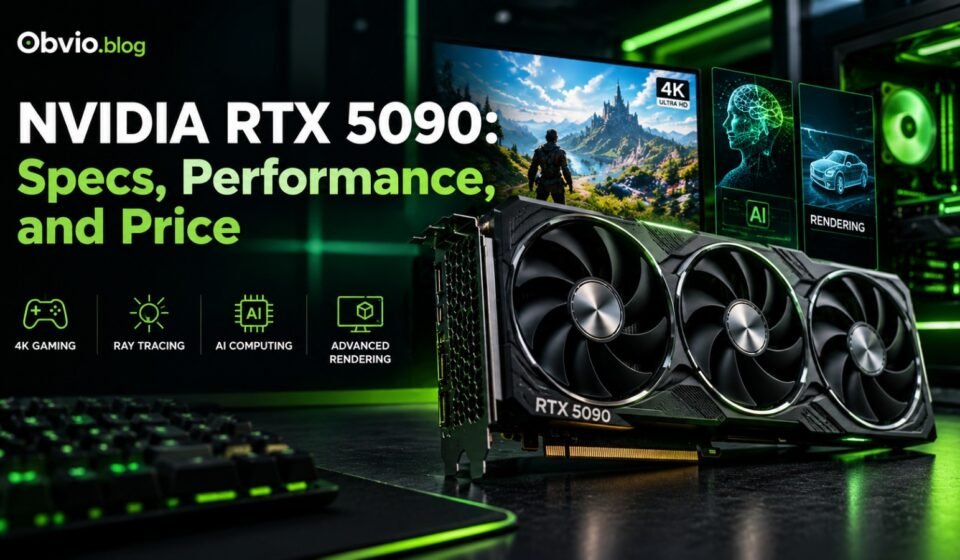

The NVIDIA GeForce RTX 5090 is a high-end graphics card designed for demanding PC gaming, professional content creation, 3D rendering, and AI workloads. It belongs to NVIDIA’s GeForce RTX 50 Series and uses the Blackwell architecture.
With 32 GB of GDDR7 memory, 21,760 CUDA cores, advanced ray tracing hardware, and support for DLSS 4, the RTX 5090 offers powerful graphics processing capabilities. However, its high price, substantial power requirements, and physical size mean it is not the right choice for every computer user.
In this guide, we explain the nvidia rtx 5090 specifications, gaming performance, features, power requirements, pricing, advantages, and disadvantages. You will also learn who should consider buying this GPU and which alternatives may provide better value.
If you want to understand the wider product lineup first, read our NVIDIA RTX graphics cards complete guide.
What Is the NVIDIA RTX 5090?
The NVIDIA GeForce RTX 5090 is NVIDIA’s flagship consumer GeForce graphics card in the RTX 50 Series. It was released on January 30, 2025, with an original U.S. suggested starting price of $1,999.
The card uses NVIDIA’s Blackwell architecture, which combines traditional graphics processing with dedicated hardware for ray tracing and AI acceleration.
The RTX 5090 is designed for users who want high performance in demanding games, advanced graphics settings, creative applications, and selected AI workloads.
Some of its main features include:
- 32 GB of GDDR7 video memory
- 21,760 CUDA cores
- A 512-bit memory interface
- Fourth-generation ray tracing cores
- Fifth-generation Tensor Cores
- Support for DLSS 4 features
- PCI Express 5.0 connectivity
- Hardware-accelerated video encoding
These specifications make the RTX 5090 a powerful option for users who need substantial graphics performance. However, performance still depends on the application, CPU, resolution, software settings, and cooling system.
For official product information, see the [NVIDIA GeForce RTX 5090 specifications] (https://www.nvidia.com/en-us/geforce/graphics-cards/50-series/rtx-5090/).
NVIDIA RTX 5090 Specifications
Before buying a graphics card, it is important to understand its hardware specifications and what they mean in practical use.
| Specification | NVIDIA GeForce RTX 5090 |
|---|---|
| GPU architecture | NVIDIA Blackwell |
| CUDA cores | 21,760 |
| Video memory | 32 GB GDDR7 |
| Memory interface | 512-bit |
| Base clock | Approximately 2.01 GHz |
| Boost clock | Approximately 2.41 GHz |
| Ray tracing | Fourth-generation RT cores |
| Tensor cores | Fifth-generation Tensor Cores |
| AI features | DLSS 4 and supported AI workloads |
| Interface | PCI Express 5.0 |
| Total graphics power | 575 W |
| Launch date | January 30, 2025 |
| U.S. launch MSRP | $1,999 |
Specifications refer to NVIDIA’s reference RTX 5090 design. Partner cards may differ in dimensions, cooling, factory clock speeds, and other characteristics.
What do these specifications mean?
CUDA cores: These are processing units used for graphics and many parallel computing tasks. The RTX 5090’s large number of CUDA cores helps it handle demanding workloads.
GDDR7 memory: Video memory stores textures, graphics assets, rendered frames, and other data. The RTX 5090’s 32 GB capacity can be useful for high-resolution gaming, large creative projects, and certain AI workloads.
512-bit memory interface: The wide memory interface helps the GPU transfer data between the graphics processor and its memory. Actual memory performance also depends on memory speed and architecture.
Boost clock: This is the approximate clock speed the GPU can reach under suitable conditions. Actual operating speeds vary with temperature, workload, power limits, and the individual card.
575 W total graphics power: This is a substantial power requirement. A suitable power supply, proper cabling, adequate cooling, and a compatible computer case are important.
You can check the official NVIDIA GeForce RTX 5090 product specifications for the manufacturer’s complete specification list.
NVIDIA RTX 5090 Gaming Performance
Gaming performance is one of the main reasons people consider buying the RTX 5090.
Its high-end GPU hardware makes it suitable for demanding games, especially when users want high resolutions, detailed graphics, ray tracing, and high refresh rates.
However, there is no single frame-rate figure that applies to every game. Performance changes according to the game engine, graphics settings, resolution, CPU, driver version, and whether upscaling or frame generation is enabled.
RTX 5090 for 1080p gaming
At 1080p, the RTX 5090 can deliver very high frame rates in many games. However, its full potential may not be used in every title because the CPU can become the performance limit.
For someone who mainly plays competitive games at 1080p, a less expensive graphics card may provide a better balance between cost and performance.
RTX 5090 for 1440p gaming
At 1440p, the GPU has more graphics work to perform than at 1080p. The RTX 5090 can be useful for demanding games with high graphics settings and ray tracing enabled.
Nevertheless, many gamers can achieve an excellent 1440p experience with less expensive cards. Consider the price difference before investing in a flagship GPU.
RTX 5090 for 4K gaming
4K gaming is one of the strongest use cases for the RTX 5090.
Rendering at 3840 × 2160 requires substantially more pixels than 1080p. Demanding games can benefit from the RTX 5090’s powerful processing hardware and large memory capacity.
The card is especially relevant for users who want to combine 4K resolution with demanding visual settings and supported ray tracing features.
Even so, not every game will run at the same frame rate. Always check independent benchmarks for the specific titles you play.
Does the RTX 5090 support ray tracing?
Yes. The RTX 5090 includes fourth-generation ray tracing cores.
Ray tracing simulates how light interacts with surfaces to produce more realistic reflections, shadows, and illumination. Path tracing is a more demanding rendering technique that models lighting more extensively.
These features can improve visual quality, but they can also increase the amount of work the GPU must perform. NVIDIA’s DLSS technology can help improve performance in compatible games.
For additional details, read our planned guide to NVIDIA RTX 5080 gaming performance.
NVIDIA DLSS 4 and Multi Frame Generation
DLSS stands for Deep Learning Super Sampling. It is a collection of AI-assisted graphics technologies designed to improve image quality and performance in supported games.
The RTX 5090 supports DLSS 4 features, including Multi Frame Generation in compatible titles.
DLSS Super Resolution
Super Resolution reconstructs a higher-resolution image from a lower-resolution rendering. This can improve performance while maintaining good visual quality.
Ray Reconstruction
Ray Reconstruction uses AI to improve certain ray-traced image effects in supported games.
Frame Generation
Frame Generation generates additional frames to increase the displayed frame rate in compatible games.
Multi Frame Generation
Multi Frame Generation can generate multiple additional frames for each traditionally rendered frame on supported RTX 50 Series GPUs and compatible software.
However, generated frames are not equivalent to frames rendered directly by the GPU. They do not automatically reduce input latency, and the experience depends on the underlying frame rate and game implementation.
You can learn more from the official NVIDIA DLSS technology guide.
Is the RTX 5090 Good for AI and Content Creation?
The RTX 5090 is not limited to gaming. Its hardware can also be useful for professional and creative tasks.
AI model development
The GPU’s Tensor Cores accelerate supported AI operations. Its 32 GB of VRAM can help with certain local AI models and workloads that require substantial GPU memory.
However, not every model will fit entirely into 32 GB of VRAM. Memory requirements depend on model size, precision, quantization, context length, batch size, and the software framework.
For demanding AI projects, check the memory requirements of the exact model and application you intend to use.
Video editing
Video editors may benefit from GPU acceleration in supported editing software, particularly when working with effects, color grading, high-resolution footage, and accelerated encoding.
The real benefit depends on the software, video format, codecs, CPU, and workflow.
3D rendering
Artists and designers working with compatible rendering software can use the GPU to accelerate rendering tasks. Large scenes and complex materials may benefit from the RTX 5090’s processing capacity and memory.
Before purchasing, confirm that your rendering application supports the GPU acceleration technology you need.
Streaming and recording
The RTX 5090 includes hardware video encoding capabilities. Supported streaming and recording applications can use the GPU’s encoder to process video without relying entirely on the CPU.
This can be useful for creators who stream gameplay or record high-quality video while gaming.
NVIDIA RTX 5090 Price: How Much Does It Cost?
NVIDIA announced a U.S. launch MSRP of $1,999 for the RTX 5090. However, the actual retail price can differ significantly because of demand, availability, third-party card designs, retailer pricing, taxes, and import costs.
The launch MSRP should not be treated as the current market price.
Before buying, compare prices from multiple retailers and check whether a card is actually in stock. Avoid assuming that an advertised listing is available at the displayed price.
What affects the RTX 5090 price?
Several factors influence the price of the RTX 5090:
- Manufacturer and card design
- Cooling system and factory overclocking
- Local stock and demand
- Retailer markup
- Import duties and taxes
- Warranty and after-sales support
- Shipping and payment costs
Buying the RTX 5090 in Pakistan
For buyers in Pakistan, local prices may differ significantly from U.S. prices because of import costs, currency movements, availability, and seller margins.
Compare the total price in Pakistani rupees, including delivery and applicable taxes. Check the seller’s warranty policy and confirm the exact model before paying.
Because prices can change quickly, check current retailer listings instead of relying on an old price mentioned in an article.
RTX 5090 vs RTX 4090: What Is the Difference?
The RTX 4090 belongs to the previous GeForce generation and uses the Ada Lovelace architecture. The RTX 5090 uses Blackwell and introduces newer hardware features.
| Feature | RTX 5090 | RTX 4090 |
|---|---|---|
| Architecture | Blackwell | Ada Lovelace |
| CUDA cores | 21,760 | 16,384 |
| Video memory | 32 GB GDDR7 | 24 GB GDDR6X |
| Memory interface | 512-bit | 384-bit |
| Total graphics power | 575 W | 450 W |
| DLSS generation | DLSS 4 features | DLSS 3 features, with feature availability varying |
| Original U.S. launch MSRP | $1,999 | $1,599 |
These figures describe NVIDIA’s reference specifications and original launch prices.
The RTX 5090 offers more memory, more CUDA cores, and newer architecture. Independent benchmark testing also shows performance improvements over the RTX 4090 in many demanding 4K workloads, although the size of the gain varies by game and settings.
However, the RTX 4090 may still be worth considering if it is available at a substantially lower price and meets your performance requirements.
If the RTX 5090 is outside your budget, explore our RTX 5080 vs RTX 5090 comparison to understand the differences in specifications, power consumption, and gaming performance.
If the RTX 5090 is outside your budget, read our NVIDIA RTX 5070 Ti vs RTX 5090 guide to understand the differences in specifications, gaming performance, power requirements, and overall value.
Power Supply Requirements for the RTX 5090
Power planning is essential when building a computer around the RTX 5090.
NVIDIA lists the card’s total graphics power at 575 W. The recommended system power supply for the reference configuration is 1,000 W, although actual system requirements depend on the rest of the computer and the specific card design.
A high-quality power supply is important because the GPU operates alongside the CPU, motherboard, storage devices, cooling fans, and other components.
Before installing the card, check:
- The manufacturer’s recommended PSU wattage
- The required power connector and cable specifications
- Whether the case has sufficient room for the card
- Airflow and cooling capacity
- The power requirements of the CPU and other components
Use the supplied or manufacturer-approved cables and follow the card’s installation instructions. Ensure power connectors are fully seated and avoid sharp bends close to the connector.
Do not select a power supply based on wattage alone. Quality, compatibility, protection features, and cabling also matter.
Advantages and Disadvantages of the RTX 5090
Advantages
- Very high-end gaming performance
- 32 GB of GDDR7 memory
- Strong ray tracing capabilities
- Support for DLSS 4 features
- Useful for demanding rendering and creative workloads
- Suitable for selected local AI workloads
- Hardware-accelerated video encoding
Disadvantages
- Very high purchase price
- Substantial power consumption
- Requires careful power and cooling planning
- May be unnecessary for 1080p gaming
- Large card designs may not fit every computer case
- DLSS and AI features depend on software support
The RTX 5090 is best suited to people who can make practical use of its performance. It is not automatically the best-value GPU simply because it is the flagship model.
Who Should Buy the NVIDIA RTX 5090?
The RTX 5090 may be a good choice if you:
- Want high-end 4K gaming performance.
- Regularly use demanding ray tracing or path tracing settings.
- Work with GPU-accelerated 3D rendering.
- Run AI applications that benefit from its processing power and VRAM.
- Need a powerful GPU for professional creative work.
- Have a sufficient budget for the GPU and the rest of the system.
You may not need it if you mainly play lightweight games, use a 1080p monitor, have a limited budget, or do not run applications that benefit from such a powerful GPU.
For many users, a lower-priced GPU may provide a more sensible balance of performance, power consumption, and cost.
Frequently Asked Questions
What is the NVIDIA RTX 5090?
The NVIDIA GeForce RTX 5090 is a flagship desktop graphics card based on the Blackwell architecture. It has 32 GB of GDDR7 memory and is designed for demanding gaming, creative applications, and supported AI workloads.
How much VRAM does the RTX 5090 have?
The RTX 5090 has 32 GB of GDDR7 video memory. This capacity can help with high-resolution graphics, large creative projects, and selected AI workloads.
How much power does the RTX 5090 use?
NVIDIA lists the RTX 5090’s total graphics power at 575 W and recommends a 1,000 W system power supply for its reference configuration. Requirements can vary with the complete system and the specific card model.
Is the RTX 5090 worth buying?
It can be worth buying for users who need flagship performance for demanding 4K gaming, rendering, or AI tasks. For more ordinary gaming needs, a less expensive GPU may offer better value.
Is the RTX 5090 better than the RTX 4090?
The RTX 5090 has newer architecture, more CUDA cores, and more VRAM. It is generally the more capable card, but the RTX 4090 may offer better value depending on current prices and the workload.
Can the RTX 5090 run games at 4K?
Yes. The RTX 5090 is designed for high-end gaming, including demanding 4K workloads. Actual frame rates depend on the game, graphics settings, ray tracing, CPU, and use of supported DLSS features.
Can the RTX 5090 run local AI models?
Yes, it can accelerate supported AI applications. Its 32 GB of VRAM is useful for many workloads, but some models or configurations may require more memory or other compromises.
What is the launch price of the RTX 5090?
Its original U.S. launch MSRP was $1,999. Actual retail prices can be higher or lower depending on the market, availability, and card model.
Conclusion
The NVIDIA GeForce RTX 5090 is a powerful graphics card designed for users who need high-end performance in gaming, creative work, rendering, and supported AI applications.
Its 32 GB of GDDR7 memory, 21,760 CUDA cores, Blackwell architecture, and DLSS 4 support make it a compelling option for demanding workloads. However, its purchase price, power consumption, and system requirements should be considered carefully.
Before buying, compare current prices, verify compatibility, and review benchmarks for the games or applications you use. The best graphics card is the one that meets your actual needs without requiring unnecessary spending.
For more graphics card comparisons and buying advice, explore our complete NVIDIA RTX graphics cards guide.

[…] our detailed RTX 5080 vs RTX 5090 comparison for the related flagship GPU […]