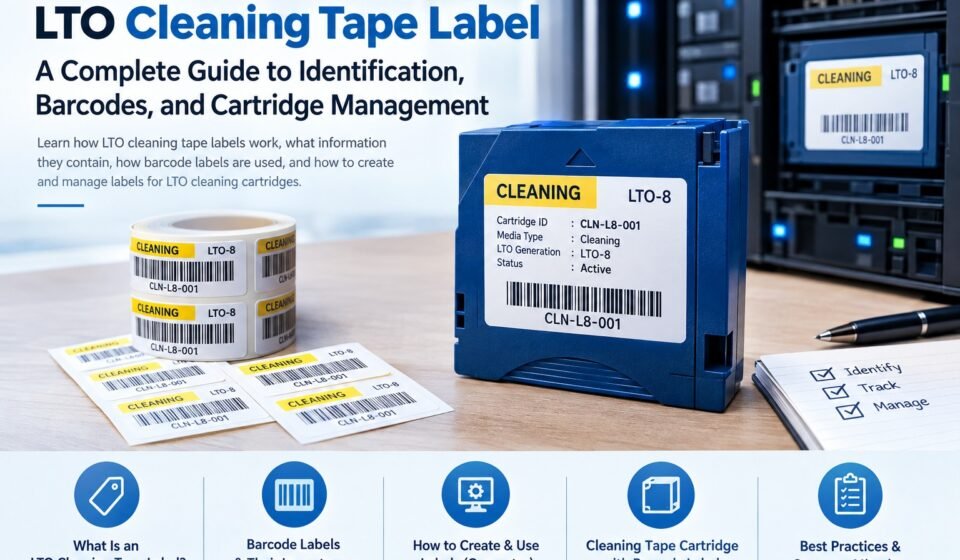
LTO Cleaning Tape Label: A Complete Guide to Identification, Barcodes, and Cartridge Management

Managing an LTO tape library requires more than simply storing cartridges in the correct location. Organizations often need a clear way to identify cleaning cartridges, distinguish them from data tapes, and make sure tape libraries can recognize them correctly. This is where an LTO cleaning tape label becomes important.
A properly designed label can make a cleaning cartridge easier to identify while helping administrators maintain an organized tape inventory. When barcode information is included, the label can also support automated identification in compatible tape libraries.
This guide explains what LTO cleaning tape labels are, what information they can contain, how barcode labeling works, and how organizations can create and manage labels for LTO cleaning cartridges.
What Is an LTO Cleaning Tape Label?
An LTO cleaning tape label is a physical label attached to an LTO cleaning cartridge to identify the cartridge and distinguish it from standard data cartridges.
LTO cleaning cartridges are used to clean the tape path and other components of compatible LTO tape drives. Because a cleaning cartridge has a different purpose from a data cartridge, clear identification is important, particularly in environments where many cartridges are stored together.
A label may contain information such as:
- Cleaning cartridge identification
- Cartridge or inventory number
- Barcode information
- Cleaning cartridge status
- Asset or tracking information
- Internal identification codes
- Organization-specific information
The exact labeling requirements can vary depending on the tape library, barcode system, cartridge type, and inventory-management process.
Why Are LTO Cleaning Tape Labels Important?
A tape library can contain dozens, hundreds, or even thousands of cartridges. Without a consistent identification system, finding the correct cleaning cartridge can become unnecessarily difficult.
Using standardized LTO cleaning tape labels can provide several benefits.
1. Easier Cartridge Identification
A visible label makes it easier for administrators to recognize a cleaning cartridge without manually inspecting every cartridge.
For example, an organization might use a consistent naming convention such as:
CLN-LTO-001
This immediately communicates that the cartridge is a cleaning cartridge and provides a unique identifier.
2. Better Tape Inventory Management
Organizations can maintain records of individual cartridges using their label information.
An inventory database might record:
- Cartridge ID
- Barcode
- Cartridge type
- Location
- Date added
- Cleaning usage
- Current status
This creates a more organized approach to tape-media management.
3. Reduced Risk of Confusion
Cleaning cartridges should not be confused with normal backup cartridges. Clear labels help users distinguish cleaning media from data media.
This is particularly useful when a tape library contains multiple generations or types of LTO cartridges.
4. Support for Barcode-Based Identification
Many tape libraries use barcode readers to identify cartridges. A compatible barcode label can allow the library-management system to associate a physical cartridge with an inventory record.
However, the barcode format and label requirements should always be checked against the specifications of the particular tape library and cartridge system.
What Information Should an LTO Cleaning Tape Label Contain?
There is no single universal label design for every LTO environment. The information you use should depend on your inventory and tape-library requirements.
A basic cleaning label could contain:
Cartridge ID: CLN001
Media Type: Cleaning
LTO Generation: LTO-8
Status: Active
Barcode: Unique machine-readable identifier
For larger environments, additional information may be useful.
Common Label Information
| Label Information | Purpose |
|---|---|
| Cartridge ID | Provides a unique human-readable identifier |
| Barcode | Enables machine-readable identification |
| Media type | Identifies the cartridge as cleaning media |
| LTO generation | Helps identify compatibility |
| Inventory number | Connects the cartridge to internal records |
| Status | Shows whether the cartridge is active or retired |
| Location | Helps track physical storage |
The most important principle is consistency. Every cleaning cartridge should follow the same naming and labeling system.
LTO Cleaning Tape Barcode Labels
Barcode identification can be especially useful in automated tape libraries.
LTO cleaning tape barcode labels are designed to provide machine-readable identification in environments that support barcode scanning.
Instead of relying only on printed text, a barcode gives the tape-management system a unique identifier that can be associated with a cartridge record.
For example, a barcode might correspond to an internal inventory record:
CLN00027 → Cleaning Cartridge → LTO-8 → Library A
When the cartridge is scanned, the system can use that identifier to retrieve the associated information.
Why Use Barcodes?
Barcode-based identification can help organizations:
- Track cartridges more efficiently
- Reduce manual data entry
- Improve inventory accuracy
- Identify cartridges faster
- Maintain consistent media records
- Integrate physical media with inventory software
The barcode itself should be generated and printed according to the requirements of the equipment and labeling system being used.
How Do LTO Cleaning Tape Labels Work in a Tape Library?
The exact process depends on the tape library, but a typical workflow looks like this:
Step 1: Assign a Unique Cartridge ID
First, assign a unique identifier to the cleaning cartridge.
For example:
CLN-L8-001
Step 2: Generate the Barcode
The identifier can be converted into a supported barcode format if the library requires barcode identification.
Step 3: Print the Label
The label is printed using a suitable label printer and compatible media.
Step 4: Apply the Label
The label should be positioned in the location specified for the cartridge and library system.
Step 5: Add the Cartridge to Inventory
Record the cartridge in the organization’s tape-management system.
Step 6: Verify Recognition
If the cartridge is being used in an automated library, verify that the barcode can be read correctly.
This final step is important because a label that looks correct to a person may still fail to scan if the barcode format, placement, print quality, or dimensions are incorrect.
How to Create an LTO Cleaning Tape Label
Creating a cleaning cartridge label does not necessarily require complicated software.
The basic process is:
- Determine the cartridge type.
- Check the tape-library labeling requirements.
- Choose a unique cartridge identifier.
- Select the required barcode format.
- Create the label design.
- Print a test label.
- Verify barcode readability.
- Apply the label correctly.
- Add the cartridge to the inventory system.
For organizations managing only a small number of cartridges, a basic label template may be sufficient.
Larger environments may benefit from dedicated barcode-label software or an LTO Cleaning Tape Label Generator that can create consistent labels for multiple cartridges.
What Is an LTO Cleaning Tape Label Generator?
An LTO cleaning tape label generator is a tool or software solution that helps users create labels for LTO cleaning cartridges.
Depending on the software, it may allow users to enter:
- Cartridge identifiers
- Barcode values
- Media type
- LTO generation
- Organization information
- Sequential numbers
A generator can be particularly useful when many cartridges need to be labeled.
For example, instead of manually designing 100 labels, an administrator could create a sequence such as:
- CLN001
- CLN002
- CLN003
- CLN004
- CLN005
The software can then generate corresponding labels.
For a detailed explanation of how these tools work, the next article in this cluster will cover LTO Cleaning Tape Label Generator solutions, workflows, and best practices.
Choosing the Right Barcode for an LTO Cleaning Cartridge
Barcode selection should not be based solely on what is easy to print.
The barcode must be compatible with the equipment and labeling requirements of the environment where the cartridge will be used.
Before creating labels, check:
- Supported barcode symbology
- Required barcode length
- Label dimensions
- Printable area
- Barcode orientation
- Required character set
- Tape-library compatibility
- Scanner requirements
If a tape library has specific barcode requirements, those requirements should take priority over a generic barcode-label template.
Cleaning Tape Cartridge for LTO With Barcode Labels — 1 Pack
Some users may specifically be looking for a cleaning tape cartridge for LTO with barcode labels 1 pack.
This type of product can be useful when an organization needs a single cleaning cartridge that already includes a compatible barcode label or labeling option.
Before purchasing, however, it is important to confirm:
- LTO generation compatibility
- Drive compatibility
- Tape-library compatibility
- Cleaning-cycle specifications
- Barcode requirements
- Label dimensions
- Whether the barcode is already printed or must be generated separately
A product description alone may not provide enough information to determine whether a cartridge is suitable for a particular tape-library environment. Always compare the cartridge and labeling specifications with the equipment manufacturer’s requirements.
How to Apply an LTO Cleaning Tape Label Correctly
Even a correctly designed label can cause problems if it is applied incorrectly.
Follow these general practices:
Clean the Label Area
Make sure the surface is clean and dry before applying the label.
Keep the Label Straight
A crooked label may make identification more difficult and can potentially interfere with barcode scanning.
Avoid Wrinkles
Wrinkles, bubbles, or damaged sections can affect the appearance and readability of the label.
Do Not Cover Important Cartridge Information
Never place a label over manufacturer information, cartridge identifiers, or areas that are required for normal cartridge operation.
Check Barcode Readability
After applying the label, scan it if possible.
A successful scan provides much stronger confirmation than simply checking the printed appearance.
Common LTO Cleaning Tape Labeling Mistakes
Several mistakes can make a labeling system less reliable.
Using Duplicate IDs
Every cartridge should have a unique identifier when the inventory system depends on individual cartridge tracking.
Using Unsupported Barcode Formats
A barcode that can be scanned by a smartphone may not necessarily be supported by a tape library.
Poor Print Quality
Low-resolution or damaged barcodes can result in scanning failures.
Incorrect Label Placement
The correct barcode can still fail if it is placed outside the scanner’s expected reading area.
Mixing Naming Conventions
Using different naming systems for different cartridges can make inventory management confusing.
Failing to Update Inventory Records
A physical label is only useful when the corresponding inventory information is accurate.
Best Practices for Managing LTO Cleaning Cartridges
A good labeling system should be combined with a good media-management process.
Consider these practices:
- Use unique cartridge IDs.
- Maintain consistent naming conventions.
- Record cartridge information in an inventory system.
- Use compatible barcode formats.
- Test labels before applying them to large batches.
- Keep cleaning cartridges separate from data cartridges when appropriate.
- Track cleaning-cartridge usage.
- Replace cartridges according to the manufacturer’s recommended usage limits.
- Periodically audit physical cartridges against inventory records.
- Keep spare cleaning media available for critical tape environments.
LTO Cleaning Tape Labels vs. Data Cartridge Labels
Although both may use barcode identification, cleaning cartridges and data cartridges serve different purposes.
| Feature | Cleaning Cartridge | Data Cartridge |
|---|---|---|
| Primary purpose | Clean tape-drive components | Store backup or other data |
| Identification | Cleaning-specific ID | Data/media ID |
| Barcode | May be used | Commonly used in libraries |
| Inventory tracking | Recommended | Essential in many environments |
| Usage | Limited cleaning cycles | Repeated data read/write operations |
This distinction is important when creating an inventory system.
How to Build a Consistent LTO Labeling System
For organizations managing multiple tape libraries, consistency becomes increasingly important.
A simple system could use the following structure:
CLN-LTO8-001
Where:
CLN= CleaningLTO8= LTO generation001= Unique cartridge number
The exact format can be customized to suit the organization’s inventory system.
The important point is to establish the naming convention before producing large quantities of labels.
Frequently Asked Questions
What is an LTO cleaning tape label?
An LTO cleaning tape label identifies a cleaning cartridge and can contain a cartridge ID, barcode, media type, or other inventory information.
Do LTO cleaning cartridges need barcode labels?
Not every environment necessarily requires a barcode label, but barcode identification can be useful or required in automated tape-library environments.
Can I create my own LTO cleaning tape labels?
Yes, labels can be created using appropriate label-design or barcode-generation software, provided the resulting label meets the requirements of the cartridge and tape library.
What should an LTO cleaning tape barcode contain?
The barcode should contain a unique identifier in a format supported by the equipment or inventory system. The exact format should be verified against the relevant tape-library specifications.
Can one label work with every LTO tape library?
No. Label dimensions, barcode formats, placement, and other requirements can vary. Always verify compatibility with the specific tape library.
How often should an LTO cleaning cartridge be replaced?
Cleaning cartridges have limited cleaning cycles. The appropriate replacement schedule depends on the cartridge manufacturer’s specifications and how frequently it is used.
Conclusion
A well-designed LTO cleaning tape label provides a simple but effective way to identify and manage cleaning cartridges in an LTO environment. When combined with barcode identification, consistent naming, and accurate inventory records, labeling can make cartridge management considerably more organized.
For small environments, a simple identification label may be enough. Larger tape libraries can benefit from standardized barcode systems and label-generation software.
The key is to verify the labeling requirements of your specific LTO cartridge and tape library before printing labels in bulk. Correct barcode format, placement, print quality, and inventory tracking all contribute to a reliable labeling process.
For organizations looking to automate the label-creation process, the next step is understanding how an LTO Cleaning Tape Label Generator can simplify sequential IDs, barcode creation, and batch printing. For barcode-specific requirements, the third article will explore LTO Cleaning Tape Barcode Labels in greater detail.



[…] 1: LTO Cleaning Tape Label → General labeling and cartridge […]
[…] the broader process of creating cartridge labels, see the LTO Cleaning Tape Label […]