
Choosing cybersecurity protection is an important decision for a small business. Owners need to protect company networks, customer information, and internet-connected devices without spending more than their budgets allow. However, comparing security products can be difficult when subscription prices, included services, and technical features differ.
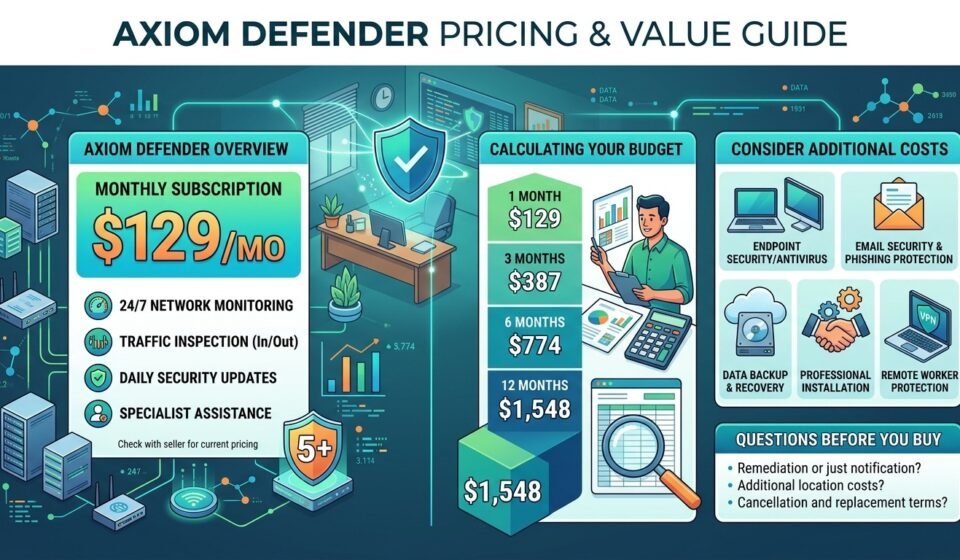
Axiom Defender is a network security product listed by BrickHouse Security for small businesses. Its advertised subscription price is $129 per month, with network monitoring and traffic inspection among its listed features. The product page also describes support for up to five users.
In this guide, we explain Axiom Defender pricing, the advertised subscription features, possible additional expenses, and the questions businesses should ask before committing to a cybersecurity service.
How Much Does Axiom Defender Cost?
According to the Axiom Defender product listing, the advertised subscription price is $129 per month, billed monthly.
The listing describes a small-business network security device with monitoring and traffic inspection capabilities. It also states that the plan supports up to five users.
Pricing and product terms can change. Check the current listing and confirm all charges with BrickHouse Security before making a purchase.
Axiom Defender pricing overview
| Pricing detail | Information advertised |
|---|---|
| Monthly subscription | $129 per month |
| Billing frequency | Monthly |
| User capacity | Up to five users |
| Network monitoring | Advertised 24/7 monitoring |
| Traffic inspection | Incoming and outgoing internet traffic |
| Security updates | Advertised daily updates |
| Setup fee | Product page states there is no setup fee |
These details reflect the seller’s product description, not an independent technical assessment. Confirm whether all listed features and terms apply to your particular order.
What does $129 per month mean for your budget?
A recurring subscription should be evaluated as an ongoing business expense rather than a one-time purchase.
At the advertised rate, the estimated subscription cost is:
| Period | Estimated subscription cost |
|---|---|
| One month | $129 |
| Three months | $387 |
| Six months | $774 |
| Twelve months | $1,548 |
These estimates assume the advertised monthly rate remains unchanged for the entire period. They exclude taxes, any optional services, additional equipment, and other expenses that may apply.
Before budgeting, confirm the final price and whether the subscription includes hardware, installation assistance, support, and threat-response services.
What Features Are Included in the Advertised Price?
Understanding the included features helps you determine whether the subscription addresses your business’s needs.
1. Continuous network monitoring
BrickHouse Security advertises 24/7 live network monitoring. Continuous monitoring can help a business identify suspicious network activity outside normal office hours.
However, monitoring does not guarantee that every threat will be detected or prevented. Ask what types of alerts are generated, who reviews them, and how quickly the provider responds.
2. Incoming and outgoing traffic inspection
The product listing states that Axiom Defender inspects internet traffic entering and leaving the business network.
This type of inspection may help identify suspicious connections or unusual traffic patterns. Actual coverage depends on the product’s configuration, supported protocols, and technical capabilities.
Ask whether encrypted traffic is inspected, which threat categories are supported, and what happens when suspicious activity is identified.
3. Daily security updates
The seller advertises 150 significant security updates daily and references a larger set of threat points. These are claims from the product listing rather than independently verified performance measurements.
Ask whether updates are automatic, how failures are handled, and whether the provider publishes technical documentation about its detection capabilities.
4. Threat notifications and specialist assistance
The product description states that a specialist contacts the customer when a threat is detected.
Before purchasing, establish whether this means notification only or whether the subscription includes investigation, containment, malware removal, and recovery assistance.
A low monthly price can be difficult to evaluate without understanding the scope of support included.
Are There Any Additional Costs to Consider?
The advertised monthly fee does not necessarily represent the total cost of securing your business.
Some expenses depend on your existing IT setup, while others depend on the service terms and security requirements that the provider confirms.
Additional users or business locations
The product page describes a plan supporting up to five users. Businesses with more employees, multiple offices, guest networks, or numerous connected devices should confirm whether their setup is supported.
Ask whether extra users require a different product or subscription and whether additional locations involve extra charges.
Endpoint security and antivirus
Network-level protection and endpoint security address different parts of the threat landscape.
Your business may still need protection for laptops, desktops, mobile devices, and servers. Confirm whether endpoint security software is included or must be purchased separately.
Email security and account protection
A network security device should not automatically be assumed to prevent every phishing attack or compromised account.
Email filtering, multifactor authentication, secure account settings, and employee training may require separate tools or services.
Backup and recovery services
Regular backups help businesses recover from accidental deletion, hardware failure, ransomware, and other disruptions.
Ask whether backup storage, recovery testing, and incident-recovery assistance are included. Do not assume these services form part of the Axiom Defender subscription unless the provider confirms them.
Installation, support, and contract terms
Although the product listing states that there is no setup fee, confirm whether your particular network requires additional equipment, professional configuration, or other paid services.
Also review cancellation conditions, hardware replacement, warranty coverage, and support availability.
Is Axiom Defender Worth the Monthly Cost?
Whether the subscription represents good value depends on what your business needs and what the provider actually delivers.
A price alone cannot establish the quality or effectiveness of a cybersecurity product. Consider the coverage, service commitments, compatibility, and additional expenses alongside the monthly fee.
When the subscription may be worth evaluating
Axiom Defender may be worth investigating if your business:
- Wants additional visibility into network traffic.
- Needs a network security solution for a small office.
- Has limited internal IT resources.
- Values a recurring service that includes network monitoring.
- Can confirm that the advertised features meet its security requirements.
These are potential use cases, not a guarantee that the product will be suitable for every business.
When you should investigate other requirements
Your business may need additional or different controls if it:
- Has remote employees who work outside the office network.
- Handles sensitive customer or financial information.
- Relies heavily on cloud applications and business email.
- Operates multiple sites or complex network infrastructure.
- Requires documented compliance controls or defined incident-response times.
Before making a decision, compare the product’s documented capabilities with your organization’s actual risks.
For a broader explanation of the product, read our guide to Axiom Defender Small Business Cyber Security: Features, Pricing, and Review.
How to Compare Axiom Defender With Other Security Solutions
A useful pricing comparison should consider more than the subscription amount.
| Evaluation factor | Questions to ask |
|---|---|
| Network protection | What threats can the solution detect or block? |
| Endpoint coverage | Are individual computers and mobile devices protected? |
| Monitoring | Is monitoring continuous, and who reviews alerts? |
| Incident response | Does the service investigate and resolve threats? |
| User capacity | How many users and devices are supported? |
| Remote employees | Does protection extend beyond the office network? |
| Data and reporting | Are security logs and incident reports available? |
| Total cost | Are additional tools, support, or services required? |
A less expensive product may require several additional services. A more expensive product may include capabilities that your business does not need. Compare equivalent coverage before drawing conclusions.
For a more detailed comparison, see our upcoming guide, Axiom Defender vs. Traditional Firewall and Antivirus: What Is the Difference?
How to Budget for Small Business Cybersecurity
Small businesses can create a practical security budget by identifying their most important assets and determining which controls they already have.
Start with these steps:
- List your important systems. Include business email, customer records, payment systems, computers, cloud applications, and network equipment.
- Review your existing protection. Identify current firewall, antivirus, endpoint security, backup, and account-protection tools.
- Identify security gaps. Determine which risks remain unaddressed and which require professional assistance.
- Request a complete quotation. Ask for subscription costs, optional services, support terms, and any additional equipment.
- Calculate the annual cost. Include recurring subscriptions and any additional services you expect to need.
- Review the plan regularly. Reassess coverage when your employee count, devices, locations, or business requirements change.
The Federal Trade Commission’s small-business cybersecurity guidance provides practical information about protecting business systems and data. The CISA small and medium-sized business resources also cover cybersecurity practices that organizations can use alongside commercial security products.
Questions to Ask Before Buying Axiom Defender
Before agreeing to a subscription, ask the seller the following questions:
- Is the current subscription price still $129 per month?
- What hardware and services are included?
- Does the plan support all my employees and connected devices?
- What happens if the product detects suspicious activity?
- Does specialist assistance include remediation or only notification?
- Is endpoint protection included?
- Can remote employees receive protection outside the office network?
- What logs and reports can administrators access?
- What are the cancellation, warranty, and replacement terms?
- Are there any additional charges for support or configuration?
Written answers make it easier to compare providers and understand the service you are purchasing.
Frequently Asked Questions
What is the current Axiom Defender monthly price?
The BrickHouse Security listing reviewed for this article advertises a price of $129 per month, billed monthly. Confirm the current price and terms directly with the seller before ordering.
Does Axiom Defender have a setup fee?
The product listing states that there is no setup fee. Confirm whether any optional installation, configuration, or additional equipment charges apply to your specific setup.
How many users does Axiom Defender support?
The listed small-business plan describes support for up to five users. Ask the seller how users and connected devices are counted and what options are available if your business grows.
Does the subscription include antivirus software?
The available listing emphasizes network security, monitoring, and traffic inspection. It does not establish that a separate endpoint antivirus product is included. Confirm this with the seller.
Is Axiom Defender billed monthly or annually?
The listing reviewed describes a $129 monthly subscription billed monthly. Confirm the current billing options and contract terms before purchasing.
How can I decide whether the subscription fits my budget?
Compare the annual subscription cost with your required coverage, existing security tools, and potential additional expenses. Evaluate documented capabilities and service commitments rather than price alone.
Conclusion
Axiom Defender is advertised by BrickHouse Security as a small-business network security solution priced at $129 per month. Its listing describes continuous monitoring, traffic inspection, daily security updates, and support for up to five users.
The subscription cost is only one part of the purchasing decision. Businesses should confirm the current price, understand exactly what the service includes, and identify any additional protection needed for endpoints, email accounts, backups, and remote employees.
By comparing the complete cost with your security requirements, you can make a more informed decision about whether Axiom Defender fits your business budget and IT environment.


[…] For a more detailed cost discussion, see our upcoming guide to Axiom Defender pricing, subscription costs, features, and value. […]
[…] For more information, read our guide to Axiom Defender pricing, subscription costs, features, and value. […]
[…] For a detailed breakdown, read our guide to Axiom Defender pricing, subscription costs, features, and value. […]