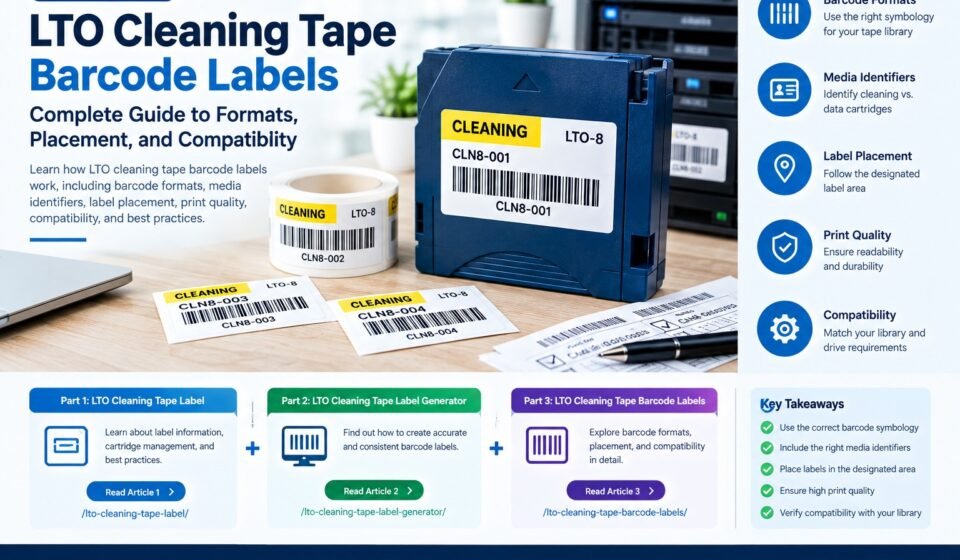
LTO Cleaning Tape Barcode Labels: Complete Guide to Formats, Placement, and Compatibility

Barcode identification is an important part of managing cartridges in automated LTO tape libraries. A correctly formatted barcode can help a library identify a cartridge, distinguish cleaning media from data media, and connect physical cartridges with inventory records.
However, not every barcode label is suitable for every LTO environment. Barcode length, character format, media identifiers, print quality, label placement, and library requirements can all affect whether a cartridge is recognized correctly.
This guide explains how LTO cleaning tape barcode labels work, what information they contain, how barcode formats are structured, how cleaning cartridges can be identified, and what to check before purchasing or creating labels.
What Are LTO Cleaning Tape Barcode Labels?
LTO cleaning tape barcode labels are machine-readable labels used to identify cleaning cartridges in compatible LTO tape libraries.
The label normally contains both:
- A barcode that can be scanned by the library
- Human-readable characters that allow an administrator to identify the cartridge
The barcode connects the physical cartridge to an identification value used by the tape library or media-management system.
IBM documentation explains that, in supported IBM tape libraries, the barcode identifies the cartridge’s VOLSER and can indicate whether the cartridge is a data cartridge or cleaning cartridge. The barcode can also contain a media-type identifier indicating the LTO generation.
This makes barcode labeling particularly useful in automated environments where cartridges are frequently inventoried, loaded, unloaded, or moved between storage slots and drives.
Why Are Barcode Labels Important for LTO Cleaning Cartridges?
A cleaning cartridge has a different purpose from a normal data cartridge. If a tape library cannot correctly identify the cartridge, automated cleaning workflows may not operate as expected.
Barcode labels can help with:
- Cartridge identification
- Automated inventory
- Cleaning-cartridge recognition
- Media tracking
- Cartridge location management
- Library inventory scans
- Reducing manual identification
- Connecting cartridges with inventory records
HPE documentation notes that barcode labels can help libraries and application software identify cartridges quickly and improve inventory time.
The exact behavior depends on the library model and its configuration.
LTO Cleaning Tape Barcode Labels vs. Standard Data Tape Labels
Cleaning cartridges and data cartridges may use similar barcode technology, but their identification requirements can differ.
A data cartridge is normally associated with stored data, while a cleaning cartridge is used for drive-cleaning operations.
Some tape-library systems use specific prefixes or media identifiers to recognize cleaning media.
For example, HPE documentation for the MSL6480 states that its auto-cleaning function recognizes a cleaning cartridge when the cartridge label begins with CLN.
IBM documentation also identifies universal LTO cleaning cartridges using values beginning with CLNU in its documented barcode examples.
This demonstrates why the label should not be designed based only on appearance. The barcode value itself can have operational meaning.
What Information Is Included in an LTO Barcode?
The exact barcode structure depends on the tape-library specification.
For example, IBM’s LTO cartridge label specification uses USS-39 barcode symbology. IBM’s documented requirements also describe an eight-character barcode structure for supported library environments, with media identifiers used in the final characters.
A simplified example might look like:
CLN001L8
The exact value and structure should not be copied blindly into another tape-library environment. Always check the manufacturer’s specification.
Common Barcode Components
An LTO barcode may contain information representing:
- Cartridge volume or unique identifier
- Media type
- LTO generation
- Cleaning-media identification
- Other library-specific information
The human-readable portion may be displayed underneath or near the barcode so that an administrator can identify the cartridge without scanning it.
Understanding LTO Media Identifiers
One of the most important concepts in LTO barcode labeling is the media identifier.
IBM’s documentation describes identifiers such as L1, L2, L3, through L9, where L identifies the cartridge as LTO media and the number indicates the generation.
For example:
L5= LTO-5L6= LTO-6L7= LTO-7L8= LTO-8L9= LTO-9
However, cleaning cartridges may use a different identification convention depending on the library.
This is why the media identifier should always be checked against the documentation for the specific tape library.
What Barcode Symbology Is Used for LTO?
IBM’s official LTO cartridge label specification identifies USS-39 as the barcode symbology used for its LTO cartridge labels.
Some environments and vendor documentation may refer to Code 39 terminology in connection with LTO barcode labels.
The important point is that a generic barcode generator should not be used without first checking the library’s specifications.
Before selecting a barcode format, verify:
- Barcode symbology
- Character count
- Allowed characters
- Media identifier
- Quiet zones
- Print dimensions
- Barcode height
- Label finish
- Label placement
IBM’s published specifications also address details such as non-glossy label surfaces, barcode dimensions, and other print characteristics.
LTO Cleaning Tape Barcode Label Requirements
There is no single universal label specification that should be assumed to work with every tape library.
Different vendors and library models can impose different requirements.
Before producing labels, check the manufacturer’s documentation for:
Barcode Length
Some library environments require a specific number of characters.
IBM documentation, for example, specifies eight uppercase alphanumeric characters for certain LTO library applications.
Allowed Characters
Some specifications restrict the barcode to uppercase letters and numbers.
Media Identifier
The final characters may identify the LTO generation or media type.
Label Finish
Barcode labels should have suitable optical characteristics. IBM specifically identifies label reflectivity as a factor in barcode-reading problems and recommends suitable label stock.
Barcode Dimensions
The barcode must be printed at the appropriate size and proportions.
Quiet Zones
The area immediately before and after the barcode must remain clear according to the applicable specification.
Label Position
The label must be attached in the designated area of the cartridge.
Where Should an LTO Barcode Label Be Placed?
Correct label placement is just as important as creating the correct barcode.
LTO cartridges have a designated recessed label area. HPE documentation instructs users to place the adhesive-backed barcode label within this recessed area.
IBM likewise states that the label should be placed only in the recessed label area and warns that a label extending beyond that area can cause loading problems.
Therefore, do not place an LTO barcode label wherever there is available space.
Correct Placement Practices
When applying a label:
- Locate the cartridge’s designated label area.
- Make sure the surface is clean and dry.
- Align the label carefully.
- Keep the label inside the recessed area.
- Avoid wrinkles or bubbles.
- Do not cover cartridge controls or important information.
- Confirm the orientation required by the library.
- Test the barcode after application.
HPE documentation also warns against applying multiple labels to one cartridge because this can contribute to cartridge jams.
Why Barcode Print Quality Matters
A barcode can be technically correct but still fail during scanning if it is poorly printed.
IBM identifies two common causes of barcode misreads:
- Label-surface reflectivity
- Print quality
A glossy surface can reflect light in a way that interferes with the barcode reader. Poor printing can also produce bars that are too weak, distorted, incomplete, or inconsistent.
Good Barcode Printing Practices
Use:
- High-quality label stock
- Suitable printing equipment
- Correct barcode dimensions
- Adequate contrast
- Non-glossy surfaces where required
- Consistent print quality
After printing, inspect the barcode before putting the cartridge into production.
How to Check Barcode Readability
Before applying a large batch of labels, test a sample.
A basic verification process can include:
Visual Inspection
Check whether:
- All bars are complete
- Text is readable
- There are no smudges
- There are no missing sections
- The label is not damaged
Scanner Verification
If possible, scan the label using the actual tape-library barcode reader.
This is more useful than relying only on a smartphone barcode application because the tape library’s scanner is the device that ultimately needs to read the label.
Inventory Verification
After scanning, confirm that the cartridge appears correctly in the library’s inventory system.
If the cartridge is identified incorrectly, investigate the barcode value, media identifier, label placement, and library configuration.
How to Create LTO Cleaning Tape Barcode Labels
Creating a barcode label involves more than choosing a barcode font.
A reliable process looks like this:
Step 1: Identify the Tape Library
Record the manufacturer and model.
Step 2: Check Barcode Requirements
Review the official documentation for:
- Symbology
- Character count
- Media identifiers
- Dimensions
- Label material
- Orientation
- Placement
Step 3: Determine the Cleaning-Cartridge Identifier
Use the identification format required by the library.
Step 4: Generate the Barcode
Use a compatible barcode-generation system.
Step 5: Add Human-Readable Text
The barcode should normally be accompanied by readable identification according to the applicable specification.
Step 6: Print a Test Label
Print a small sample before producing a complete batch.
Step 7: Apply the Label
Use the cartridge’s designated recessed area.
Step 8: Test the Cartridge
Verify that the tape library can recognize the cartridge correctly.
For the broader process of creating cartridge labels, see the LTO Cleaning Tape Label guide.
If you need to automate sequential IDs and barcode creation before printing, see the LTO Cleaning Tape Label Generator guide.
Using an LTO Cleaning Tape Label Generator
A barcode generator can be useful when multiple cartridges need to be labeled.
A generator may allow you to:
- Create sequential IDs
- Generate barcode images
- Produce printable label layouts
- Import cartridge data
- Generate multiple labels
- Maintain consistent formatting
However, the generator should be configured according to the tape-library specification.
A generic barcode generator may produce a visually valid barcode that does not meet the operational requirements of the library.
This is why the generator should be treated as a production tool rather than as the source of the barcode specification.
Cleaning Tape Cartridge for LTO With Barcode Labels 1 Pack
Some buyers specifically search for a cleaning tape cartridge for LTO with barcode labels 1 pack because they want a ready-to-use cartridge rather than creating a label separately.
A pre-labeled cartridge can simplify deployment, but compatibility should still be verified.
Before purchasing, check:
- LTO compatibility
- Drive compatibility
- Tape-library compatibility
- Cleaning-cartridge type
- Barcode format
- Media identifier
- Label placement
- Number of cleaning cycles supported
- Whether the barcode is already attached
IBM documentation shows that LTO cleaning cartridges and their barcode labels can be supplied as media products, including universal cleaning cartridges with VOLSER labels.
What Makes a Good LTO Cleaning Tape Barcode Label?
A good label should satisfy both human and machine requirements.
Easy to Read
An administrator should be able to identify the cartridge without scanning it.
Easy to Scan
The barcode must meet the relevant scanner and library requirements.
Correctly Formatted
The barcode value must follow the applicable specification.
Correctly Positioned
The label must stay within the designated cartridge label area.
Durable
The label should remain attached and readable during normal cartridge handling.
Consistent
All cartridges in the same inventory should follow a consistent labeling convention.
Common LTO Barcode Label Problems
Barcode Does Not Scan
Possible causes include:
- Poor print quality
- Incorrect barcode format
- Glossy label surface
- Incorrect dimensions
- Damaged label
- Incorrect placement
IBM specifically identifies reflectivity and print quality as major causes of barcode-reading problems.
Library Does Not Recognize the Cleaning Cartridge
Check whether the barcode value uses the correct cleaning-media identifier.
Some libraries have specific rules for identifying cleaning cartridges. For example, HPE’s MSL6480 documentation states that the cleaning cartridge label must begin with CLN for its library to recognize it as cleaning media.
Cartridge Loads Incorrectly
An incorrectly applied label can extend beyond the intended recessed area and potentially interfere with cartridge handling.
IBM warns that labels extending outside the recessed area can cause loading problems.
Multiple Labels Are Applied
Avoid placing additional barcode labels over an existing label.
HPE warns that multiple labels can cause a cartridge to jam in a tape drive.
LTO Barcode Labels and Inventory Management
Barcode labeling becomes increasingly valuable as the number of cartridges increases.
An inventory system can associate a barcode with information such as:
| Information | Example |
|---|---|
| Cartridge ID | CLN001 |
| Media type | Cleaning |
| LTO generation | LTO-8 |
| Location | Library A / Slot 12 |
| Status | Active |
| Cleaning usage | Tracked internally |
| Date added | Inventory record |
The barcode itself does not necessarily need to contain every piece of this information.
Instead, the barcode can act as an identifier that connects the physical cartridge to a database or media-management system.
Best Practices for LTO Cleaning Tape Barcode Labels
Follow these practices to create a reliable labeling process:
- Check the tape-library manufacturer’s specifications first.
- Use the required barcode symbology.
- Follow the required character structure.
- Use the correct media identifier.
- Use high-quality label stock.
- Avoid glossy surfaces when the specification requires non-glossy labels.
- Keep the barcode’s quiet zones clear.
- Apply the label only to the designated area.
- Never place multiple labels on one cartridge.
- Test labels before producing a large batch.
- Verify the barcode using the actual library scanner where possible.
- Keep barcode values synchronized with inventory records.
LTO Cleaning Tape Barcode Labels: Quick Checklist
Before putting a cleaning cartridge into production, verify:
- Correct cartridge type
- Correct LTO generation
- Correct barcode format
- Correct media identifier
- Correct character count
- Good print quality
- Suitable label surface
- Correct label dimensions
- Correct label placement
- Barcode successfully scanned
- Cartridge correctly appears in inventory
This checklist can prevent many avoidable barcode and cartridge-identification problems.
Frequently Asked Questions
What are LTO cleaning tape barcode labels?
They are machine-readable labels used to identify LTO cleaning cartridges in compatible tape libraries. They typically contain a barcode and human-readable cartridge identification.
What barcode format is used for LTO cartridges?
The required format depends on the tape-library specification. IBM’s LTO cartridge label specification uses USS-39, while specific library documentation may define additional requirements.
How do I know if a barcode is for a cleaning cartridge?
The identification method depends on the tape library. Some systems use specific prefixes or media identifiers. For example, HPE documents CLN as the required beginning for cleaning-cartridge labels in the MSL6480 auto-cleaning workflow.
Can I print my own LTO barcode labels?
Requirements vary by manufacturer. Some vendors recommend or require approved preprinted labels rather than user-printed labels. HPE documentation, for example, recommends purchasing approved barcode labels and specifically advises against printing barcode labels yourself for its supported systems.
Where should an LTO barcode label be placed?
The label should be applied within the designated recessed label area of the cartridge. The exact orientation should follow the applicable library and cartridge documentation.
Why is my LTO barcode not scanning?
Common causes include poor print quality, excessive label reflectivity, incorrect barcode format, incorrect dimensions, damage, or incorrect placement. IBM specifically identifies reflectivity and print quality as common causes of barcode misreads.
Can I use the same barcode label for different LTO generations?
Do not assume that you can. Media identifiers can communicate the LTO generation to the library, and the required format depends on the specific system. Always follow the manufacturer’s requirements.
Should I use more than one barcode label on an LTO cartridge?
No. Applying multiple labels can create handling and loading problems. HPE specifically warns that multiple labels can cause cartridges to jam in a tape drive.
Conclusion
LTO cleaning tape barcode labels provide an important identification mechanism for automated tape-library environments. A correctly designed barcode can help a library identify cleaning media, associate cartridges with inventory records, and reduce manual media management.
The most important consideration is compatibility. Barcode length, symbology, media identifiers, print quality, label dimensions, and placement should all follow the requirements of the specific tape library.
A reliable process starts with the manufacturer’s documentation, followed by barcode generation, test printing, correct label application, and verification using the actual library scanner whenever possible.
For the fundamentals of cartridge labeling, start with the LTO Cleaning Tape Label guide. If you need to create labels in batches, the LTO Cleaning Tape Label Generator guide explains the generation and printing workflow.
Together, these three resources form a complete LTO cleaning-cartridge labeling cluster covering general labels, label generation, and barcode-specific requirements.



[…] 3: LTO Cleaning Tape Barcode Labels → Barcode-specific requirements and best […]
[…] creation, and batch printing. For barcode-specific requirements, the third article will explore LTO Cleaning Tape Barcode Labels in greater […]