
Making videos is one of the most potent methods in drawing attention, communicating ideas, selling products, and creating an online community. However, the process of making quality videos through the traditional approach requires expertise in editing videos, images, soundtracks, and scripts, along with much time.
This whole process is being transformed through AI video solutions. One of such platforms that include all these features is pictory ai. This is a video editing and creation platform powered by artificial intelligence that is aimed at helping creators, marketers, companies, educators, and content producers create videos quicker.
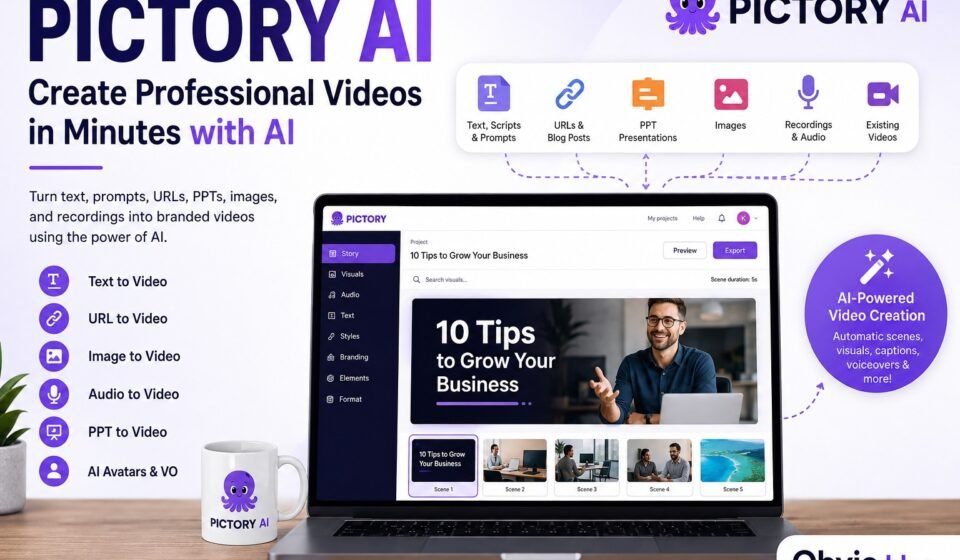
Instead of always starting from an empty timeline, you are able to upload any kind of material, be it texts, scripts, URL links, presentations, pictures, audio files, or already existing videos, and create videos using AI assistance.
Based on the features provided by Pictory, the following features can be added to the service: Text-to-Video, URL-to-Video, Audio-to-Video, PPT-to-Video, Image-to-Video
What Is Pictory AI?
Pictory AI is a AI-driven video-making platform that leverages the power of cloud computing to automate the video production process.
Simply put, instead of spending the time for finding clips, writing captions, organizing scenes, recording voice-overs, and manually adjusting the timeline, you feed all the necessary raw content to Pictory’s AI and let it do the bulk of the heavy lifting.
For instance, you could start with:
- A blog article
- A written script
- A text prompt
- A webpage URL
- A PowerPoint presentation
- A collection of images
- A podcast or audio recording
- A webinar or long-form video
- An existing video that needs editing
The platform can thus assist in creating videos out of the content through the use of images, captions, music, voiceover, avatars, etc.
This makes the platform very useful to those individuals looking for videos of a professional look without having to spend a lot of time learning how to edit videos.
How Does Pictory AI Work?
Workflow automation forms the core of this platform.
Rather than having to create a timeline yourself, you simply give your material to the AI and it does the organizing into scenes for you.
A typical process looks like this:
- Choose a video creation or editing workflow.
- Upload or paste your source material.
- Allow AI to analyze the content.
- Review the automatically generated scenes.
- Replace or adjust visuals where necessary.
- Add branding, captions, music, and voiceover.
- Edit the script or scenes.
- Preview the final result.
- Export the finished video.
According to Pictory, their platform is able to automatically pick visuals for scenes and offers AI-generated visuals, AI voices, captions, and avatars based on the workflow and plan.
What is crucial here is the fact that the use of AI technology does not eliminate the necessity of human involvement. Rather, it minimizes the repetitive part of the job.
Key Features of Pictory AI
One reason the platform is useful is that it combines several video-production functions in one environment.
1. Text-to-Video Creation
One of the most helpful things is the possibility to transform written content into videos.
This means that you can begin with some kind of script, article, prompt, etc. Then, using the AI, you can split the material into scenes and select suitable images and captions for them.
This is especially useful for:
- YouTube videos
- Educational content
- Marketing videos
- Blog-to-video content
- Social media videos
- Explainer videos
- Training material
Rather than constructing your video manually scene-by-scene, you could begin with your own written content, and improve on the AI generated output.
2. URL-to-Video
If you currently have existing content posted online, then there is no need for writing an entirely new script.
Pictory offers the ability to turn URLs, blog posts, and even entire websites into videos.
For bloggers and publishers, this creates an interesting content-repurposing workflow.
For example:
Blog article → AI video → social media clips → YouTube content
This can help businesses get more value from content they have already created.
3. Pictory AI Video Generator
The pictory ai video generator strives to simplify the whole video scene creation process through input text and other source material.
The website is helpful in picking out visuals, generating video scenes, inserting subtitles, and incorporating voiceovers or AI avatars.
The primary benefit is the speed at which the videos are generated. There is no need to look out for each individual stock video clip, then add them to the timeline; rather, one starts from an already AI-generated basic scene and makes the required modifications.
The key to success lies in using AI generation as the initial stage.
4. Image-to-Video Creation
Images are also capable of being used in AI-made videos.
“Pictory” enables the use of images with prompts along with video-making capabilities of AI. Feature documentation of Pictory provides workflows for converting images into video by adding motion, scenes, captions, AI avatars, and realistic AI voices.
This can be useful when you have:
- Product images
- Travel photographs
- Infographics
- Company graphics
- Event photographs
- Historical images
- Social media artwork
Rather than just viewing an image for a few seconds, you could incorporate it into a much more animated sequence of videos.
5. PPT to Video
There is usually a lot of information in business and academic institutions that is present in the form of PowerPoint presentations.
Pictory has capabilities for creating videos out of PowerPoint presentations.
This can be useful for:
- Online courses
- Employee training
- Sales presentations
- Product demonstrations
- Internal communications
- Educational lessons
Transformations from a presentation to a video with more visuals, subtitles, voiceovers, and other items are possible.
6. Audio-to-Video
Podcasts, interviews, voice records, and other audio materials may be quite informative; however, audio material may not be the best form for social media use.
Pictory offers an audio to video workflow to convert audio records into videos with visuals, subtitles, AI avatars, and AI voices.
This makes it easier to repurpose an existing podcast or recording into visual content.
7. Edit Videos Using Text
Traditional video editing can involve searching through a timeline to locate specific words or sections.
However, Pictory uses an alternative strategy that enables users to edit videos using text.
It provides a platform where users can edit their recordings, make highlights, remove unwanted portions, and add captions through a text-based system.
This can prove to be especially useful in webinars, podcasts, interviews, meetings, and other long recordings.
8. AI Voices and Voiceovers
A professional video often needs narration.
Pictory offers standard AI voices as well as more advanced voice options. Its current plans also include ElevenLabs-powered AI voice minutes on selected subscriptions.
You can also use your own recorded voiceover in supported workflows.
This gives creators flexibility:
- Use an AI voice for fast production.
- Upload your own narration for a personal touch.
- Use voice cloning where available on an eligible plan.
- Combine narration with captions and visuals.
9. AI Avatars
AI avatars can provide another way to present information without recording a person on camera.
They can be useful for:
- Training videos
- Business presentations
- Educational material
- Product explanations
- Marketing videos
- Internal communications
Pictory’s current Professional and Team offerings include access to avatar-related capabilities, with limits depending on the plan.
10. Automatic Captions
Captions are essential for accessibility purposes and when watching videos on social media platforms as most individuals like watching videos without any sounds.
Pictory automatically generates subtitles and captions so that individuals can add text to their videos without having to type out every single line.
Captions can make videos more understandable.
How to Create a Video With Pictory AI
When it comes to making videos using AI technology, it might appear that you have to go through an extensive and intricate procedure if you are just starting out.
Step 1: Prepare Your Content
First of all, you should determine what you want to create.
This could be, for instance, a video on:
“10 Tips for Improving Website SEO”
Create a script or an article with a strong introduction, body, and conclusion.
The more effective your source material is, the more easily you can create a good video.
Step 2: Choose Your Creation Method
Select the workflow that matches your content.
You might choose:
- Text to video
- URL to video
- PPT to video
- Image to video
- Audio to video
- Video editing
- AI avatars
For a blog post, URL-to-video or text-to-video may be the easiest option.
Step 3: Let AI Build the Initial Video
Once you provide the content, allow the AI to analyze it.
The system can organize information into scenes and suggest visuals.
This is where an AI video generator saves time. Instead of creating the first draft manually, you receive a structured starting point.
Step 4: Review Every Scene
Do not immediately export the video.
Watch the complete project and check:
- Are the visuals relevant?
- Are captions accurate?
- Is the narration natural?
- Are scenes too long?
- Are transitions appropriate?
- Does the video match your brand?
- Are there unnecessary sections?
AI-generated content can sometimes choose a technically relevant visual that does not perfectly match the intended meaning.
Human review is therefore important.
Step 5: Add Your Branding
If the video is for a business or website, add consistent branding.
You can consider:
- Logo
- Brand colors
- Fonts
- Intro and outro
- Website URL
- Consistent caption style
- Brand music
Pictory’s current plans include different numbers of customizable Brand Kits depending on the subscription.
Step 6: Add Voiceover and Music
Next, choose the narration style.
AI voice can be used, you can add your own voiceover, or any other form of narration that is supported.
Background music helps set a certain tone, but it must not overshadow the narration.
Step 7: Optimize the Video for Its Platform
The video that is created for YouTube need not have the same style as a video that is to be uploaded on TikTok, Instagram, and other social media platforms.
Consider:
- Landscape format for traditional YouTube content
- Vertical format for short-form social media
- Square format for certain feeds
- Large readable captions for mobile viewers
Pictory supports landscape, portrait, and square video formats on its current paid plans.
Step 8: Export the Final Video
After reviewing the complete project, export the video according to your selected plan.
Remember that Pictory’s video-minute limits generally apply to exported videos rather than simply previewing or editing projects inside the platform.
Pictory AI Pricing: What Should You Know?
One of the most important questions before choosing an AI video platform is cost.
The current pictory ai pricing structure includes a free trial and several paid plans. Pictory’s official pricing page currently lists Starter, Professional, Team, and Enterprise options, with prices varying depending on whether you pay monthly or annually.
At the time of writing, the official pricing page shows annual-billing promotional prices of approximately:
- Starter: $25 per month when billed annually
- Professional: $35 per month when billed annually
- Team: $119 per month when billed annually
- Enterprise: Custom pricing
However, prices for monthly subscriptions, according to Pictory, are higher as their starter, professional, and team plans cost $29, $59, and $199 per month.
The prices and special offers may vary; therefore, one needs to visit Pictory’s official pricing page before buying.
The most important factor is not simply the monthly price. You should compare:
- Video export minutes
- AI credits
- Storage
- Brand Kits
- AI voice minutes
- Avatar access
- Voice cloning
- Premium media
- Team collaboration
- Maximum video length
For example, the current Professional annual plan includes 7,200 video minutes per year, 20 GB of storage, five Brand Kits, and additional AI-powered capabilities.
What About a Pictory AI Group Buy?
You may see people online searching for a pictory ai group buy because they want to access premium software at a lower cost.
A group-buy arrangement generally involves multiple people sharing access to one subscription or purchasing access through a third party.
While this may appear cheaper, it can create several problems.
Potential issues include:
- Account-sharing restrictions
- Privacy concerns
- Unreliable access
- Limited control over projects
- Security risks
- Unknown third-party practices
- Possible loss of saved projects
- Difficulty getting official customer support
In cases where one is working professionally, subscribing officially to the platform will be more secure considering that the videos that you create, your corporate assets, branding details, as well as your account details are valuable.
If the issue is cost, compare both the official subscription offers and free trial offers before you resort to using an unofficial group buy.
Who Should Use Pictory AI?
Pictory can be useful for a wide range of users.
Bloggers
Bloggers can convert written articles into videos and repurpose existing content for YouTube and social media.
YouTube Creators
Creators can use AI-assisted workflows to produce informational videos, explainers, list videos, and other formats.
Digital Marketers
The marketing team can easily develop their promotion videos, social media posts, product videos, and ads.
Small Businesses
Small businesses can have an advantage because they can make video content without having to hire a professional editor for each task.
Educators
Teachers, instructors, and tutors can convert their presentations or written course materials into video-based courses.
Agencies
Marketing agencies can produce more content for their various clients without doing the same repetitive task.
Podcasters
Podcasters can repurpose audio recordings into visual videos and short clips.
Advantages of Pictory AI
There are several reasons someone might choose the platform.
Faster Production
AI can significantly reduce the time required to create the first video draft.
Beginner-Friendly Workflow
You do not necessarily need advanced video-editing knowledge to get started.
Multiple Input Formats
The platform supports several content sources, including scripts, URLs, presentations, images, audio, and video.
Content Repurposing
One piece of content can become multiple formats.
For example:
Blog → Video → Short Clip → Social Post
Built-In Media Resources
Pictory provides access to stock media through its plans. The company currently highlights media from providers including Getty Images and Storyblocks on selected plans.
Branding Tools
Brand Kits can help businesses maintain visual consistency across videos.
Limitations to Consider
Although AI video generation is powerful, it is not perfect.
AI Can Make Incorrect Visual Choices
A visual may technically relate to a sentence but still fail to communicate the intended message.
Human Editing Is Still Necessary
For professional content, you should review the entire video before publishing.
AI Voiceovers May Not Suit Every Brand
Some audiences prefer authentic human narration, particularly for personal brands, podcasts, and storytelling.
Subscription Limits Matter
Different plans have different video-minute, storage, AI-credit, voice, and feature limits.
Creative Control Can Be More Limited Than Traditional Editing Software
Professional editors requiring a level of control frame by frame can still choose video-editing software.
Tips for Getting Better Results
For improved output from any AI video tool, consider the quality of your input.
Write Clear Scripts
Use short paragraphs and clear sentences.
Give Each Section One Main Idea
A scene should communicate one primary message instead of trying to explain everything at once.
Review AI-Selected Visuals
Always check whether the footage actually represents the message.
Keep the Introduction Short
Viewers decide quickly whether to continue watching. Start with a clear benefit, question, or interesting statement.
Use Captions
Captions can make videos easier to understand, especially on mobile devices.
Maintain Brand Consistency
Use the same logo, colors, fonts, and general visual identity across your videos.
Create Different Versions
One long video can potentially be repurposed into shorter clips for social media.
Pictory AI vs Traditional Video Editing
Traditional video editing provides extensive control but usually requires more time and technical knowledge.
An editor may need to:
- Import files.
- Organize footage.
- Cut clips.
- Find stock footage.
- Write captions.
- Record narration.
- Add music.
- Synchronize audio.
- Create transitions.
- Export multiple formats.
An AI-assisted platform can automate or simplify many of these steps.
This doesn’t mean that AI takes away the jobs of professional editors entirely. Rather, it can be used as a productivity tool that performs repetitive functions while humans concentrate on story-telling, accuracy, creativity, etc.
Best Use Cases for Pictory AI Video
A pictory ai video can be especially effective when the main objective is to communicate information quickly.
Good use cases include:
- Blog-to-video content
- Product explainers
- Social media videos
- Educational lessons
- Training material
- YouTube explainers
- Podcast repurposing
- Presentation videos
- Marketing content
- Company announcements
It is especially helpful if you already have your writing or recordings and are looking to convert them into videos.
Frequently Asked Questions
Is Pictory AI good for beginners?
Absolutely. The AI-powered workflow process is geared toward streamlining video production, hence making it an ideal platform for novice users without prior knowledge on how to edit videos.
Can Pictory turn text into video?
Yes. Pictory supports text-to-video workflows that can transform scripts, articles, prompts, and written content into video scenes.
Can Pictory convert a blog post into a video?
Yes. Pictory supports URL and blog-to-video workflows, allowing existing written content to be repurposed as video.
Can Pictory create videos from images?
Yes. Pictory’s current feature set includes image-to-video functionality that can combine images and text prompts with AI-generated video elements.
Does Pictory have AI voiceovers?
Yes. Pictory provides AI voice capabilities with voices powered by ElevenLabs on select subscriptions as well as the capability to upload or record voiceovers.
Does Pictory have AI avatars?
Yes. Pictory offers AI avatars with access restrictions based on your chosen subscription.
Is there a free version of Pictory?
Pictory currently offers a free trial. The official pricing details are to be considered.
Is Pictory better than traditional video editing?
That will depend on what you need. Pictory is especially helpful in cases where speed, automation, and reuse of content are important factors. Regular editing software would be better for you if you need very fine creative control.
Is a Pictory AI group buy worth it?
It can decrease the price factor, but it might bring problems related to security, privacy, account access, and others. So for professional use, it is better to choose an official subscription.
Final Verdict
The generation of videos by means of AI makes it easier for both individuals and companies to bring ideas or existing materials to life in a form of a video. The uniqueness of pictory AI lies in its inclusion of text-to-video, URL-to-video, image-to-video, PPT-to-video, audio-to-video, AI avatars, captions, voiceovers, and text editing into one tool.
What is important is not only the possibility of video generation but rather a potential to make the whole process faster and easier.
This means that a blogger may make a video based on the article. A marketer may develop a visual idea from the marketing campaign. A teacher may make a narration from the presentation. A podcaster may develop a video from audio. A company may produce training materials without reinventing the wheel every time.
The pictory ai video generator can be very beneficial as a productivity tool for people who make videos on a regular basis.
Before purchasing any plan, check the existing pricing for pictory ai, analyze the video minutes and AI credits and see what is really needed in your case. When thinking about making a pictory ai group buy, think thoroughly about potential security issues related to using a third-party project.
It should be noted that Pictory works most effectively when it comes to the right mix of automation and human creativity. Leave the production of video to AI but leave the control over the story, the message, the accuracy, the branding, and the editing to humans.